Modern Employee Directory Guide for 2026
A practical guide showing why modern directories matter, the core functions and features to look for, real-world use cases, directory types, cost options and expert FAQs. Learn how the right employee directory can break silos, speed communication and strengthen culture for teams of any size.
An easy way to help employees work together faster is to add a modern employee directory.
Why?
Because an employee directory is a searchable, always-updated map of your people, so anyone can find the right person, understand teams and reporting lines, and connect across locations.
The good news is it doesn’t take much effort to add employee directory software to your toolkit, and there are plenty of options.
The hard part is knowing what’s good advice and what’s noise.
So we put together this easy-to-read guide to the humble employee directory. It’s everything you need to get started.
A modern employee directory helps you:
- Find people fast (name, role, team, location, contact method)
- Understand structure (teams, managers, reporting lines)
- Discover expertise (skills, certifications, projects)
- Build connection (faces, bios, interests, especially hybrid/remote)
In this guide, we’ll cover what an employee directory is, what to include, and how to choose the right approach.
Employee Directory Definition
An employee directory is a software application that helps you find contact details and other important information about your coworkers.
An employee directory is like a digital telephone book for your company. It's a searchable database of the names, job titles, phone numbers, and other useful info about the people you work with.
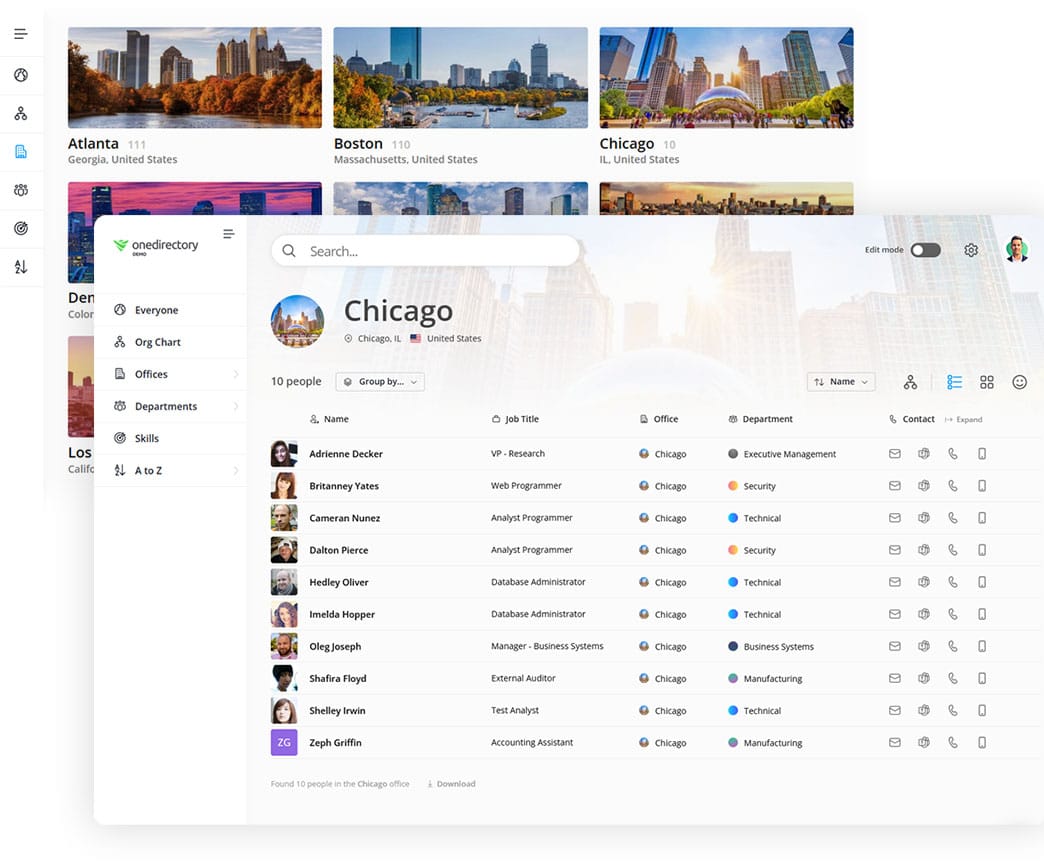
Employee directories can be as simple as a basic list of contact information. Or they can be more advanced, including personal information like nicknames and pronouns, photos, skills, biographies, birthdays, locations, projects, and work experience.
In the olden days employee directories were printed out and handed to employees. This was time consuming, used a lot of paper, and became outdated pretty quickly.
Later, employee directories went digital. People used (and in fact some still use) spreadsheets to create and manage them, with distribution over email. This of course requires a lot of manual work and you have to keep sending out new versions.
Today, most employee directories exist in the form of digital software applications, running in the cloud and available to your employees on any device and accessible from anywhere in the world.
In the end, whatever you call your corporate-staff-contact-directory-list-software, the goal is the same: to help your staff easily connect with their coworkers.
How Employee Directories Improve Workplace Performance
According to McKinsey, knowledge workers spend 1.8 hours daily, nearly 19% of their work week, searching for information. A quality employee directory eliminates this inefficiency while delivering multiple organizational benefits.
1. Enhanced Communication and Collaboration
As organizations grow, finding the right person becomes increasingly difficult. Employee directories solve this by enabling instant search and connection with colleagues across departments, locations, and time zones. This streamlines information flow and improves team productivity.
Example: Product managers can quickly locate engineers in different time zones, eliminating days of email delays.
2. Stronger Workplace Relationships
Employee directories help colleagues connect personally by displaying bios, interests, skills, birthdays, work anniversaries, pronouns, work experience, education, languages, and social links. This information fosters meaningful relationships beyond basic work interactions.
3. Faster Expertise Discovery
Skills directories enable employees to locate colleagues with specific expertise or knowledge. This facilitates project collaboration, knowledge sharing, and helps management assess team capabilities and maintain skills inventories.
Pro Tip: Tag employee skills, certifications, and languages clearly to maximize expert discoverability.
4. Better Remote Team Connection
Remote work makes culture-building challenging. Employee directories provide a "digital desk" for every team member, enabling connection regardless of location. Employees can find colleagues, initiate calls or chats, and understand organizational structure from anywhere.
Example: Remote-first startups use directories daily to maintain culture and help teams learn about each other.
5. More Efficient HR Operations
Centralized, searchable employee information helps HR teams work more effectively. Unlike HR-only systems that become outdated, employee directories allow self-service profile updates. Visual org charts help HR identify structural issues like manager overload.
Example: HR spots overloaded managers through org chart visualization, enabling proactive resource reallocation.
6. Smoother New Hire Onboarding
New employees need to quickly understand organizational structure, team members, and reporting relationships. Employee directories accelerate onboarding by providing immediate access to profiles, org charts, office locations, and department structures.
Pro Tip: Grant new hires directory access immediately and include profile exploration in onboarding checklists.
Ready to improve workplace efficiency? Implement an employee directory to enhance communication, collaboration, and company culture.
Primary Functions of an Employee Directory
An employee directory is far more than a digital phone book, it’s the single, authoritative source for “who’s who” inside your company. At its core, an effective directory delivers four essential functions:
| Function | Why It Matters |
|---|---|
| Contact & Profile Lookup | Instantly find a colleague’s name, role, location, and preferred contact method. |
| Org & Reporting Clarity | Shows who reports to whom and how departments fit together, reducing confusion. |
| Skill & Expertise Discovery | Surfaces skills, certifications, and project experience so teams can locate in-house experts fast. |
| Workplace Connection & Culture | Puts faces to names, encourages cross-team interaction, and reinforces a sense of community — especially in hybrid settings. |
When these primary functions are built on accurate, continuously synced data, your employee directory becomes a daily utility, boosting productivity, collaboration, and overall employee experience.
What to Look for in an Employee Directory
When selecting or building an employee directory, prioritize these core capabilities:
1. Advanced People Search
A robust search function is the foundation of any effective employee directory. Look for tools that offer advanced filtering, multiple view options, and the ability to search across various data points including offices, departments, skills, interests, and job titles. Modern solutions aggregate results from multiple sources for comprehensive discovery.
2. Comprehensive Employee Profiles
Employee profiles serve as internal LinkedIn pages, displaying essential information accessible company-wide. Standard details include name, job title, department, office location, contact information, and photo. Enhanced profiles feature bios, skills, interests, birthdays, work anniversaries, manager relationships, pronouns, work history, education, languages, and social links.
3. Interactive Organization Chart
Visual org charts help employees understand reporting structures and company hierarchy at a glance, making it easier to navigate organizational relationships.
4. Office and Department Directories
For distributed teams and multi-location companies, searchable office directories provide crucial details like addresses, contact numbers, employee lists, and office photos, streamlining cross-location collaboration.
5. Skills and Interest Directories
Skills databases enable employees to find colleagues with specific expertise or shared interests. This feature supports project staffing, knowledge sharing, and skills inventory management by making employee capabilities searchable across the organization.
Types of Employee Directories
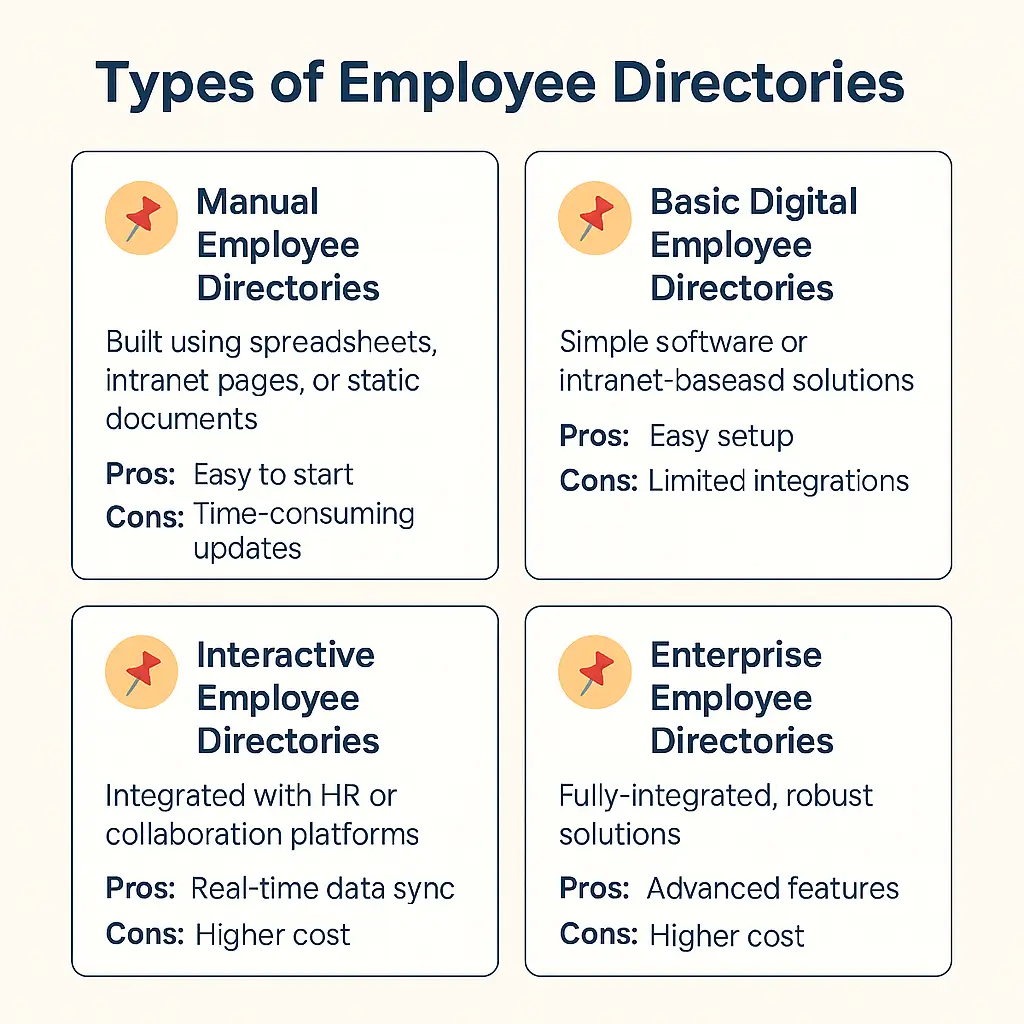
Not all employee directories are created equal. Depending on your organization's needs, budget, and technology stack, you have several options to choose from:
1. Manual Employee Directories
Often built using spreadsheets (Excel or Google Sheets), intranet pages, or static documents. These are maintained manually by an HR or admin team.
- Best for: Small organizations or startups with fewer employees.
- Pros: Easy to start; inexpensive.
- Cons: Time-consuming updates; quickly becomes outdated; limited functionality.
2. Basic Digital Employee Directories
Simple software or intranet-based directories that digitize employee contact information and basic profiles.
- Best for: Smaller companies or teams needing basic information access.
- Pros: Easy setup; affordable; digital accessibility.
- Cons: Limited integrations; lack advanced features like search, org charts, or skills tagging.
3. Interactive Employee Directories
Dynamic solutions integrated with HR systems or collaboration platforms, allowing automatic updates, comprehensive employee profiles, and advanced search capabilities.
- Best for: Medium-to-large organizations, distributed teams, and companies scaling rapidly.
- Pros: Real-time data sync; highly searchable; visually appealing; includes features like skills search and detailed profiles.
- Cons: Higher upfront cost; requires integration with HRIS or identity providers.
4. Enterprise Employee Directories
Robust, fully-integrated solutions designed for large enterprises, with advanced features like identity management, security compliance, multi-region support, and integration into complex technology ecosystems.
- Best for: Large enterprises or global organizations requiring advanced governance, compliance, and security features.
- Pros: Comprehensive feature set; scalability; sophisticated integration capabilities; robust security.
- Cons: Higher cost; requires dedicated administrative resources for management.
Why Choose OneDirectory For Your Employee Directory?
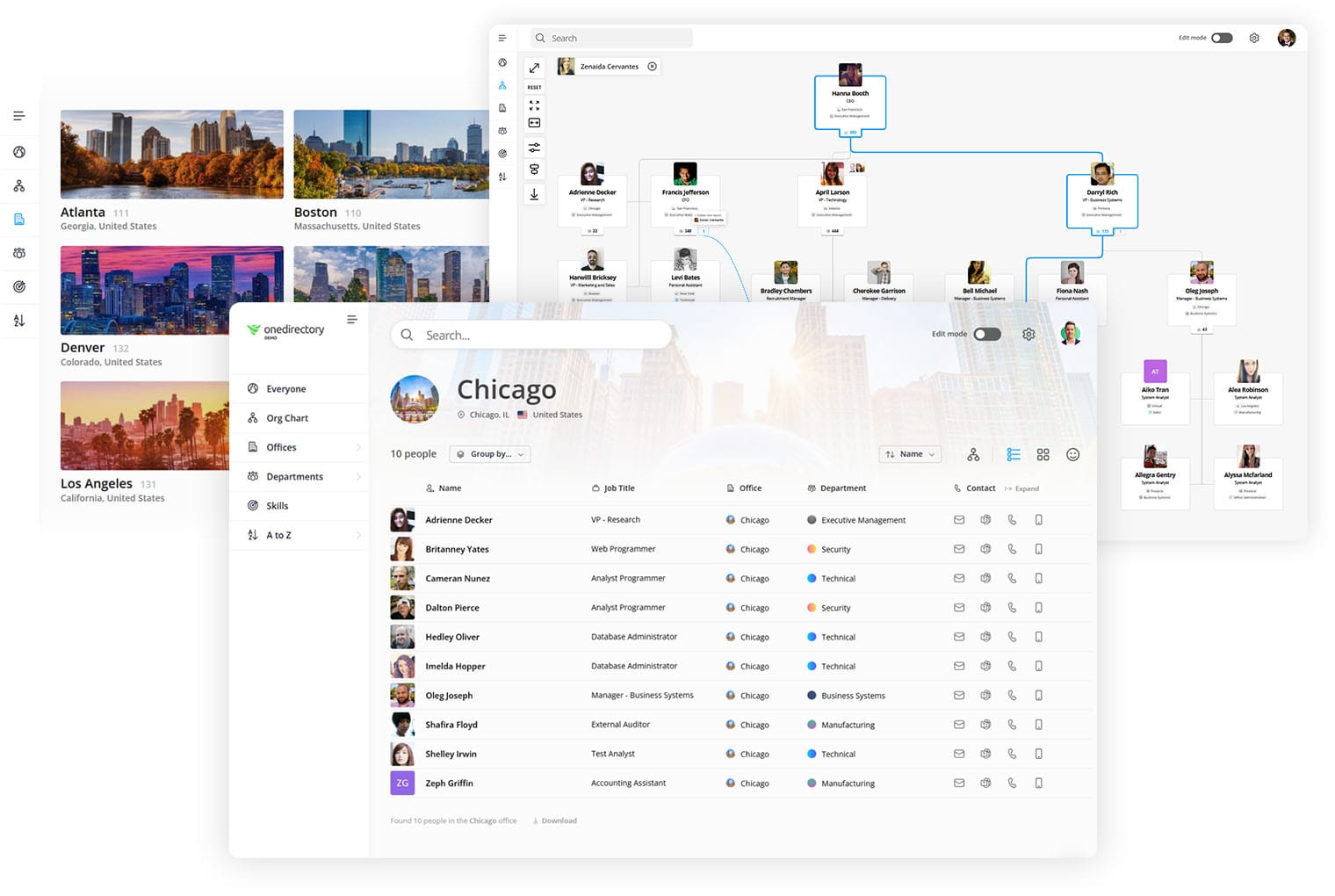
OneDirectory is more than a contact list, it’s a modern employee directory software and interactive org chart solution that helps your people find each other, understand your structure, and stay connected.
Here’s why teams choose OneDirectory:
- Always up to date – Syncs with Microsoft 365 (Entra ID) for real-time accuracy
- Easy to navigate – Interactive org chart and powerful search by name, team, location, skills, and more
- Built for remote & hybrid work – Helps distributed teams stay visible and connected
- Enterprise-ready – SSO, private cloud options, custom fields, and API integrations
- Drives adoption – Clean design, rich profiles, and seamless integrations into Teams and SharePoint
It’s like giving every employee a digital map to your company, and a face to go with the name.
OneDirectory is trusted by modern organizations around the world, from fast-growing startups to enterprise teams with 10,000+ employees.
Frequently Asked Questions: Employee Directories
Do employee directories really get used that much?
Yes, and we’ve got the numbers to prove it. Across OneDirectory customers, the average usage is 11% of employees logging in at least once per month. In some companies, over one-third of the entire workforce signs in monthly. That’s hundreds or even thousands of employees actively using their directory to find people and get work done.
Can’t I just use a spreadsheet or simple list for my employee directory?
You can, but it comes with tradeoffs. A shared Excel or Google Sheet works fine as a basic contact list. But spreadsheets are hard to maintain, become outdated quickly, and lack search, filters, and employee profiles. They’re best for very small teams. If you want a truly useful directory, software built for it is a better long-term solution.
Should our employee directory be available to people outside our company?
In most cases, no, directories are internal tools. However, some public sector orgs like universities or government agencies publish their directories for external use. For internal use, make sure the directory is secure but accessible from anywhere your team works, whether via intranet, Teams, or a standalone app.
Where should we put our employee directory so people can find it?
Your company intranet is a common home, but not always the best. Many companies host their directory on a standalone web app for faster access and better UX. Others integrate it into Microsoft Teams or Slack. The key is placing it where employees can easily find and use it daily.
Ready to Make Your Employee Directory Work for You in 2026?
An employee directory isn’t just a list of names, it’s your gateway to a more connected, productive, and collaborative organization. From streamlining communication to accelerating onboarding and strengthening company culture, a modern employee directory unlocks your organization’s full potential.
Don’t settle for a static phonebook. Make the switch to a smarter, interactive, and real-time employee directory.
Get started with OneDirectory and empower your team to connect, collaborate, and thrive, no matter where they work.