11 Best Org Chart Software for Mid to Large Companies in 2026
Compare the 11 best org chart software platforms for mid-size and large organizations in 2026, with real G2 ratings, verified pricing, and ERP integrations, so you can tell a live org chart tool from a diagramming app.
Compare the 11 best org chart software platforms for mid-size and large organizations in 2026. Real G2 ratings, verified pricing, ERP integrations, and reviewer quotes, so you can tell a live org chart tool from a diagramming app with boxes and lines.
That definition matters, because "org chart software" gets used for two very different products.
- Org chart builder tools (Lucidchart, Miro, Creately, SmartDraw) are general-purpose diagramming apps. You drag boxes, draw lines, and the chart is a static picture the moment you finish it. Fine for a 40-person startup's all-hands deck. Not fine for a 12,000-person company where three people change roles before lunch.
- Live org chart software (OneDirectory, Ingentis org.manager, OrgChart, Orgvue, ChartHop, Nakisa, and the org-chart modules inside Workday, SAP SuccessFactors, and UKG) connects to a live data source and regenerates the chart automatically, with structural features a 40-person company will never need: multi-entity modeling, bidirectional ERP write-back, role-based data governance, and scenario planning for reorgs and M&A.
It turns Microsoft 365 data into a live, searchable org chart that handles organizational units, multi-tenancy, and assistants automatically, and it holds a 4.9/5 rating on G2 in the Org Chart Software category.
If your organization runs on SAP, Workday, or UKG and needs org charts pulled directly from that ERP, or you need workforce-planning and scenario-modeling depth for a restructure or M&A, one of the alternatives below will fit you better. We built this list by pulling verified ratings, review counts, and reviewer quotes directly from G2 and Capterra, so the comparisons reflect what real buyers report, not vendor marketing copy.
One disclosure up front: we build OneDirectory, so we hold ourselves to a higher standard of proof than a neutral reviewer would. Every rating and quote below, including for OneDirectory itself, is pulled directly from each product's live G2 or Capterra page and linked to its source, so you can verify any claim independently rather than take our word for it. Last verified against live review data: July 2026.
In this guide
- Comparison table
- What mid-size and large organizations need that smaller teams don't
- How we researched this list
- 1. OneDirectory
- 2. Ingentis org.manager
- 3. OrgChart (by OfficeWork Software)
- 4. Orgvue
- 5. ChartHop
- 6. Nakisa Workforce Planning
- 7. Workday HCM
- 8. SAP SuccessFactors HCM
- 9. UKG Pro
- 10. Workleap (formerly Pingboard)
- 11. Deel HR
- Why org chart builder tools aren't enough at scale
- Other org chart tools worth knowing
- How to choose org chart software for your organization
- Frequently asked questions
Best org chart software for mid to large organizations at a glance
| # | Tool | Best for | Starting price | Free trial | G2 rating |
|---|---|---|---|---|---|
| 1 | OneDirectory | Mid-size and large organizations with multiple offices, divisions, and matrix reporting on Microsoft 365 | Pro from $349/mo (up to 250 profiles) to $1,599/mo (1,001-2,000). Above 2,000 profiles, Enterprise, custom pricing | 14 days, full Pro features | 4.9 (19 reviews) |
| 2 | Ingentis org.manager | Companies running SAP, Workday, UKG, or Oracle that need ERP-native org charts | One-time license, quote-based (published estimates start near $2,000) | Demo | 4.7 (15 reviews) |
| 3 | OrgChart | HR teams wanting a dedicated, HRIS-agnostic org chart tool with 50+ data connectors | Core from $1,260/yr per 100 employees charted | 14 days | 4.5 (278 reviews) |
| 4 | Orgvue | Org design, workforce planning, and M&A scenario modeling at scale | Custom quote | Demo | 4.4 (16 reviews) |
| 5 | ChartHop | People-analytics-driven org charts tied to headcount planning and compensation | ~$5/employee/mo (Core), modules ~$3/employee/mo each | Free trial | 4.3 (164 reviews) |
| 6 | Nakisa Workforce Planning | Organizations of 5,000+ employees needing org design plus bidirectional ERP write-back | Custom quote | Demo | 4.5 G2 (1); 4.5 Capterra (8) |
| 7 | Workday HCM | Companies already standardized on Workday HCM | Not published; enterprise contracts | Demo | 4.1 (1,692 reviews) |
| 8 | SAP SuccessFactors HCM | Organizations standardized on SAP with 1,000+ employees | ~$18-38+/employee/mo (OutSail benchmark) + implementation | Demo | 4.1 (1,657 reviews) |
| 9 | UKG Pro | HR and payroll suites that need an org chart module included | ~$27-40/employee/mo (OutSail/Vendr benchmark) | Demo | 4.3 (2,187 reviews) |
| 10 | Workleap (formerly Pingboard) | Upper-mid-market teams that want a dedicated visual org chart builder | Pingboard module from $4/user/mo; Workleap platform from $99/mo | 14 days | 4.3 (1,090 reviews) |
| 11 | Deel HR | Global organizations with distributed workforces across 150+ countries | Free up to 200 employees, then from $5/employee/mo | Demo | 4.8 (1,314 reviews) |
Ratings and review counts pulled directly from each product's G2 reviews page, current as of July 2026. Pricing sourced from vendor pricing pages and G2's published pricing data; "custom quote" means the vendor does not publish list prices.
What mid-size and large organizations need that smaller teams don't
A 30-person startup can run its org chart as a slide in a deck, updated by hand whenever someone asks. That approach breaks down long before a company reaches a thousand people, and the tools built for small teams break down with it. Five things separate real org chart software from a diagramming app, or from a small-team tool wearing an "enterprise" label.
Scale that doesn't fall over. A flat list of 200 names renders fine in almost anything. An org chart with 8,000, 30,000, or 100,000 positions needs a rendering engine built for it, plus filtering so a regional VP sees their 400-person division instead of the entire company tree. Several tools in this guide, including Nakisa and Orgvue, are explicitly built and priced for 5,000+ employee organizations; general-purpose diagramming tools were never engineered for that load, and it shows in load times once a chart passes a few hundred nodes.
Bidirectional integration with the actual system of record. Mid-size and large organizations run payroll and HR through SAP, Workday, UKG, ADP, or an HRIS, and a chart that isn't synced to that source of truth goes stale within a pay cycle. Ingentis org.manager, OrgChart, Nakisa, and OneDirectory all build their entire product around this sync; Ingentis and Nakisa go further with bidirectional write-back, so scenario changes modeled in the org tool can flow back into the ERP. A diagramming tool with a one-time CSV import cannot do this.
Matrix, dotted-line, and multi-entity structures as first-class objects. Organizations at this size rarely have a clean single hierarchy. Shared services teams report two ways. Regional divisions sit inside global business units. Post-merger organizations run two or three legal entities as one operating company. Tools built for this end of the market model dotted lines, assistants, and multiple organizational units as structured data; smaller tools mostly treat this as a text field or force you to fake it with duplicate boxes.
Governance, security, and procurement fit. Role-based field permissions, SOC 2 or ISO 27001 compliance, data residency options, SSO, and audit logs aren't nice-to-haves at this size, they're procurement requirements. Vendors at this end of the market also sell in annual contracts with SLAs; tools priced per named user with a credit card checkout usually aren't built for a security review, let alone a multi-year MSA.
Scenario planning for structural change, not just visualization. Reorgs, M&A integration, and headcount planning are recurring events at this size. Orgvue, ChartHop, Nakisa, and Ingentis all include modeling tools that let you build a "what-if" structure, compare it against the current state on cost and headcount, and publish the approved version, without touching the live org chart until the change is final. A static diagramming tool shows you today's structure; it can't model tomorrow's. This isn't a rare event: in a McKinsey survey, 82% of executives reported experiencing an organizational redesign at their company, and 70% said the most recent one happened within the past two years, which is exactly why a chart someone has to remember to redraw by hand can't keep up.
None of this means smaller org chart builders are bad products. Lucidchart, Miro, and Creately are excellent for what they're built for: fast, flexible, one-off diagrams a small team edits by hand. The mismatch happens when a growing company keeps using a builder tool past the point its structure has outgrown it. We cover why that gap matters below. For background on org chart concepts before you get into vendor comparisons, see our org chart guide and our walkthrough on picking the right org chart tool for your business needs.
How we researched this list
This is a research-based comparison, not a hands-on trial report: we did not create trial accounts in every tool listed here, several of which (Ingentis, Nakisa, Orgvue, Workday, SAP SuccessFactors) are sold exclusively through sales-led enterprise contracts with no public self-serve trial to test.
Instead, every rating, review count, and quoted review in this guide was pulled directly from each product's live G2 reviews page in July 2026, cross-checked against vendor pricing and documentation pages. Where a quote is attributed to a named or verified G2 reviewer, it's linked to the source review. Where pricing isn't publicly published, we say so and cite the best available estimate rather than presenting a guess as a fact.
We evaluated each tool against the five requirements above: scale, ERP/HRIS integration depth, support for matrix and multi-entity structures, governance and security posture, and scenario-planning capability, alongside standard G2 signals like satisfaction, ease of setup, and support quality.
Reviews of the 11 best org chart software platforms
1. OneDirectory
Best for mid-size and large organizations with complex structures
OneDirectory is built around the problem that breaks most org charts at scale: structural complexity across multiple offices, divisions, and reporting lines that change constantly.
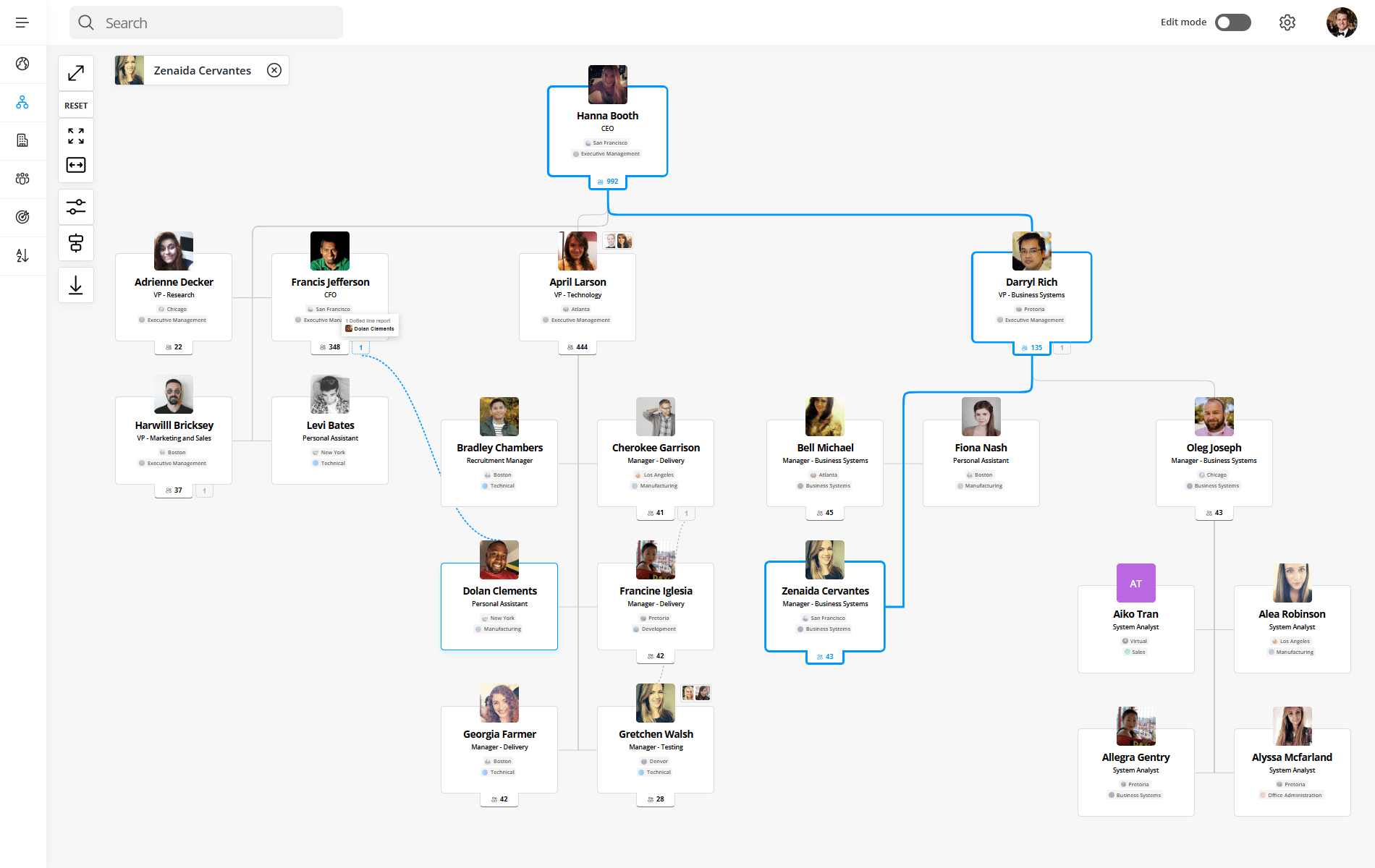
It turns Microsoft 365 data into a live, interactive org chart, searchable directory, and skills database, automatically kept accurate through Entra ID sync rather than manual entry. It is deployed across multi-site organizations including Hitachi, Samsung, Sony, Newmont, and Copenhagen Airports, and it holds a 4.9/5 rating from 19 reviews on G2 in the Org Chart Software category.
Key features:
- Organizational units: Model branches, divisions, regions, and business units as searchable structures in the org chart, so it reflects how the company actually works instead of one flat tree.
- Dotted-line reporting and assistants: Matrix relationships and executive support roles appear directly on the org chart and on individual profiles, critical anywhere accountability crosses team lines.
- Multi-tenancy: Sync multiple Microsoft 365 tenants into a single org chart and directory, built for groups, subsidiaries, and organizations formed through M&A.
- Live sync from Entra ID: Reporting-line, title, and department changes made in Microsoft 365 flow into the org chart automatically, with no manual re-entry.
- People search at scale: Search across names, roles, offices, departments, and a curated dataset of 37,000+ skills, with instant profile previews from inside the chart.
- Directory completeness tracking: Admins see exactly which profile fields are missing data across the organization.
What users say: A verified enterprise reviewer on G2 wrote that OneDirectory is "easy to use, and more importantly, easy to administer," giving staff a central place to find departments and home offices. Another reviewer described it as "intuitive, powerful, and seamless," highlighting its Azure AD and Microsoft 365 integration and the ability to "visualize reports and gain insights into the organizational hierarchy" without complicated configuration.
The most common criticism across reviews is a desire for more org chart customization and filtering options; several reviewers called this a nice-to-have rather than a blocker, and one noted the chart can be hard to view in full at very large scale.
Integrations: Microsoft 365, Microsoft Entra ID (Azure AD), Microsoft Teams, SharePoint, Slack, Webex.
Pricing: Company-size pricing with no per-user billing. Pro is banded by the number of employee profiles in the directory: $349/month or $3,790/year up to 250 profiles, $649/month or $6,990/year for 251 to 500, $999/month or $10,790/year for 501 to 1,000, and $1,599/month or $17,290/year for 1,001 to 2,000. Above 2,000 profiles, Enterprise is quoted per organization and adds unlimited profiles, multi-tenancy, EU and AU data residency, an SLA, and custom rollout support. At 2,000 profiles that is $17,290 a year, against roughly $120,000 for the same headcount at $5 per employee per month, which is where several tools on this list start. Profiles, not seats, is the unit that matters: filtering rules exclude guest users, external accounts, and service accounts from the count. 14-day free trial with full Pro features.
Pros:
- Purpose-built for structural complexity: organizational units, dotted lines, assistants, and multi-tenant sync in one org chart
- No data entry to set up: the chart and directory populate from existing Microsoft 365 data, then stay current through Entra ID sync rather than manual admin work
- Company-size pricing with no per-user fees, so cost doesn't scale linearly with headcount; 4.9 on G2
Cons:
- Requires Microsoft 365 as the primary data source; not a fit for Google Workspace or non-Microsoft HRIS-only shops
- Lighter on workforce-planning and scenario-modeling depth than dedicated org-design platforms like Orgvue or Nakisa
- No bidirectional write-back into SAP or Workday; it's built to visualize and search structure, not to model reorgs against ERP data
Start a free 14-day trial of OneDirectory →
2. Ingentis org.manager
Best for enterprises running SAP, Workday, or UKG that need ERP-native org charts
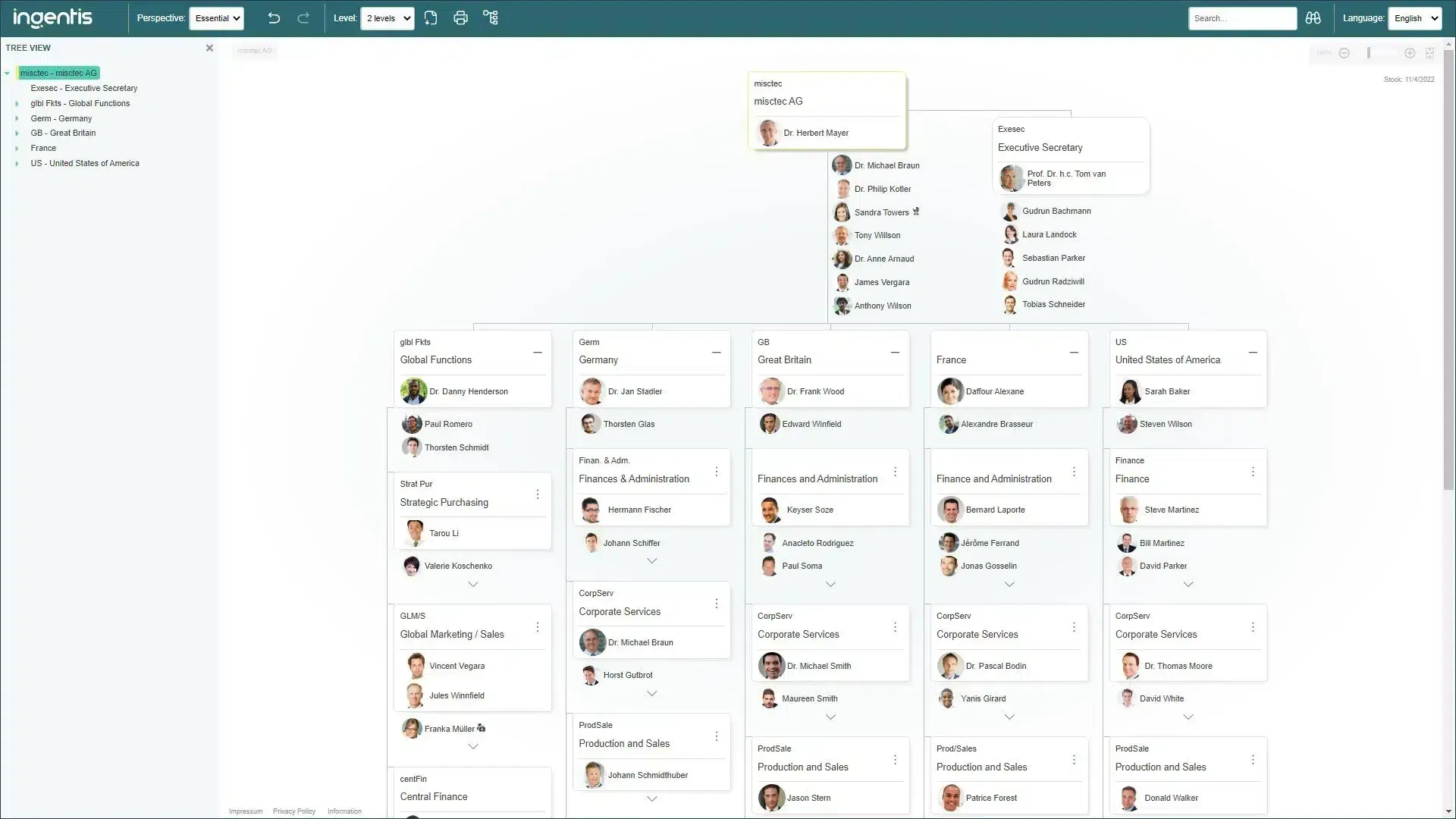
Ingentis org.manager is the closest thing on this list to pure enterprise infrastructure. It's built to sit on top of an existing ERP or HRIS and turn that data into interactive, branded org charts and dashboards, with more than 2,000 customers worldwide, including a significant share of the Global Fortune 500.
Key features:
- Direct ERP connectivity: Generates org charts, sunburst diagrams, dashboards, and lists straight from SAP HCM, SuccessFactors, Workday, Oracle, UKG, or ADP, with more than 100 supported HR and IT system integrations.
- Scenario simulation: Model reorganizations, M&A structures, and cost changes in a sandbox, then write approved changes back to the source ERP.
- Configurable, rule-based publishing: Show, hide, or manipulate information per user role, and publish charts via web, email, CSV, or PDF on a schedule.
- Custom KPI visualization: Build dashboards on span of control, cost, headcount, and other metrics layered directly onto the chart.
What users say: A system administrator on G2 wrote that after roughly ten years using Ingentis org.manager, "we did not even once reach the point where Ingentis support had to tell us 'Sorry, your request cannot be realised,'" praising the tool's flexibility for a 300,000-person org chart at an automotive enterprise.
The recurring criticism is complexity: one enterprise reviewer rated it 3/5 and warned that "the main problem we had was the communication with the support team, who needed continuous and repetitive explanations," while others describe a genuine learning curve for administrators configuring advanced rules, offset by what most reviewers call excellent, responsive consulting support.
Integrations: SAP HCM, SAP SuccessFactors, Workday, Oracle, UKG, ADP, and 100+ HR/IT systems via API.
Pricing: Not published. License fees are based on the number of objects (employees) displayed in the org charts, with no extra cost for super users, admins, or viewers; published third-party estimates put entry pricing near a $2,000 one-time license fee, scaling with headcount. Confirm current terms directly with Ingentis. Demo available.
Pros:
- Deepest ERP-native integration on this list, purpose-built for SAP, Workday, and UKG shops at real enterprise scale
- Bidirectional write-back between simulated scenarios and the live ERP, a feature most competitors lack entirely
- 4.7/5 on G2 with reviewers consistently praising support quality and structural flexibility
Cons:
- Steep learning curve for administrators; several reviewers say advanced configuration requires vendor consulting time
- Pricing isn't published and is quote-based, which slows procurement comparison
- Overkill and likely cost-prohibitive for any company without an existing ERP deployment to connect to
3. OrgChart
Best for HR teams wanting a dedicated, HRIS-agnostic org chart tool
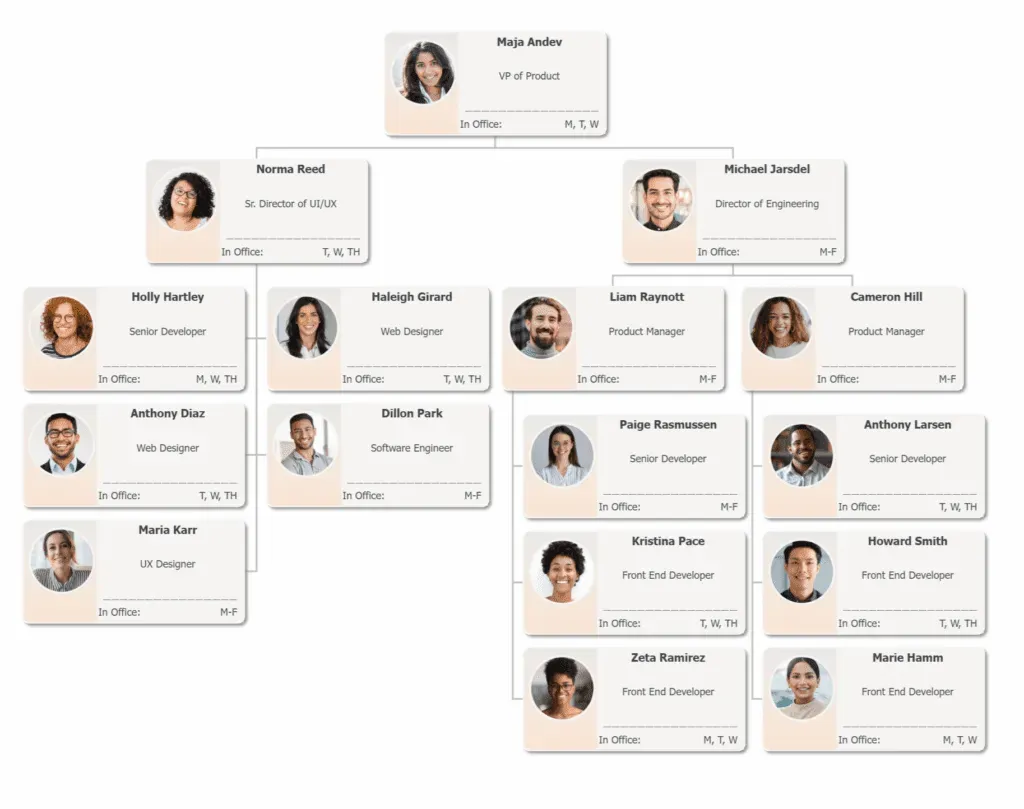
OrgChart, from OfficeWork Software, is a purpose-built org chart automation and workforce-planning tool that integrates with more than 50 HR systems rather than tying itself to one ERP. It holds a 4.5/5 rating on G2 across 278 reviews, one of the largest verified review bases of any dedicated org chart product.
Key features:
- Automated data sync: Connects to 50+ HR systems and keeps charts current through scheduled syncs or one-click updates, without manual redrawing.
- Workforce-planning views: Visualize open and vacant positions, remote-employee status, and headcount by structure.
- M&A and reorg modeling: Compare before-and-after states for mergers, acquisitions, and restructures directly on the chart.
- Customizable chart design: Color-coding, flexible layouts, and box templates for publishing to different audiences.
What users say: OrgChart holds 70% 5-star and 25% 4-star reviews on G2. Reviewers highlight direct integrations with systems like ADP and UKG that keep the chart synced automatically, and describe setup, including image loading, as straightforward.
The recurring criticism is around visual flexibility: reviewers note the default box shapes and connector styles feel restrictive for teams wanting highly custom layouts, and that advanced configuration isn't always intuitive on first use.
Integrations: 50+ HR systems including ADP Workforce Now, ADP Vantage HCM, BambooHR, UKG Pro, UKG Ready, Workday, Paycor, Paylocity, Greenhouse, Dayforce, and Microsoft Excel.
Pricing: Priced by the number of employees or positions charted. Core starts at $1,260/year for 100 employees charted; Plus from $2,256/year; Pro from $3,156/year. Volume discounts apply at higher headcounts. 14-day free trial.
Pros:
- Broadest verified HRIS integration list of any dedicated org chart tool on this list (50+ systems)
- Largest G2 review base among standalone org chart products (278 reviews, 4.5/5)
- Doesn't require a specific ERP; works for enterprises on ADP, UKG, Workday, or a mixed HR tech stack
Cons:
- Pricing scales directly with employees charted, which can get expensive fast at large headcounts compared to flat enterprise pricing
- Visual customization is more limited than dedicated org-design platforms
- Less workforce-planning and scenario-modeling depth than Orgvue or Nakisa
4. Orgvue
Best for org design, workforce planning, and M&A scenario modeling
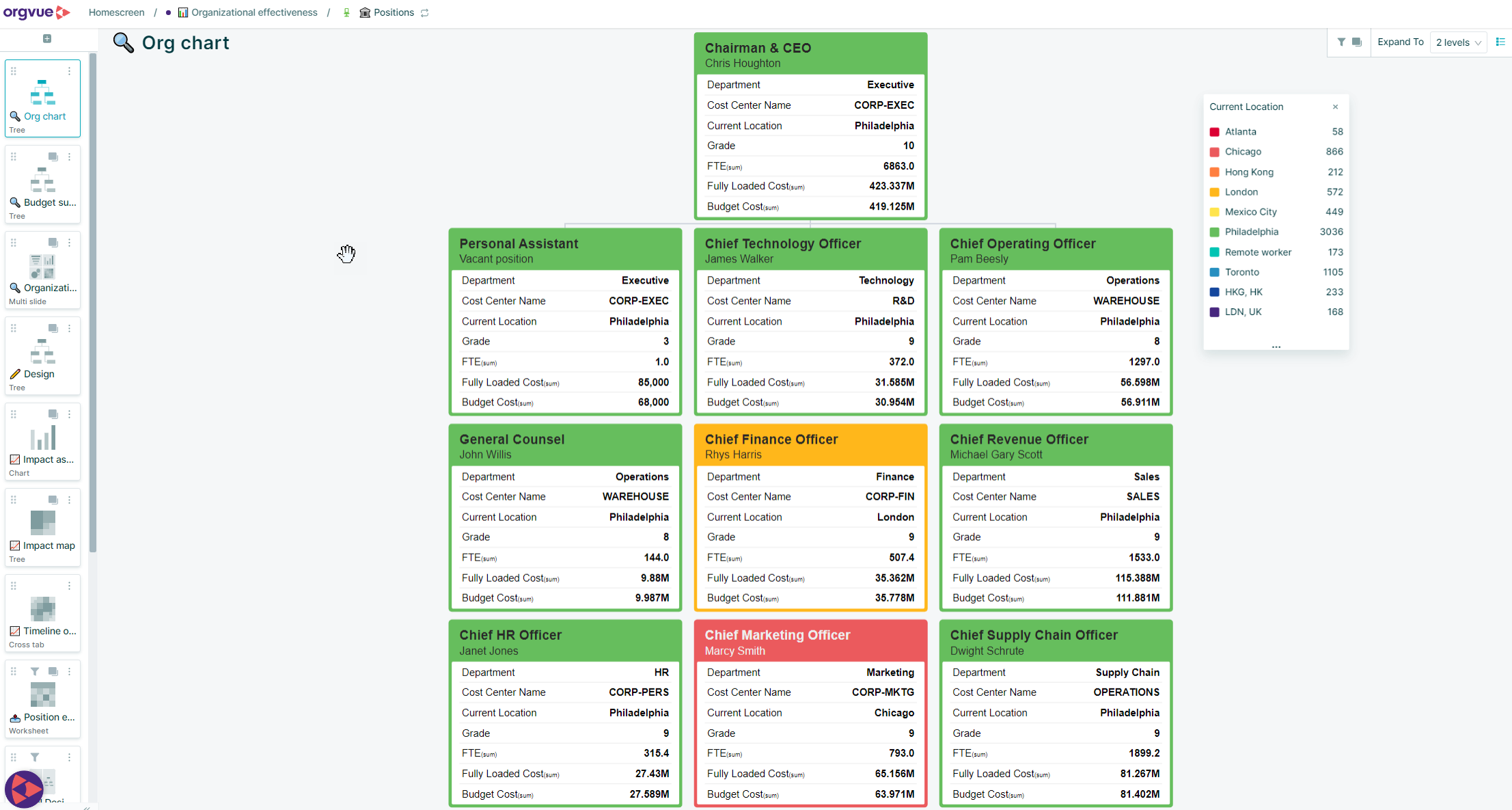
Orgvue is an organizational design and planning platform, not primarily a "chart my current headcount" tool. It's used heavily by large enterprises and management consulting firms to model current and future org states, calculate cost and headcount impact, and answer strategic questions like where cost sits and whether the organization is rightsized.
Key features:
- Schemaless data integration: Merge disparate HR, finance, and operational datasets without forcing them into a rigid schema first.
- Scenario modeling: Build and compare multiple "to-be" organizational structures against the "as-is" state, with automatic cost and headcount calculations.
- Spans-and-layers analytics: Instantly surface management layers, span of control, and organizational health metrics that would otherwise take days in Excel.
- Stakeholder-ready visualization: Export polished charts and packs for board- and exec-level presentations.
What users say: An enterprise organization design analyst on G2 called Orgvue "a huge time (and money) saver," writing that visualizing structure and identifying spans and layers "in a matter of minutes… saves a tremendous amount of time compared to trying to do the same thing using standard tools such as Excel and PowerPoint." A management consultant with five-plus years on the platform described it as "an incredibly slick platform that enables me to do all of my organisation design, workforce planning, and analytics work in one place… it provides me and my clients with an elegant solution that can be used at enterprise level or for bespoke engagements."
The consistent criticism is the learning curve: multiple reviewers describe the interface as "not always intuitive," citing a real ramp-up period to master expression logic and advanced configuration, and note that large datasets can slow the platform down, especially when screen-sharing live.
Integrations: Works with data exported from HRIS, ERP, and finance systems (SAP SuccessFactors, Workday, and others) via flexible data import rather than pre-built bidirectional connectors.
Pricing: Custom quote based on scale and use case; not published. Reviewers describe the sales process as responsive rather than "salesy." Demo available.
Pros:
- Purpose-built for organization design and M&A/restructuring work at genuine enterprise scale (reviewers cite modeling 10,000+ employee organizations)
- Powerful, fast data-to-visualization workflow that reviewers consistently say beats Excel and PowerPoint for stakeholder presentations
- 4.4/5 on G2 with strong praise for customer support
Cons:
- Steep learning curve, particularly for workforce-planning modules and custom expressions; several reviewers flag this as a real adoption barrier
- Not a live, always-current org chart in the way OneDirectory or OrgChart are; more suited to periodic design projects than daily people-lookup
- Pricing isn't published, and reviewers describe it as a premium-priced platform
5. ChartHop
Best for people-analytics-driven org charts tied to headcount and compensation
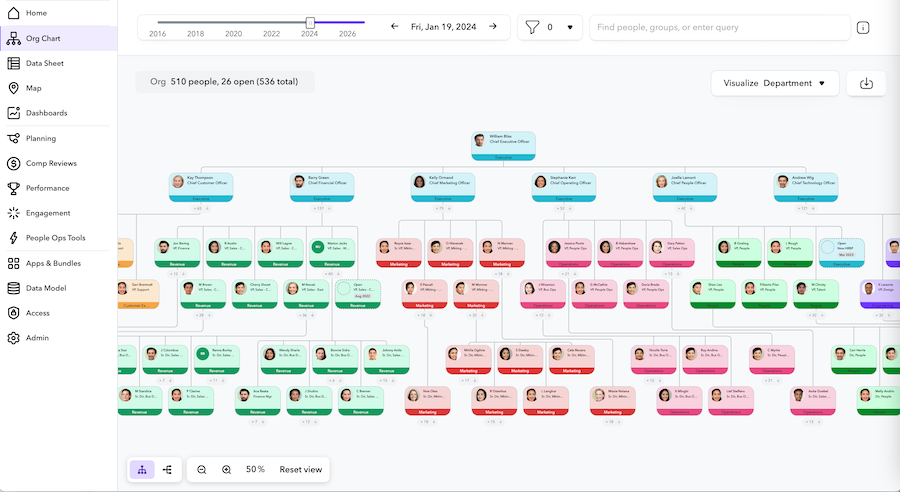
ChartHop is an AI-powered people operations platform where the org chart is the front door into headcount planning, compensation, performance, and engagement data, all built on a single underlying dataset. It's the org chart tool most tightly wired into day-to-day HR operations rather than a standalone visualization layer.
Key features:
- Real-time graphical org charts: Update automatically as headcount and reporting-line data change, with historical org structure views.
- Headcount planning and position management: Model and approve open positions directly against the org chart before they hit the ATS.
- Modular compensation and performance tools: Add merit-cycle planning, pay transparency, and performance reviews on top of the same org data.
- Scenario planning: Model reorgs without touching live data, then publish approved changes.
What users say: A VP of People on G2 wrote, "ChartHop is absolutely critical to us… it's our source of truth that allows us to be completely accurate," crediting it with freeing up time to be "proactive and strategic versus constantly reacting to changes." An enterprise-segment reviewer in IT services described ChartHop as filling gaps left by larger HCM systems, noting the org chart and alerting capabilities work well for a midsize-to-large organization "as the HRIS is not really ready for larger orgs yet."
The most common criticism is around HRIS integration and field customization: one reviewer noted they "have permission to change a data point on the Data Sheet view, but don't have permission to change that same data point on an employee's personal profile," and several flag that syncing with an existing HRIS like ADP isn't always bidirectional or fully customizable.
Integrations: Workday, SAP SuccessFactors, BambooHR, ADP (RUN and Workforce Now), Gusto, Justworks, TriNet, Greenhouse, Lever, Ashby, Slack, and 25+ others.
Pricing: ChartHop Core starts around $5/employee/month, with additional modules (headcount planning, HRIS, compensation, performance, engagement, goals) priced around $3/employee/month each. No permanent free plan; free trial available.
Pros:
- Real-time org chart wired directly into headcount planning and compensation, not a separate tool that needs manual reconciliation
- Strong G2 review volume (164 reviews) with consistent praise for interface and support quality
- Modular pricing lets enterprises add only the pieces they need instead of buying a full HCM replacement
Cons:
- Per-employee, per-module pricing can add up quickly across a large enterprise headcount
- Reviewers report integration friction with some HRIS platforms and non-customizable standard fields
- Less deep ERP write-back and multi-entity modeling than Ingentis or Nakisa for the largest, most complex enterprises
6. Nakisa Workforce Planning
Best for 5,000+ employee enterprises needing org design plus ERP write-back
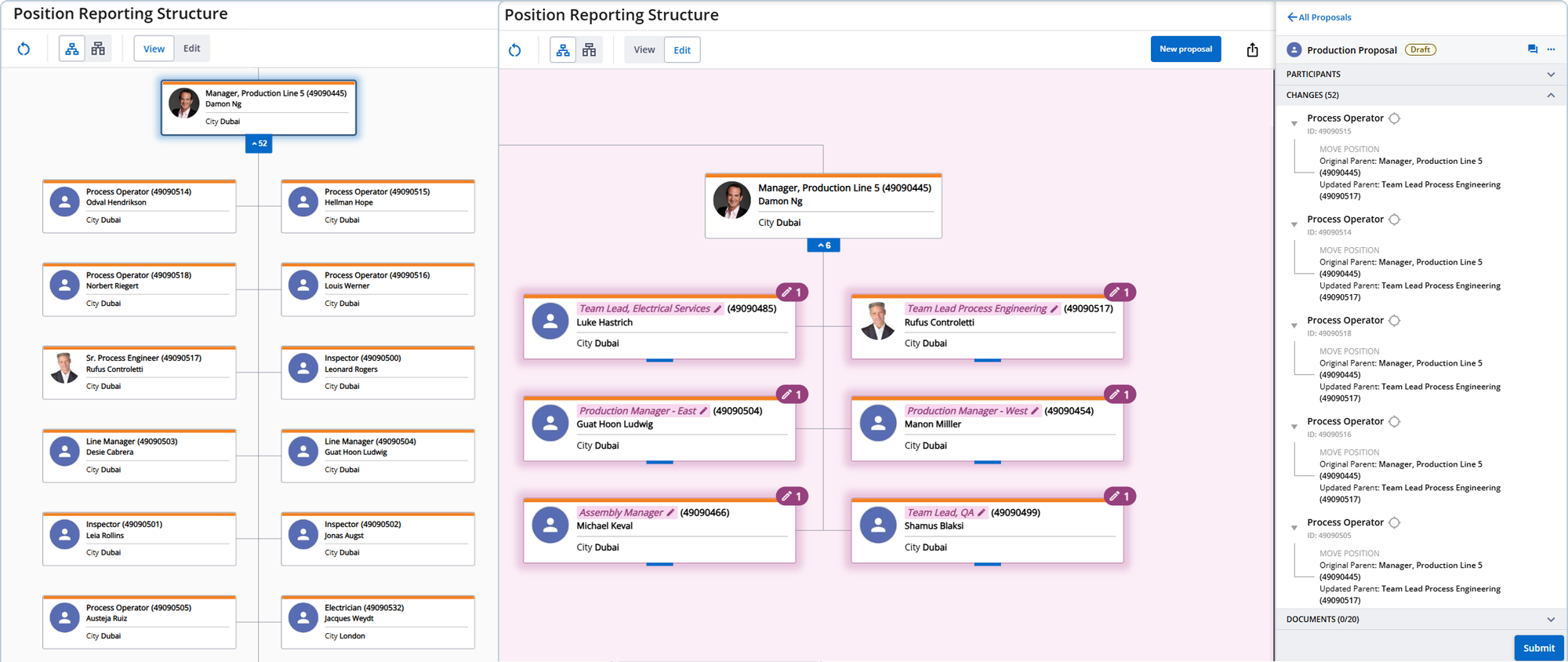
Nakisa Workforce Planning (formerly Nakisa HR Suite) is cloud-native software built specifically for enterprises with 5,000 or more employees, combining org charting (OrgInsight), org design and scenario modeling (OrgDesign), and strategic workforce planning in one suite, with native bidirectional integrations into SAP HCM, SAP SuccessFactors, Workday, and Oracle.
Key features:
- OrgInsight: Configurable, exportable org charts, HR reports, and dashboards (span of control, DEI, headcount trends) built on live ERP data.
- OrgDesign: Model organizational restructures during mergers, acquisitions, or divestitures, assign structure ownership to specific managers, and compare scenarios side by side.
- Bidirectional ERP write-back: Approved scenario changes sync back into SAP or Workday, rather than living only inside the org chart tool.
- Strategic Workforce Planning suite: Annual headcount planning and skill-gap analysis tied to long-term staffing objectives.
What users say: G2's review base for Nakisa Workforce Planning is thin, one verified enterprise reviewer, a 4.5/5 rating, describing it as "a really great problem solver" for restructuring HR data and generating analytic reports in an SAP-centered deployment, while noting the platform's web-only delivery means there's no native desktop or mobile app. Because that sample size is so small on its own, it's worth cross-checking: Capterra shows a consistent picture across a larger sample, a 4.5/5 rating from 8 verified reviews. A Principal Specialist in Organizational Design and Transformation at an entertainment-industry enterprise wrote that prior to Nakisa, "building updated org charts and implementing changes for a single division could take days to accomplish manually," while "today, updates for the entire organization take only a few hours to complete," crediting the platform's "out-of-the-box dashboards" for a single source of current, accurate data. Reviewers on both platforms independently flag the same friction point: a real learning curve for administrators and menus that take practice to navigate.
Integrations: Native bidirectional connectors to SAP HCM, SAP SuccessFactors, Workday, and Oracle, plus broad API connectivity to other HR data sources.
Pricing: Not published; enterprise contracts scoped to headcount and modules (OrgInsight, OrgDesign, Strategic Workforce Planning). Demo available.
Pros:
- Purpose-built for the 5,000+ employee segment specifically, with bidirectional SAP and Workday write-back most competitors don't offer
- Combines org charting, scenario-based org design, and strategic workforce planning in one connected suite rather than three separate tools
- Cloud-native architecture (Kafka, Kubernetes, Elasticsearch) built for large-scale data volume, with a published 99.5% uptime SLA
Cons:
- Very thin G2 review base (1 review) on its own, though a larger, consistent 4.5/5 across 8 verified Capterra reviews corroborates it; still worth a live demo and reference calls before committing
- Web-only; no native mobile or desktop application
- Pricing isn't published, and the product is squarely aimed at large enterprises, so it's not a fit for mid-market budgets
7. Workday HCM
Best for enterprises already running Workday HCM
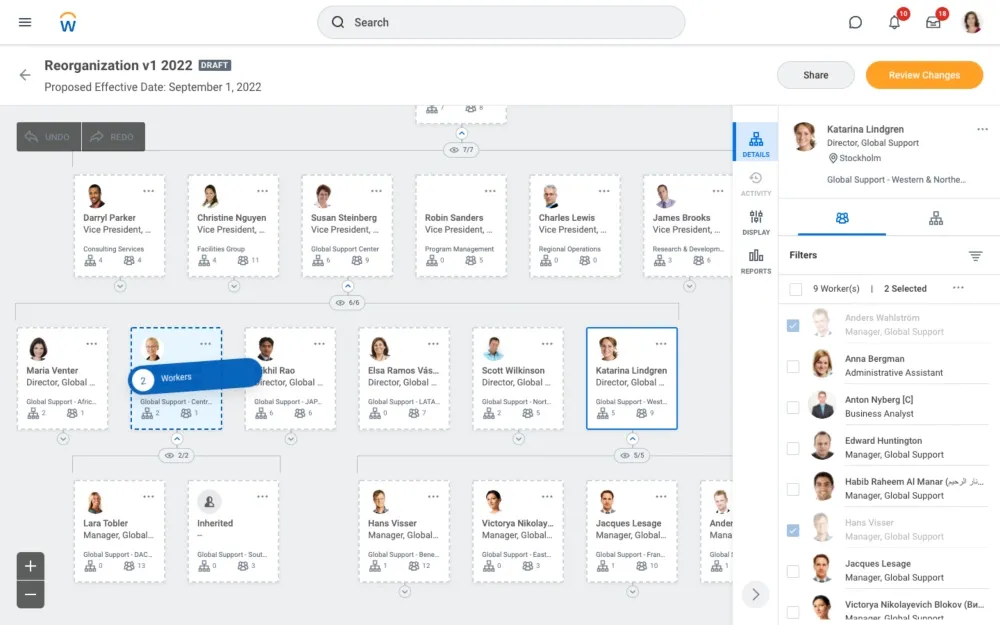
Workday's org chart comes bundled inside one of the most widely deployed enterprise HCM platforms, where worker profiles, org structure, and talent data live in the same system as payroll, finance, and planning. Enterprises already committed to Workday should exhaust its native org chart and org-modeling features before evaluating a standalone tool; nobody should buy Workday for the org chart alone.
Key features:
- Unified worker profiles: Org chart data shares a single source with payroll, benefits, and talent records.
- Org modeling: Plan and simulate reorganizations against live workforce data inside the same platform used to execute them.
- Enterprise-grade security: Fine-grained, role-based access control across HR, finance, and org data.
What users say: Workday HCM holds a 4.1/5 rating from 1,692 verified reviews on G2, one of the largest review bases of any product in this guide. Reviewers consistently praise having a single data architecture across HR, payroll, and finance, and specifically call out the org chart visualization as making it "very easy to find who reports to whom across different technical teams." The recurring criticism, reflected in 40 reviews citing limited customization and dozens more citing confusing navigation, is usability: reviewers describe cluttered menus, excessive clicks for simple tasks, and a genuinely steep learning curve, with one widely echoed review titled, in effect, unified data but a steep learning curve and clunky search.
Integrations: A vast enterprise ecosystem including Microsoft 365, Slack, ADP, and major identity providers, plus Workday's own extensive partner and API network.
Pricing: Not published; sold exclusively through enterprise contracts. Demo available.
Pros:
- Single source of truth for org, HR, payroll, and finance data at enterprise scale; no separate vendor or sync to manage
- Deep, fine-grained security and access model built for large, regulated organizations
- One of the largest verified G2 review bases in HR tech (1,692 reviews), giving buyers a lot of signal to evaluate against
Cons:
- Org chart and general navigation UX consistently rated below dedicated org chart tools; reviewers report too many clicks and cluttered menus for simple lookups
- Implementation is measured in months, not days, and typically requires a systems integrator
- Buying Workday specifically for org chart functionality is poor value; it only makes sense if you're already running or adopting the broader HCM suite
8. SAP SuccessFactors HCM
Best for large SAP-standardized enterprises
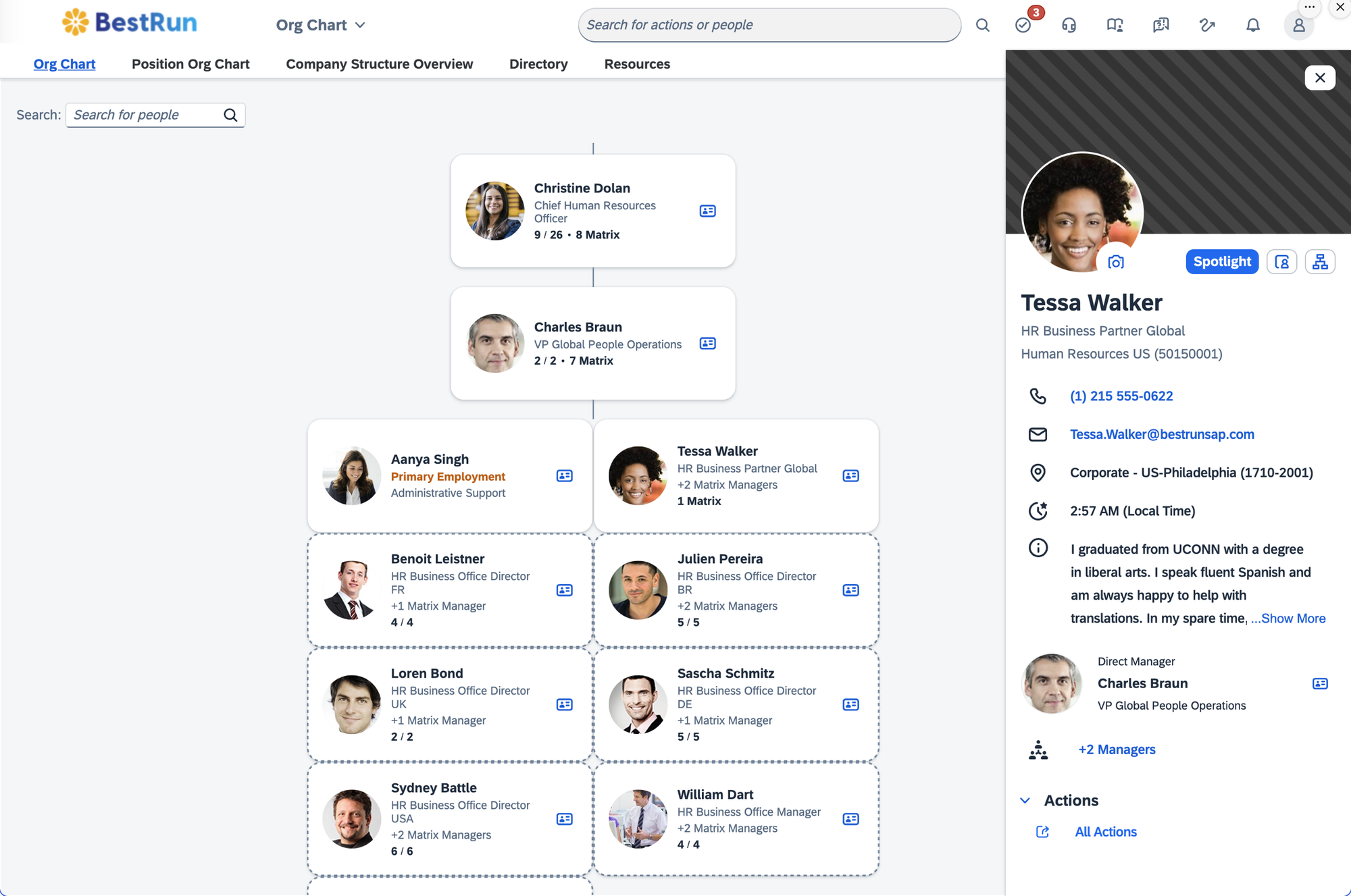
SAP SuccessFactors provides org chart visibility embedded inside its broader cloud HCM suite, with strong compliance controls and workforce-analytics integration. It's typically the right choice for organizations already standardized on SAP technology across finance and operations, more than 10,000 organizations run on it globally.
Key features:
- Real-time org visibility: Org structure connected to core HR, payroll, talent, and workforce analytics across 100+ localizations.
- Succession and development integration: Org chart data feeds directly into succession planning and talent modules.
- Configurable goal and performance frameworks: SMART goal templates aligned to organizational structure.
What users say: SAP SuccessFactors HCM holds a 4.1/5 rating from 1,657 verified reviews on G2. Reviewers most frequently cite ease of use and centralization, 217 reviews specifically praise the user-friendly interface, and value having HR data, payroll, and talent management consolidated in one system. The largest cluster of criticism (80+ reviews) points to a genuinely complex user interface, a steep learning curve requiring real onboarding investment, and limited customization options that some teams find restrictive.
Integrations: Native integration across the SAP ecosystem (SAP HCM, SAP ERP, SAP Analytics Cloud) plus a broad third-party marketplace.
Pricing: Not published in detail. Pricing benchmarks from procurement-data firm OutSail put core HCM pricing in a wide $18-38+ per employee per month range depending on modules and negotiated discount, with mid-market deployments (500-2,000 employees) running $100,000-$500,000 for implementation alone per OutSail's 2025 benchmark, plus ongoing support fees of roughly 22% of the annual license. Demo available.
Pros:
- Deep compliance and workforce-analytics integration purpose-built for large, global, regulated enterprises
- Strong installed base (10,000+ organizations) with a very large G2 review sample to evaluate against
- Org structure lives in the same system as payroll, talent, and succession planning, reducing integration overhead for SAP shops
Cons:
- Complex interface and steep learning curve are the most-cited complaints across 1,600+ reviews
- Implementation cost is substantial: published estimates put it at roughly the same size as a full year of software fees
- Like Workday, only makes sense as an org chart solution if you're already committed to the broader SAP HCM suite
9. UKG Pro
Best for enterprises that want an org chart module inside a full HR and payroll suite
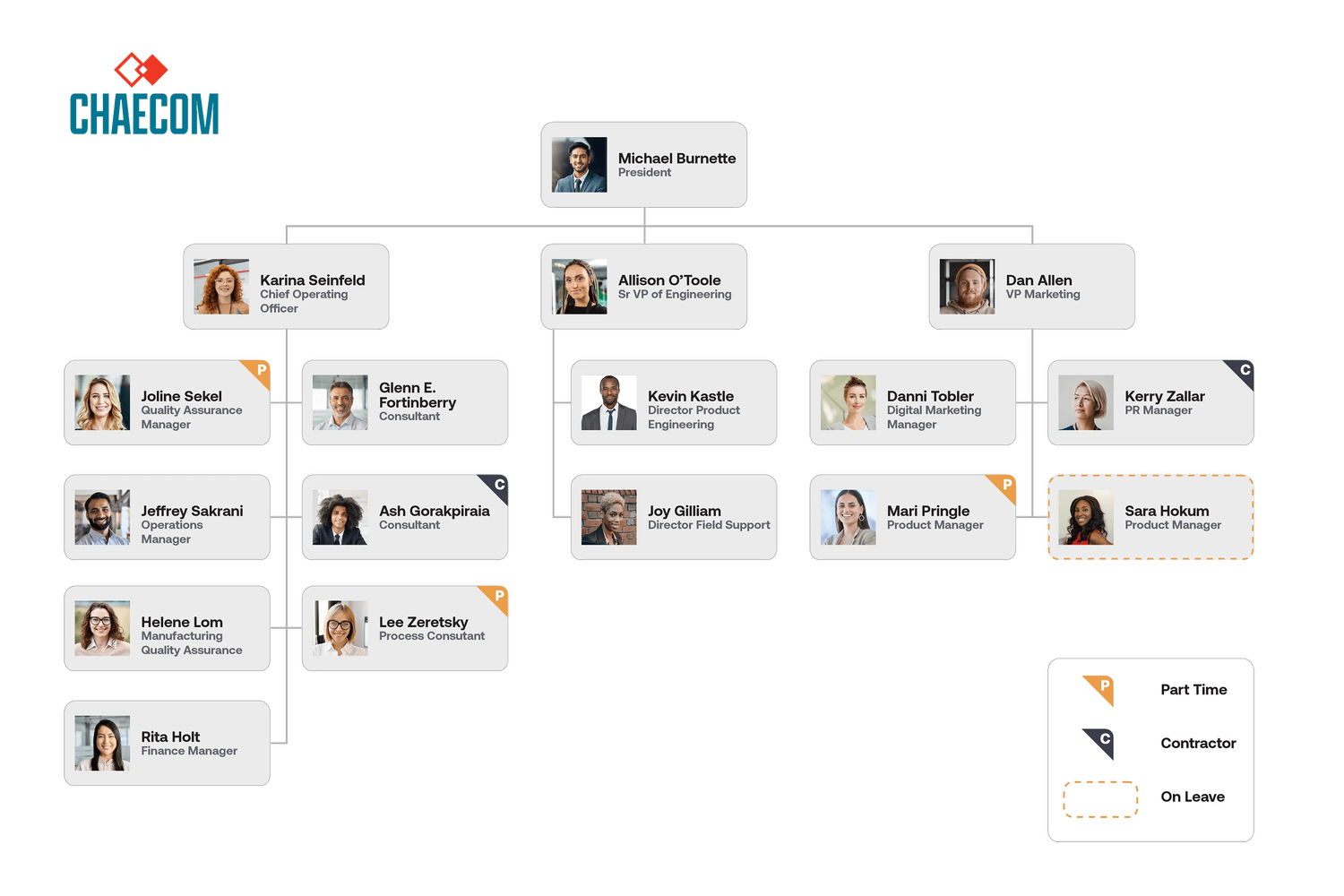
UKG Pro brings core HR, payroll, and workforce management into one platform, with an org chart generated from the same reporting-line data used for payroll and compliance. It holds the largest G2 review base of any product in this guide at 2,187 reviews.
Key features:
- Unified HR and payroll data: Org chart draws from the same records used for payroll, benefits, and time tracking.
- Highly configurable fields and workflows: Tailor org data, reports, and dashboards to specific company policies.
- Global payroll support: Payroll and workforce data across 160+ countries feeds the same org structure.
What users say: UKG Pro holds a 4.3/5 rating from 2,187 verified reviews on G2, reviewers most frequently cite ease of use (171 reviews) and effective navigation and support (90 reviews). One reviewer's title captures the split experience well: "Powerful Platform, But Not Intuitive, Steep Learning Curve and Slow Reports." The largest clusters of criticism point to an unintuitive interface during updates (36 reviews), a steep learning curve for anyone switching from another platform, and inconsistent customer support response times.
Integrations: OrgChart, ADP, and a broad HR marketplace; supports global payroll across 160+ countries.
Pricing: Not published. Pricing benchmarks from OutSail and Vendr put the base HCM platform around $27-32 per employee per month, with a full-suite deployment including workforce management reaching $38-40+ per employee per month, plus implementation fees of roughly 40-70% of the annual software cost. Demo available.
Pros:
- Largest verified G2 review base in this guide (2,187 reviews), giving buyers substantial signal on real-world experience
- Highly configurable to specific company policies and compliance needs, which matters for complex, regulated enterprises
- Strong global payroll support (160+ countries) keeps org and payroll data in one system for multinational employers
Cons:
- Reviewers consistently describe a steep learning curve and interface that isn't intuitive, particularly after updates
- Support quality is inconsistently rated; some reviewers report long resolution times
- Org chart is a secondary module inside a much larger HR/payroll platform, not a purpose-built org chart tool
10. Workleap (formerly Pingboard)
Best for upper-mid-market teams that want a dedicated visual org chart builder
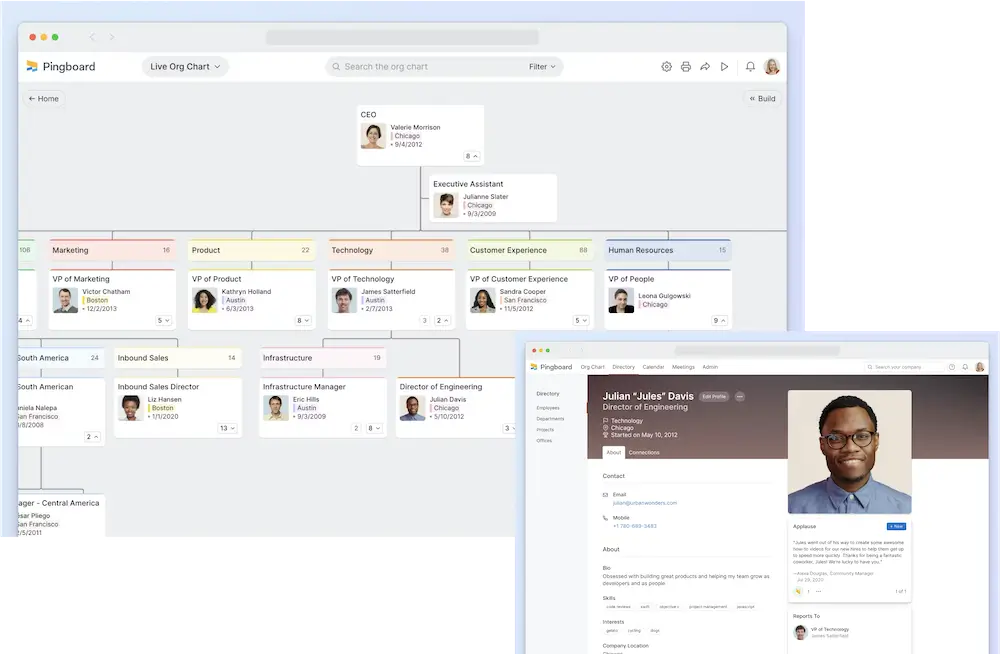
Pingboard built its reputation on visual, drag-and-drop org charts before Workleap acquired it in December 2023 and folded it into a broader modular platform covering engagement, performance, and compensation. The org chart and directory features remain solid, but buyers are now purchasing a module inside a larger HR suite rather than a standalone org chart product.
Key features:
- Drag-and-drop org chart: Model reorgs and plan future-state structures visually before announcing them.
- HRIS sync: Auto-populates profiles from common HR systems including BambooHR, ADP Workforce Now, and Dayforce.
- Directory with engagement features: Birthday and anniversary calendars alongside standard directory data.
What users say: Workleap holds a 4.3/5 rating from 1,090 reviews on G2 for the combined platform. A Capterra reviewer of the Pingboard org chart module noted "the org chart can be a little clunky," citing deleted employees lingering in the system, and another flagged that name search sometimes fails to surface a person. G2's pricing summary reports multiple reviewers explicitly describing Workleap as expensive, with one calling the pricing too high for non-enterprise customers.
Integrations: Slack, Google Workspace, Google Calendar, Okta, OneLogin, ADP Workforce Now, BambooHR, Dayforce, Justworks, Namely, and Paylocity.
Pricing: Modular. The Pingboard org chart module is $4/user/month billed annually per Capterra's verified pricing data; the broader Workleap platform starts at $99/month per G2, with the full bundle running roughly $12/user/month annually. 14-day trial.
Pros:
- Strong, purpose-built drag-and-drop org chart UX for planning and visualizing reorgs
- Engagement, performance, and directory features bundled under one roof if you need them
- Established product with a large combined review base (1,090 reviews)
Cons:
- Per-user, per-module pricing that reviewers repeatedly describe as expensive at scale
- Lighter on structural governance (multi-entity modeling, field-level permissions, ERP write-back) than tools built for the largest, most complex enterprises
- The standalone Pingboard product no longer exists; roadmap priorities now follow the broader Workleap suite rather than the org chart specifically
11. Deel HR
Best for global enterprises with distributed, multi-country workforces
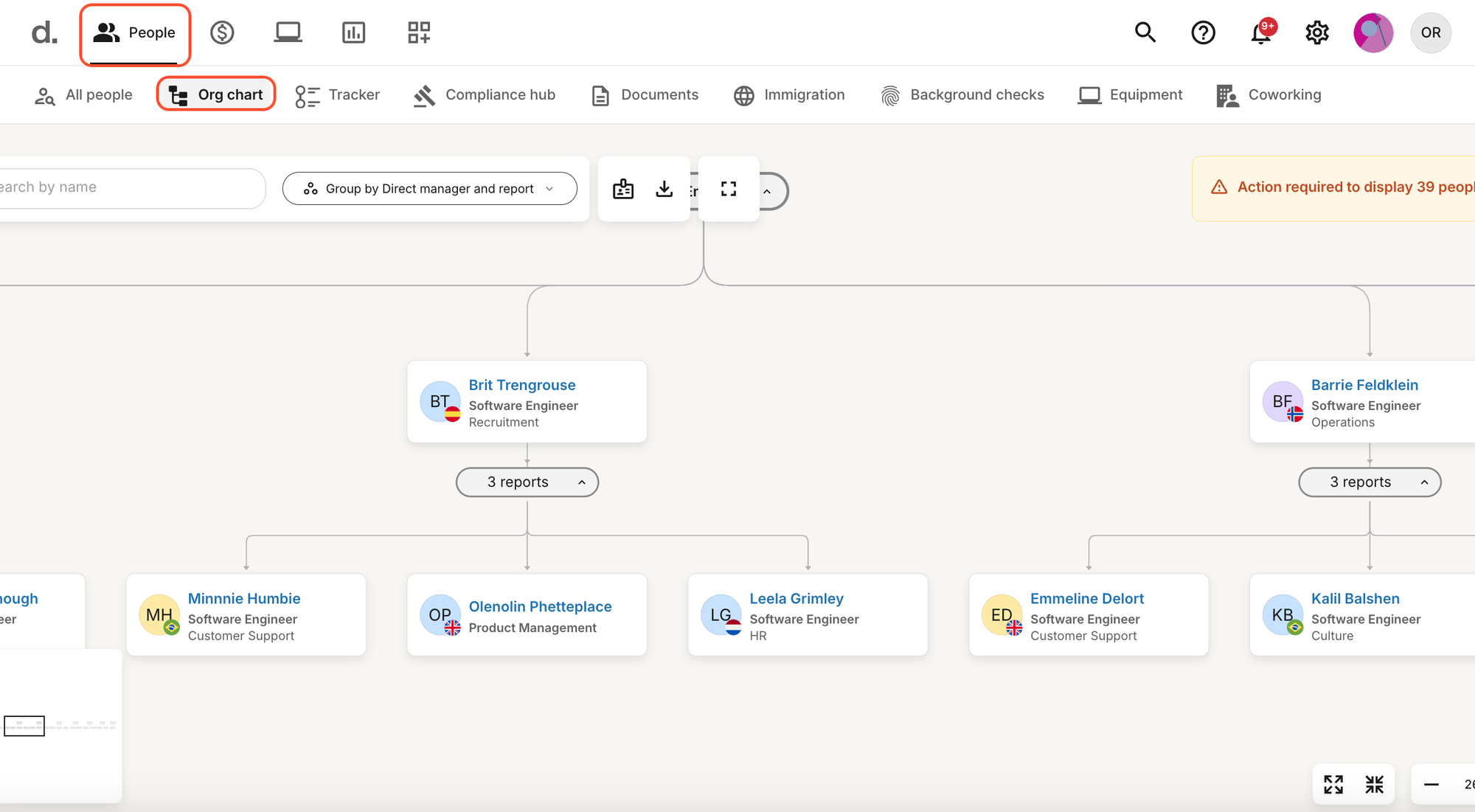
Deel HR centralizes org and employee records for enterprises hiring across borders, where the org chart problem isn't just "who reports to whom," it's representing employees, contractors, and Employer-of-Record (EOR) workers across 150+ countries and multiple employment types inside one structure.
Key features:
- Global People view: Every worker type, employee, contractor, EOR, in one searchable org structure.
- Compliance-linked records: Local employment documentation and country-specific compliance tied directly to each org chart entry.
- Org structure visualization: Reporting lines represented across countries and legal entities.
What users say: Deel HR holds a 4.8/5 rating from 1,314 reviews on G2, one of the highest ratings of any product in this guide, driven heavily by reviewer praise for ease of use (862 reviews) and interface simplicity (427 reviews). The most common criticism clusters around cost and speed rather than the org structure itself: reviewers cite high transfer and withdrawal fees, payment delays during peak periods, and slow loading times on document uploads as recurring friction points.
Integrations: Slack, QuickBooks, Xero, BambooHR, Greenhouse, Workday, Okta, Microsoft Teams.
Pricing: Deel HR (Core HR) is free for organizations up to 200 employees, then from $5/employee/month as a platform fee; payroll, EOR, and contractor products are priced separately, from roughly $29 to $599 per employee/month depending on the product. Demo available.
Pros:
- Only tool on this list built specifically around representing org structure across many countries and worker classifications at once
- Very high G2 rating (4.8/5) across a large review base (1,314 reviews)
- Free tier up to 200 employees makes it accessible for a growing multinational before a full enterprise contract
Cons:
- Org chart customization is limited compared to dedicated org chart tools; it's a feature of the broader HR platform, not the product's core focus
- Overkill, and possibly the wrong tool entirely, if your workforce is concentrated in one or two countries
- Some reviewers report cost creep from transfer fees and per-product pricing once you move beyond core HR into payroll and EOR
Why org chart builder tools aren't enough at scale
Search "org chart software" and general-purpose diagramming tools dominate the results, because they're the easiest way to make a chart look good for a slide deck. They're also, consistently, the wrong long-term choice once a company passes a few hundred employees. Here's what the G2 data actually shows about the three most common ones.
Lucid (Lucidchart / Lucid Visual Collaboration Suite) holds a 4.5/5 rating from roughly 8,800 reviews on G2, by far the largest review base of any tool in this category, and serves 99% of the Fortune 500 in some capacity. It's an outstanding diagramming and whiteboarding platform with genuine enterprise security options (SSO, admin controls, an Enterprise tier). What it isn't built for is automatic org chart maintenance: a Lucidchart org chart is a diagram you draw, not a live query against your HRIS. Every reorg, every new hire, every title change is a manual edit unless you build and maintain a custom data-connector workflow yourself.
Miro holds a 4.6/5 rating from over 13,000 reviews on G2 and is exceptional as a collaborative whiteboard for workshops, planning sessions, and ideation, including one-off org design sessions. But like Lucidchart, an org chart in Miro is a static board. It has no concept of "this person's manager changed in the HRIS," and nothing updates unless someone opens the board and redraws it.
Creately holds a 4.4/5 rating from nearly 1,400 reviews on G2 and offers genuinely good AI-assisted diagram generation for org charts and similar structures from a one-time data import. The same limitation applies: once generated, the chart is a static artifact, not a live view synced to a system of record.
SmartDraw holds a 4.5/5 rating from 368 reviews on G2 and can auto-populate org charts from an Excel or CSV import, which is a meaningful step up from pure manual drawing. It's still a one-time or scheduled import rather than a continuously live sync, and reviewers note that highly specific formatting or unique shape requirements can feel limiting compared to purpose-built org chart software.
The pattern across all four: these are excellent tools for what they're designed to do, fast, flexible, visually polished diagrams, and every one of them requires a human to notice a structural change and manually update the chart. At 50 employees, that's a mildly annoying quarterly task. At 5,000 employees with constant hiring, transfers, and reorgs, it's a full-time data-entry job, and the chart is wrong more often than it's right.
Other org chart tools worth knowing
A handful of other tools came up repeatedly in research but didn't make the full comparison, either because they're better suited to smaller teams than to the organizations this guide is written for, or the org chart is a secondary feature of a broader product. Listed here so you have the full map; no ranking implied.
- Functionly: Interactive org design software for planning future-state org charts and running restructuring scenarios, with tiered Starter, Advanced, and Enterprise pricing. Reviewers praise its collaborative planning tools; it's better suited to org design projects than as a daily-use company directory.
- Organimi: A dedicated org chart builder popular with mid-market HR teams, holding a 4.5/5 rating on G2 across roughly 150 reviews. Strong for straightforward departmental charts; lighter on the ERP write-back and multi-entity modeling larger enterprises need.
- HiBob (Bob): A modern HRIS whose org chart updates from HR records automatically, a strong fit for mid-sized companies but built more for the sub-2,000-employee segment than large, complex enterprises.
- BambooHR: Includes an auto-generated org chart as part of its HRIS. G2 reviewers frequently cite limited capabilities that restrict scalability for larger organizations, worth knowing if you're evaluating it specifically for enterprise-scale org visualization.
- Microsoft Visio: Holds a 4.2/5 rating from 660 reviews on G2. A capable diagramming tool for one-off org charts inside a Microsoft 365 environment, with the same fundamental limitation as Lucidchart and Miro: it's a static drawing, not a live sync.
How to choose org chart software for your organization
Five questions separate the right tool from an expensive procurement mistake.
1. Does it sync automatically from your actual system of record, or does someone have to update it by hand?
This is the single biggest differentiator between real org chart software and an org chart builder. If your source of truth is Microsoft 365, Entra ID sync (OneDirectory) is the fastest path to accuracy. If it's SAP, Workday, or UKG, prioritize tools with native, ideally bidirectional, ERP connectivity (Ingentis, Nakisa, or the ERP's own native org chart module). If nobody can answer "what happens the day after someone's manager changes in the HRIS," that's a red flag regardless of how polished the chart looks in a demo.
2. Can it represent your organizational structure, not just your headcount?
Demo every finalist against your actual complexity: dotted-line reporting, shared services teams, multiple legal entities, or a recent acquisition still running as a separate structure. Ask the vendor to show "everyone in the EMEA finance function who has a dotted line into the global finance org" and watch how many clicks it takes, or whether it's possible at all.
3. Does it meet your security and compliance bar, not just your HR team's wish list?
Procurement will ask about SSO, role-based field permissions, SOC 2 or ISO 27001 status, data residency, and audit logging before anyone signs a contract. Confirm these upfront rather than discovering a gap during security review, three weeks into a rollout.
4. What does it actually cost at your real headcount, not the price on the marketing page?
Per-employee and per-user pricing looks manageable in a sales deck and compounds fast in reality: $3-5 per employee per month is $180,000-$300,000 per year at 5,000 employees, before add-on modules. Banded company-size pricing, like OneDirectory's, can run a fraction of that: $17,290 a year at 2,000 profiles against $120,000 for the same headcount at $5 per employee per month. Get the number in writing for your actual headcount, including every module and minimum, before comparing options.
5. Do you need a live directory tool, an org design platform, or both?
These are genuinely different jobs. OneDirectory, OrgChart, and Ingentis are built to keep a chart continuously accurate for everyday lookup. Orgvue, Nakisa's OrgDesign suite, and ChartHop's scenario tools are built for periodic, deliberate restructuring projects. Some enterprises need one; complex, fast-changing organizations often end up running both, a live directory for daily use, and a design platform for the reorg twice a year.
When a dedicated org chart tool isn't the answer
A single-office team under roughly 100 people will get more value from a free Lucidchart or Creately template than from any tool on this list, there's no structural complexity yet to justify the cost or setup. Companies already fully committed to Workday or SAP should exhaust that platform's native org chart features before buying a second tool. And if your core problem is a distributed international workforce across many countries and worker types, Deel HR's org structure, built around that exact problem, deserves a serious look before a generic org chart tool.
Mid-size and large organizations with real structural complexity, on Microsoft 365, should start a OneDirectory trial and judge it against this list directly.
Frequently asked questions
What is the best org chart software for mid to large companies?
For mid-size and large organizations with complex structures, multiple offices, divisions, or matrix reporting, OneDirectory is a strong fit, holding a 4.9/5 rating on G2 in the Org Chart Software category. Organizations already running SAP, Workday, or UKG should evaluate Ingentis org.manager or Nakisa Workforce Planning for native ERP integration, and organizations running large-scale org design or M&A projects should look at Orgvue.
What's the difference between org chart software and an org chart builder like Lucidchart?
Org chart software syncs automatically to a live data source (an HRIS, ERP, or directory like Microsoft 365) and regenerates the chart as people, titles, and reporting lines change. An org chart builder like Lucidchart, Miro, or Creately produces a static diagram you draw and edit by hand; it has no connection to a system of record, so it goes stale the moment someone's role changes, unless someone manually updates it.
How much does org chart software cost?
It varies widely by pricing model. Per-employee pricing (ChartHop, Deel HR) typically runs $3-8 per employee per month. Per-employees-charted pricing (OrgChart) starts around $1,260/year for 100 employees. Company-size or banded pricing (OneDirectory) starts at $349/month regardless of exact headcount within a band. Enterprise ERP-embedded options (Workday, SAP SuccessFactors, UKG Pro, Ingentis, Nakisa) are quote-based and typically run into six figures annually at scale. The important step is multiplying any per-user or per-employee price by your real headcount before comparing options, since $5/employee/month becomes $300,000/year at 5,000 employees.
Can org chart software integrate directly with Workday, SAP, or ADP?
Yes, several tools on this list are built specifically for that. Ingentis org.manager and Nakisa Workforce Planning offer native bidirectional integration with SAP HCM, SAP SuccessFactors, Workday, and Oracle. OrgChart connects to 50+ HR systems including ADP, UKG, Workday, and BambooHR. ChartHop integrates with Workday, SAP SuccessFactors, ADP, and BambooHR, among others. If you're on Microsoft 365 rather than one of these ERPs, OneDirectory syncs directly from Entra ID instead.
What features matter most in org chart software?
Five things matter most at this size: automatic sync from your actual system of record (not manual data entry), support for matrix, dotted-line, and multi-entity structures as real data rather than workarounds, role-based governance and security that meets procurement requirements (SSO, SOC 2, data residency), the ability to handle thousands of positions without the chart becoming unusable, and, for many organizations, scenario-planning tools to model reorgs or M&A before committing changes to the live structure.
Can I just use PowerPoint or Excel for a large org chart?
At this size, no, not sustainably. A manually maintained chart in PowerPoint or Excel goes stale within a pay cycle at any organization with regular hiring, transfers, or reorgs, and multiple reviewers across the tools in this guide specifically cite eliminating that manual process as the reason they switched to dedicated org chart software. It can work temporarily for a single department or a one-off presentation, but it isn't a system of record and shouldn't be treated as one past a few hundred employees.