
BPM improved firmwide visibility with OneDirectory’s modern employee directory and org chart. Employees can now quickly find colleagues, teams, expertise, contact details, and reporting lines across offices, departments, and service areas.
BPM needed a better way for employees to find people, understand teams, identify expertise, and navigate a growing organization. With OneDirectory, the firm replaced fragmented, hard-to-maintain employee information with a modern employee directory and interactive org chart that employees can use every day.
By bringing people, teams, offices, practice areas, skills, and reporting structures into one easy-to-use platform, OneDirectory has helped BPM improve visibility across the firm and make it easier for employees to connect with the right people faster.
About BPM
BPM is one of the largest public accounting and advisory firms in the United States, with a global team of more than 1,200 colleagues. As a Certified B Corporation, BPM takes a people-first approach to helping clients succeed across industries, service lines, and business needs.

The Challenge
Before OneDirectory, BPM used SharePoint Online’s built-in people directory to help employees find colleagues and contact information.
While it addressed part of the need, it did not fully solve the day-to-day challenge of helping employees quickly find accurate people information across a growing firm.
Employee information was spread across multiple systems. Profiles were often outdated or incomplete. Employees did not always know the best way to find the right person, team, area of expertise, or contact details.
For an accounting and advisory firm working across offices, service lines, practice groups, client teams, and shared services, that lack of visibility created friction.
“Before OneDirectory, finding accurate employee information across the firm was more difficult and time consuming than it should have been. Information was spread across multiple systems, profiles were often outdated or incomplete, and employees did not always know the best way to find the right person, team, expertise, or contact information.” - Moe Asgharnia, Chief Information Officer at BPM
From an IT and operational standpoint, maintaining consistency across employee data and improving visibility across the organization was a constant challenge.
Exploring Alternative Solutions
BPM evaluated several possible approaches before choosing OneDirectory.
These included:
- SharePoint-based employee directories
- Native Microsoft 365 capabilities
- HRIS-driven profile tools
- Internally maintained solutions
- Spreadsheets and static directories
- A custom internal build
Each option solved part of the problem, but none offered the right balance of usability, scalability, automation, and employee experience.
Some tools were too fragmented. Others would have required too much administrative effort. Simpler approaches, like static directories and spreadsheets, could not provide the searchability or scalability BPM needed.
“While many of the alternatives technically addressed parts of the problem, they often felt fragmented, overly administrative, or disconnected from how employees naturally look for and interact with people information.” - Moe Asgharnia, Chief Information Officer at BPM
For BPM, functionality mattered. But adoption mattered just as much.
The firm needed a solution employees would actually use.

Critical Needs
BPM was looking for an employee directory solution that could support the way a modern accounting and advisory firm works.
The solution needed to provide:
- A better employee experience, so staff could easily find people, teams, skills, and contact information
- Powerful search across the firm, including office, department, service area, practice group, niche, and expertise
- A visual org chart, helping employees understand reporting structures and how teams connect
- Easy administration, reducing manual effort for IT and operations
- Microsoft 365 integration, helping improve data consistency across existing systems
- Scalability, so the directory could grow with the firm
- Clear visibility across offices and teams, making it easier to connect people across locations, departments, and service lines
Why BPM Chose OneDirectory
BPM chose OneDirectory because it delivered the right mix of user experience, ease of administration, and Microsoft 365 integration.
1. User Experience
OneDirectory felt more intuitive and natural for employees compared to the other options BPM evaluated.
For the firm, that was important. A directory can have all the right technical capabilities, but if employees do not use it, the value never fully materializes.
“OneDirectory felt far more intuitive and natural for employees to use compared to other options we evaluated. Adoption mattered just as much as features.” - Moe Asgharnia, Chief Information Officer at BPM
2. Ease of Administration
OneDirectory reduced the manual effort required to maintain accurate employee information and organizational visibility.
Instead of relying on static tools or disconnected data sources, BPM could give employees access to a directory that was easier to manage and more reliable in day-to-day use.
3. Microsoft 365 Integration
Because OneDirectory integrates with Microsoft 365, BPM could connect the platform to its existing ecosystem and improve consistency across employee data.
This helped simplify deployment and ongoing management while giving employees a more connected experience.
“Its ability to integrate cleanly with our existing Microsoft ecosystem made deployment and ongoing management much simpler while improving data consistency across systems.” - Moe Asgharnia, Chief Information Officer at BPM

How BPM Uses OneDirectory Today
Today, BPM employees use OneDirectory in several practical ways throughout the workday.
They use it to:
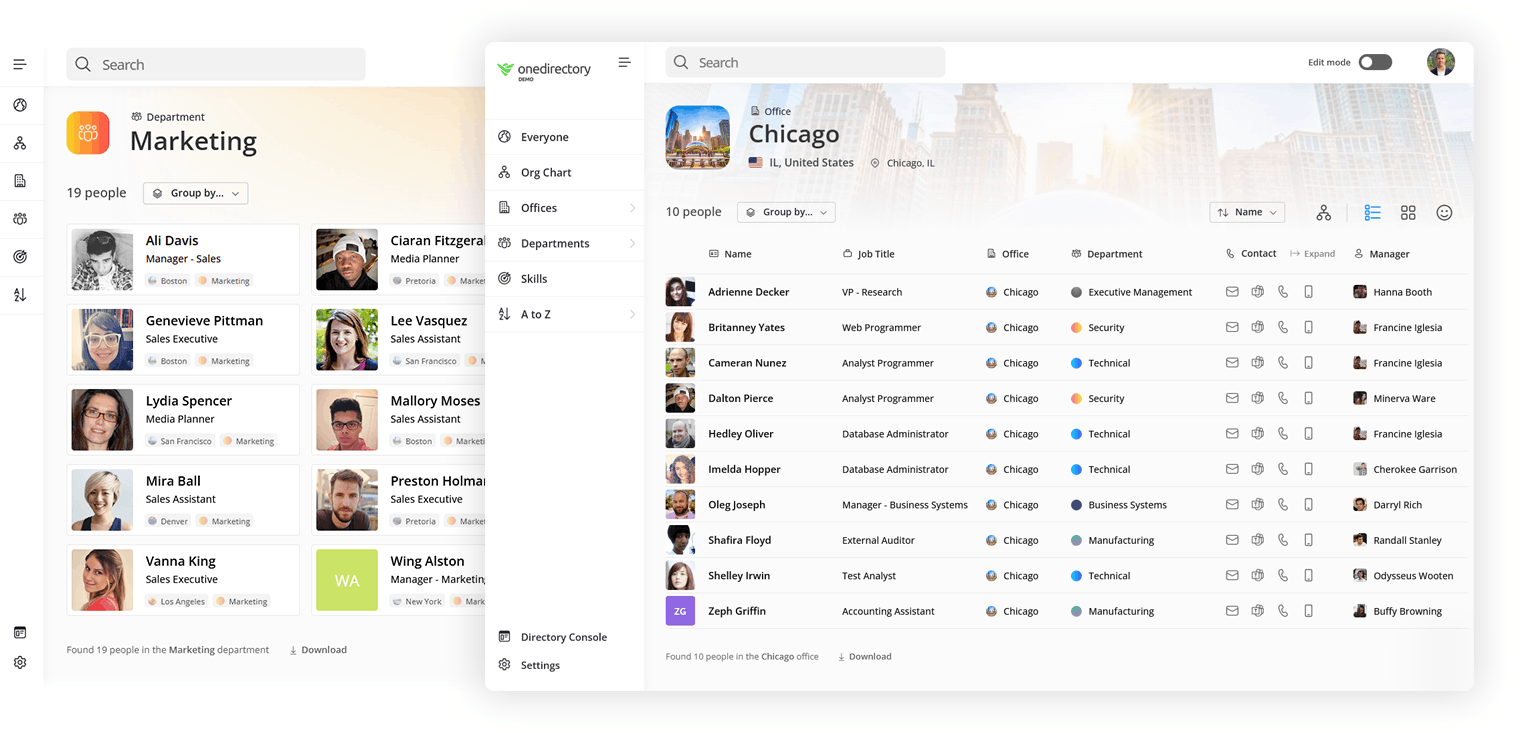
- Find team members within a specific office, department, or service area
- Identify employees with specific skills, specialties, or areas of expertise
- Pull targeted employee lists based on location, role, department, or practice group
- Quickly access contact information
- Connect with colleagues through Teams or Outlook
- Help new employees understand the firm’s structure and navigate the organization more easily
This is especially valuable in an accounting firm environment, where employees often need to locate the right partner, manager, reviewer, specialist, support contact, or internal expert across service lines and offices.
OneDirectory gives BPM a central place to find those people without relying on personal networks, outdated lists, or asking around.
The Benefits
Since implementing OneDirectory, BPM has seen clear improvements in how employees find, understand, and connect with people across the firm.
1. A more useful day-to-day employee directory
OneDirectory has become a practical tool employees can use as part of their normal workflow.
Rather than being just another system to maintain, it helps employees quickly answer common questions:
Who works in this office?
Who is part of this practice group?
Who has expertise in this area?
Who does this person report to?
How do I contact them?
“I would describe OneDirectory as a very practical, day to day employee directory that employees actually use.” - Moe Asgharnia, Chief Information Officer at BPM
2. Better visibility across offices, teams, and practice areas
BPM employees can now filter and locate people by office, team, niche, practice area, and other organizational attributes.
That visibility helps employees collaborate across locations and better understand the broader firm.
For accounting firms, this matters. Client work often crosses offices, service lines, and specialties. Being able to quickly find the right internal contact can reduce friction and help work move faster.
3. A heavily used org chart
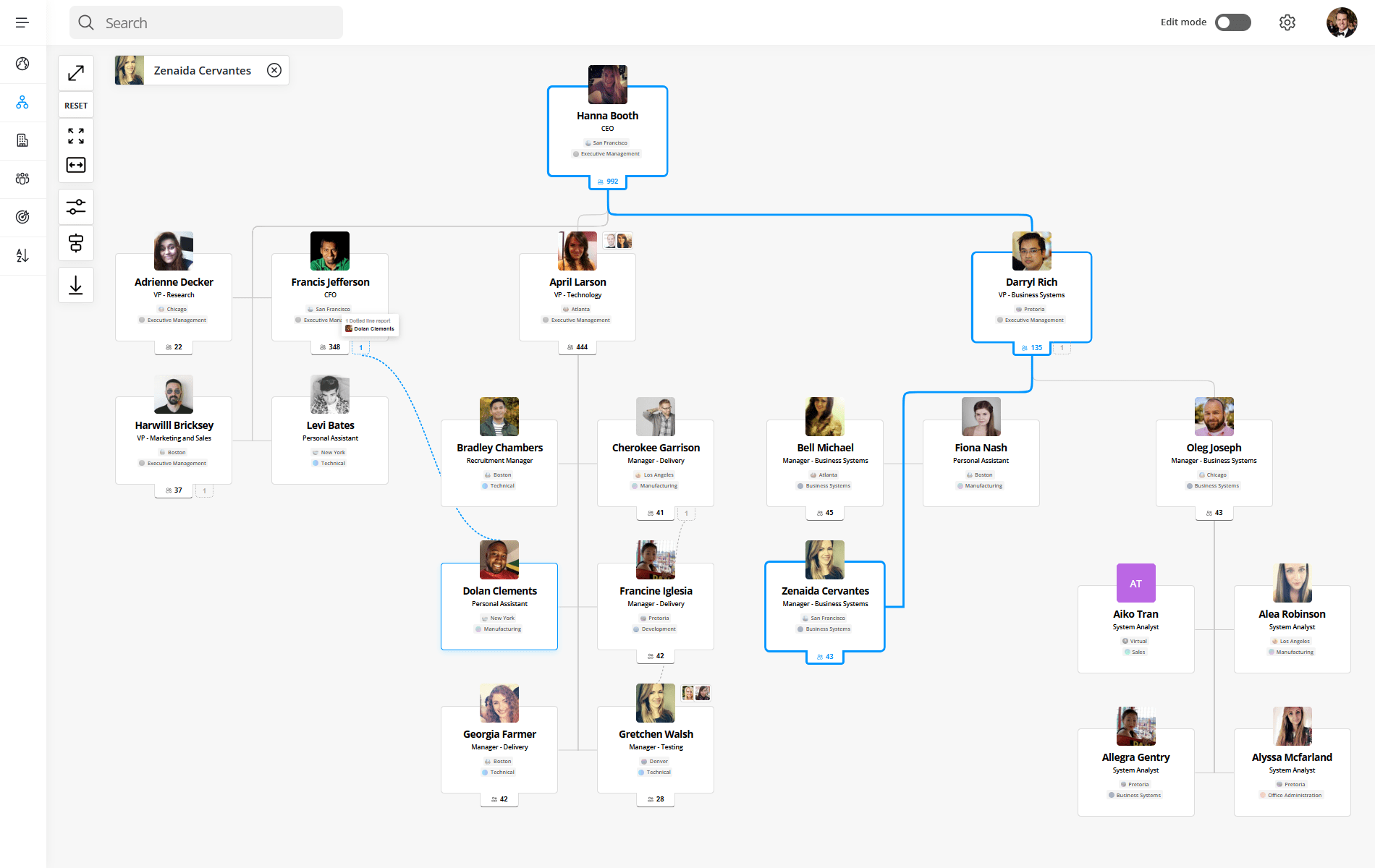
The interactive org chart is the feature BPM employees use most to navigate the firm's reporting structure.
It gives employees a simple, visual way to understand reporting structures, team relationships, and how different groups connect across the firm.
"The org chart functionality has made one of the biggest practical differences..." — Moe Asgharnia, Chief Information Officer at BPM
4. Easier onboarding for new employees
New employees can use OneDirectory to understand the organization faster.
They can explore teams, reporting lines, departments, service areas, and office structures without needing to ask around or rely on outdated information.
This helps new hires build context more quickly and feel more connected to the firm.
5. Reduced administrative overhead
OneDirectory helps reduce the effort required to maintain accurate employee and organizational information.
For IT and operations teams, this means less time spent managing fragmented systems or manually updating directory information, and more confidence that employees have access to reliable data.
The Bottom Line
For BPM, OneDirectory has become more than a replacement for a basic employee directory.
It has become a practical, everyday tool that helps employees find people, understand the organization, identify expertise, and connect across offices, teams, and service lines.
By combining a modern employee directory, powerful search, employee profiles, Microsoft 365 integration, and a visual org chart, OneDirectory has helped BPM improve firmwide visibility and make people information easier to access.
“A lot of directory solutions check the technical boxes but never become part of the normal employee workflow. OneDirectory stood out because it feels intuitive, easy to navigate, and genuinely useful across the organization.” - Moe Asgharnia, Chief Information Officer at BPM
BPM’s experience shows how the right employee directory can help accounting firms move beyond static lists and fragmented systems toward a more connected, searchable, and useful source of truth for their people.
Success Highlights
- BPM, a 1,200+ employee accounting and advisory firm, replaced SharePoint's built-in people search with OneDirectory as its firmwide employee directory
- OneDirectory gave BPM firmwide visibility across offices, departments, service areas, practice groups, and areas of expertise
- BPM employees use OneDirectory to find colleagues, skills, contact details, and reporting lines faster
- OneDirectory's interactive org chart became a heavily used tool across BPM for navigating reporting structures
- OneDirectory integrates with BPM's Microsoft 365 environment, improving data consistency across systems
- New BPM hires use OneDirectory to understand the firm's structure without relying on outdated lists
- OneDirectory reduced administrative effort for maintaining accurate people information across the firm
Frequently Asked Questions
What employee directory does BPM use?
BPM, one of the largest US accounting and advisory firms with over 1,200 employees, uses OneDirectory as its firmwide employee directory and org chart. The firm adopted OneDirectory to replace SharePoint's built-in people search, giving staff a faster way to find colleagues, teams, expertise, and reporting lines across offices.
What is the best employee directory for accounting firms?
A strong employee directory for accounting firms combines firmwide search, employee profiles, an interactive org chart, and Microsoft 365 integration. BPM chose OneDirectory for this mix, citing its intuitive experience and high adoption. The right tool helps staff find the correct partner, manager, or specialist across service lines and offices quickly.
Can OneDirectory replace SharePoint's built-in people directory?
Yes. BPM replaced SharePoint Online's built-in people directory with OneDirectory to solve fragmented, outdated employee data. While SharePoint addressed part of the need, OneDirectory provided firmwide search, an interactive org chart, easier administration, and cleaner Microsoft 365 integration, making people information more accurate and easier for employees to use.
Does OneDirectory include an org chart for accounting firms?
Yes. OneDirectory includes an interactive org chart that BPM employees use to navigate the firm's reporting structure. According to BPM's CIO, the org chart is heavily used across the organization because it gives employees a simple, visual way to understand reporting lines, team relationships, and how groups connect across offices.