OneDirectory September Updates
This Month at OneDirectory: Multiple Org Charts, Per-Profile Visibility Controls & Automatic Guest Detection 👀
Multiple Org Charts 🧩
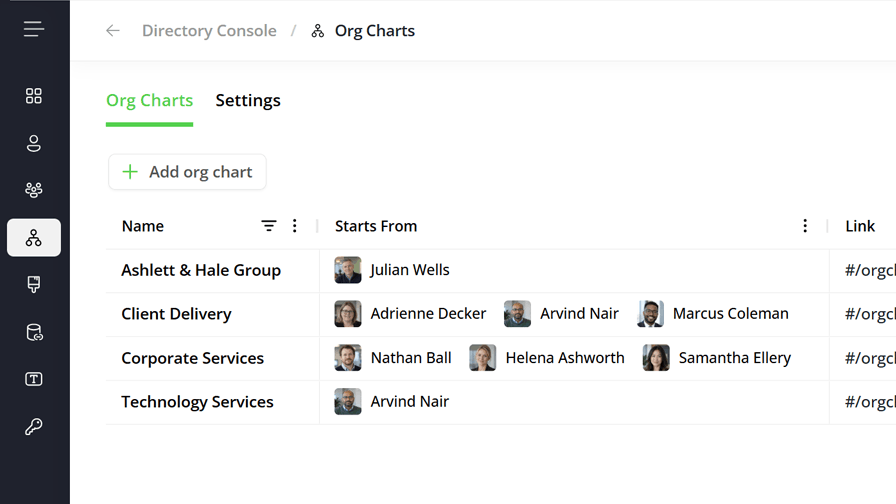
Until now, your OneDirectory had one org chart, built from a single starting point.
You can now create as many as you need: one per division, region, or subsidiary, each with its own name and its own link.
What's new:
- 🧭 Create charts in the Console under Org Charts, then choose who each one starts from
- 👥 Start a chart from up to three people, for a leadership team or a division with co-leads
- 🔗 Every chart gets its own permanent link, and Show in Directory controls whether everyone can see it
- 🔍 A new find button in the org chart toolbar narrows the chart to matching names or job titles, plus the reporting lines down to them
With a single chart, Org Chart opens it directly. With several, it opens a page listing them all. The main search box now always searches the directory, so there's no more switching between Directory and Org Chart.
Creating and editing org charts is limited to admins.
Per-Profile Visibility Controls 👁️
You can now control directory visibility one profile at a time, and see exactly why someone is hidden.
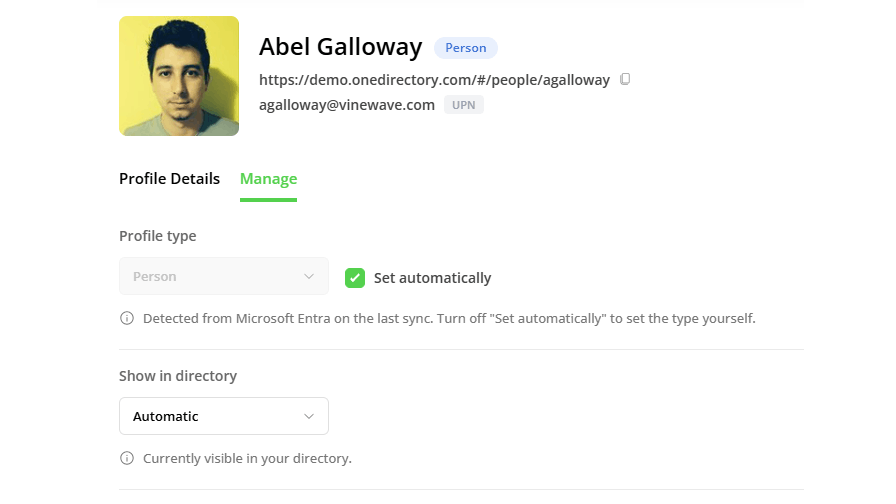
Each profile has a Show in directory setting with three options:
- Automatic: follows your display rules (the default)
- Yes: always shows the profile, regardless of the rules
- No: always hides the profile, regardless of the rules
Yes and No act as an override for that one account, so you no longer have to bend your rules to fit a single exception.
The profile list also has a sortable Visible column, so you can see every hidden profile in one list. And on any hidden profile, the Manage tab shows exactly which rules caused it to be hidden.
Automatic Guest and Service Account Detection 🤖
Every Microsoft 365 tenant is full of accounts that aren't people: room mailboxes, shared inboxes, scanner accounts, service principals, and the odd account called "svc-backup-001" or "gregtest." They sync into your directory, and hiding them by hand takes time.
OneDirectory now classifies every profile as a person, a guest, or a service account, using a weighted set of signals. Guests are read from Entra's actual userType, so guest and external are finally separate things.
- 🗂️ People, Guests, and Service Accounts tabs in the Console people list, each with a live count
- 🏷️ Profile type shown next to the name when you open a profile
- ⚙️ Untick Set automatically on the Manage tab to override the classification
The bigger change: classification and visibility are now separate. What an account is and whether it shows in the directory are two different questions, and you control both from the Manage tab of any profile.

Employee Database vs Employee Directory: What's the Difference? 📚
An employee database stores records. An employee directory makes people findable. The two share four or five fields and get bought for different reasons, and buying one does not give you the other.
Across 65 Microsoft 365 tenants, the manager field was populated for just 42% of profiles at first sync. Not one of those organizations had lost track of who reported to whom. The reporting line existed in their HR systems. It just wasn't anywhere an employee could look.
The article covers:
- 📋 What belongs in each system, and why the sensitive fields never travel outward
- 🔄 Why the directory almost always sits downstream of the HRIS and Entra ID
- 🧹 What employee database management means in practice
- ✅ How to tell which one you need, with a three-field check you can run in an afternoon
👉 Read the full article: https://www.onedirectory.com/blog/employee-database-vs-employee-directory/
Have feedback or a feature idea? Just reply to this email, we read every one.