Employee Database vs Employee Directory: What Is the Difference?
An employee database stores records. An employee directory makes people findable. Across 65 Microsoft 365 tenants the manager field was populated for 42% of profiles, and not one of those organizations had lost track of who reported to whom.

An employee database stores records. An employee directory makes people findable.
An employee database is the system of record that holds employee information: personal details, job history, compensation, benefits, tax documents and performance records. An employee directory is the employee-facing layer people use to find each other: name, photo, job title, department, location, contact details and reporting line. The database is built for HR, payroll and compliance. The directory is built for everybody else.
They share four or five fields and get bought for different reasons. Buying one does not give you the other.
The 42% that explains the difference
At first Microsoft 365 sync across 65 tenants covering more than 30,000 employee profiles, the manager field was populated for 42% of profiles. Average profile completeness was 30.8%. Only 33% of those organizations met our directory-ready bar, meaning name, email, job title and photo each populated at 60% or above.
Read that the wrong way and it says 58% of these organizations had lost track of who reports to whom.
None of them had. Every one ran payroll. Every one routed time off requests and expense approvals up a reporting line. The manager relationship existed, was correct, and was doing useful work inside an HR system every single day.
It was not anywhere an employee could look.
Cohort caveat, and it matters: this is a self-selected group. Every organization in it had already decided its directory needed work before we ever measured it. Organizations that never thought about the problem are not in the sample. Full method and figures are in the 2026 statistics benchmark.
What is an employee database?
An employee database is a structured store of employee records, owned by HR, used to run the employment relationship end to end: hiring, payroll, benefits, compliance, performance and offboarding.
What sits in it:
- Legal name, date of birth, home address, personal contact details
- Tax and work eligibility documents
- Salary, pay history, bank details
- Benefits elections and dependents
- Start date, contract type, employment history
- Performance reviews and disciplinary records
- Training records and certifications
Most of that list is confidential. Access is role-restricted, logged, and governed by retention rules. In a mid-size company the database is an HRIS: BambooHR, Sage, ADP, Paylocity, or Workday at the top end. In a smaller company it is a spreadsheet on a shared drive, with one person who knows which tab is current.
What is an employee directory?
An employee directory is the searchable view of who works here. It answers four questions: who is this person, what do they do, who do they report to, and how do I reach them.
The fields employees see:
- Name, preferred name, and often how to pronounce it
- Photo
- Job title and department
- Office, location, time zone
- Work email, work phone, chat presence
- Manager and direct reports
- Skills, projects, languages, a short bio
Almost none of that is confidential, and that is the design intent. Gartner found 47% of digital workers struggle to find the information they need to do their job (n=4,861, 2023). A directory exists to take a bite out of that number for one specific category of information: people.
The engineering problem is inverted too. A database is optimized for writing correct records under access control. A directory is optimized for reading: search, filter, browse, and an org chart anyone can open. If you want the longer definitional treatment, we have one on what a company directory is.
Employee database vs employee directory, side by side
| Employee database | Employee directory | |
|---|---|---|
| Primary user | HR, payroll, compliance | Every employee |
| Purpose | Record keeping and administration | Finding and reaching people |
| Typical data | Salary, tax forms, benefits, reviews | Name, photo, title, contacts, manager |
| Sensitivity | Confidential, role-restricted | Open across the organization |
| Access pattern | Write-heavy, a handful of users | Read-heavy, everyone |
| Product category | HRIS or HRMS | Employee directory software |
| Source of truth for | Employment facts | Usually nothing, it reads from elsewhere |
| Failure mode | An audit finding | People giving up and asking in a Teams chat |
Where the two overlap, and why the confusion is fair
Both hold a name, a job title, a department and a manager. Four fields in common is enough for the two phrases to get used interchangeably, including by vendors who know better.
Two things keep them apart.
The sensitive fields do not travel outward. Salary stays in the database.
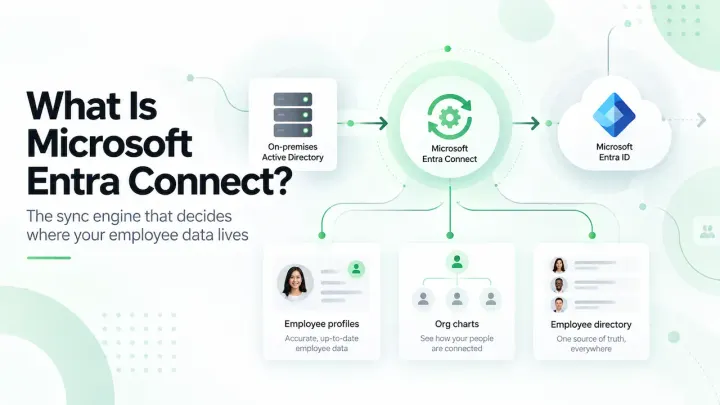
And the directory is almost always downstream. In a Microsoft 365 organization the directory reads from Entra ID, and Entra ID is often fed from the HRIS by a provisioning connector. HRIS to Entra ID to directory. Each hop carries fewer fields than the one before it, which is why a company can have immaculate HR records and a directory full of blanks.
The bank that had to ask us for its own data
September 2025. A system administrator at a community bank emailed support with one line: "I am requesting a full profile export (including custom/unsynced fields like About Me, Skills, etc.)."
Lawrence, who runs our support, asked the obvious thing back. Were they pushing this into an external HR system, or into Entra ID?
Neither. Their COO wanted the list. Name, office, department, title and About Me, for every active employee. Their people had written those About Me entries themselves, inside the directory. The HR system had never held that field. Entra ID had never held it. The only copy in the company was in the directory.
It took four days and three emails to pin down which fields and whose, because at the time we had no self-serve export. Lawrence assembled the spreadsheet by hand and sent it on 24 September. That was our gap, not theirs.
A directory that has been running for a while accumulates fields no other system was ever going to store.
What employee database management means
Employee database management is the practice of keeping employee records accurate, secure, current and compliant across the full employment lifecycle: collection, storage, access control, correction, retention and deletion.
In practice it comes down to five things:
- One system of record per fact, so a job title has exactly one home and everything else reads from it
- Role-based access, so payroll data is readable by payroll and not by the intern
- An audit trail of who changed what and when
- Retention and deletion schedules that satisfy GDPR, HIPAA or state privacy law
- A correction route an employee can use, which under GDPR is not optional
Directory quality is downstream of all five. If nobody owns the manager field in the source system, no directory product will produce a correct org chart. A vendor that tells you otherwise is selling you a manual override layer, which is a second source of truth with fewer rules than the first.
Which one do you need?
If you came to this page from a search for employee database software because you need to store I-9s, run payroll, track leave and survive an audit, buy an HRIS. BambooHR, Sage, ADP and Paylocity rank for that query because they answer it. OneDirectory does none of those things and is not going to.
You need a directory when the complaint is about finding people rather than storing them. New hires asking in chat who owns something, a receptionist acting as a lookup service, three people with the same first name and no way to tell them apart, an org chart that lives in a slide deck someone updates twice a year. We looked at how employees actually find colleagues when the directory is not doing the job.
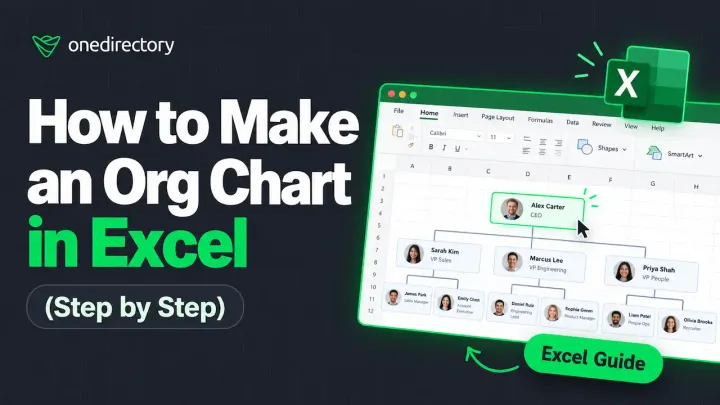
Most organizations above about 200 employees need both, and need them wired together, with the HRIS as the source of employment facts and the directory as the read layer everybody touches. Below that headcount a well-kept spreadsheet does hold up, and we have written the Excel version for exactly that case.
Where OneDirectory fits, and where it does not
OneDirectory is employee directory software, not a database. It reads from Entra ID, adds the fields Entra does not carry, such as skills, projects and bios, and gives employees search, profiles and a live org chart. It stores no salary, no tax documents, no benefits elections and no performance data.
On the 65 tenants we measured, average profile completeness moved from 30.8% at first sync to 44.1% by August 2026, and manager coverage from 42% to 79%. What we cannot do is separate what the software contributed from what the administrators did. Every organization in that cohort deployed a directory and ran its own data cleanup over the same window, and the two are tangled together. We are not going to pretend otherwise.
If you are comparing options in this category, the buyer's guide covers twelve of them, including the ones we lose to.
Frequently asked questions
Is an employee directory the same as an employee database?
No. An employee database is the HR system of record holding confidential employment data such as salary, tax forms and performance reviews. An employee directory is the open, employee-facing layer holding name, photo, job title, department, contact details and reporting line. The directory usually reads from the database rather than replacing it.
What is an employee database?
An employee database is a structured store of employee records used by HR to run hiring, payroll, benefits, compliance and performance. It typically holds legal name, address, tax documents, compensation, benefits elections, employment history and reviews, under role-restricted access.
What is employee database management?
Employee database management is the practice of keeping employee records accurate, secure, current and compliant across their lifecycle, covering collection, storage, role-based access, correction, retention and deletion.
What information should be stored in an employee database?
Personal and contact details, tax and work eligibility documents, compensation and pay history, benefits elections, start date and contract type, employment history, performance records, and training or certification records. Anything an employee needs to look up about a colleague, such as job title, department and work phone, belongs in the directory instead.
Can you use Excel as an employee database?
Yes, up to a point. Excel has no role-based access control, no audit trail and no retention policy, so it is a poor fit for confidential HR records at any size. As a small-company employee directory it works well, and there is a step-by-step build with a free template.
Who manages the employee database?
HR owns record accuracy and the retention policy. IT owns access control, security and integrations. In practice the manager field is the one that falls between them, which is why it is so often empty.
Do I still need an HRIS if I have an employee directory?
Yes. A directory holds none of the data that payroll, tax filing, benefits administration or an employment audit require.
What is the best employee directory software?
It depends on your stack. Microsoft 365 organizations should shortlist products that read Entra ID natively, including OneDirectory, Employee Directory 365 and Beyond Intranet. Google Workspace organizations should look at Happeo. Small single-office teams will get more from a simple shared directory than from structure they do not have yet.
The one query worth running before you buy anything
Count three fields in your source system for every active employee: job title, manager, and photo. Then open whatever your employees currently use to look each other up and count the same three there.
If the source system is full and the lookup tool is empty, you have a directory problem. If the source system is empty too, no directory product will save you, and the fix starts with whoever owns that field. The two gaps need different purchases, and the count takes an afternoon.