Org Charts vs. Employee Directories
An org chart shows who reports to whom. An employee directory shows who people are and how to reach them. Here's what each does, and how to choose.

An org chart shows who reports to whom; an employee directory shows who people are and how to reach them. They answer different questions, they're built from different fields in your people data, and they fail in different ways. Below is what each one does, where they overlap, and a straightforward rule for choosing between org chart software and employee directory software — or running both.
Org Chart vs. Employee Directory: The Core Difference
| Org chart | Employee directory | |
|---|---|---|
| Primary question | Who reports to whom? | Who is this person, and how do I reach them? |
| Shape | A hierarchy — boxes and reporting lines | A searchable list of profiles |
| Built from | The Manager field and job titles | Profile fields: name, title, contact details, department, location, skills, photo |
| Typical users | HR, leadership, org planners | Everyone, every day |
| Breaks when | Manager fields are missing or stale | Profile fields are incomplete |
| Best at | Structure, spans, layers, planning | Search, contact, expertise finding |
The two tools are often confused because they draw on the same people data and frequently ship in the same product. But the jobs are distinct, and knowing which job you're hiring for is most of the decision.
What an Org Chart Does That a Directory Doesn't
An organizational chart is a visual map of your company's reporting structure, usually rendered as an organogram:
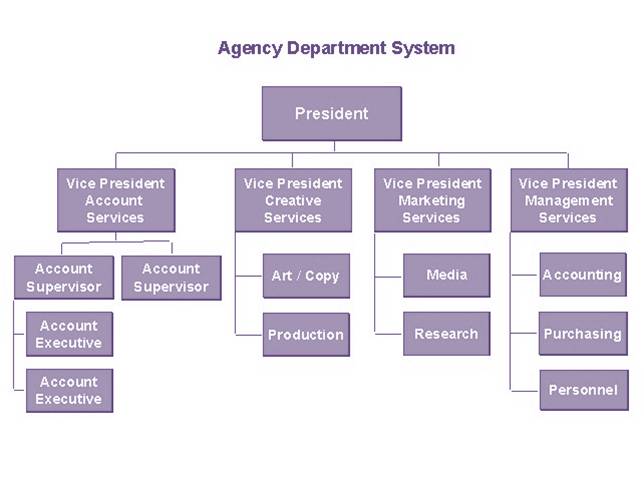
The org chart's job is structural. It shows:
- Reporting lines — who manages whom, from the C-suite down to individual contributors
- Spans and layers — how many direct reports each manager carries, and how many levels sit between the CEO and the front line
- Team boundaries — where one department ends and another begins
- Structural change — what the organization looks like before and after a reorg
None of that requires knowing anyone's phone number. An org chart can do its job with just three fields per person: name, title, and manager. That's also its limitation — it tells you where a person sits, not what they know, what they're working on, or how to contact them.
What an Employee Directory Does That an Org Chart Doesn't
An employee directory is built for finding and reaching people. Its job is answered one profile at a time: who is this person, what do they do, what are they good at, and how do I get hold of them.
That takes a much wider set of profile fields — contact details, department, location, role, skills, photo — and it makes the directory the tool people actually open daily. Nobody checks the org chart to find the one person who understands the billing integration. They search the directory.
The directory's limitation runs the other way: a flat list of profiles tells you who someone is, but not where they sit. When a new hire wants to understand how the company fits together, or an escalation needs to go one level up, the answer is structural — and that's the org chart's job.
Both Tools Read the Same Data — and Break the Same Way
Here's the part most comparisons skip: in a Microsoft 365 environment, the org chart and the employee directory aren't two databases. They're two views of the same Entra ID records.
The org chart is generated from one attribute: the Manager field. Every reporting line in the chart is a manager relationship in Entra ID. The directory reads the rest of the profile — title, department, contact details, photo.
Which means both tools inherit the same data problem. In OneDirectory's analysis of 65 Microsoft 365 and Entra ID tenants, covering more than 30,000 employee profiles, the Manager field is completed for only 42% of employees. More than half of employees are missing a reporting line. Microsoft Org Explorer — the org chart built into Microsoft 365 — simply won't render a chart for users without manager relationship data, per Microsoft's own documentation. And average profile completeness across all fields sits at just 30.8%, which is what an empty-feeling directory looks like at the data layer.
So before "org chart vs. employee directory," there's a prior question: is the data underneath either one complete enough to trust? A chart with half its reporting lines missing and a directory full of blank avatars fail for the same reason.
How to Choose Between Org Chart Software and Employee Directory Software
Three rules cover most cases:
Choose org chart software when the question is structural. If the need comes from HR or leadership — visualizing reporting lines, planning a reorg, checking spans and layers, onboarding people into how the company fits together — the hierarchy is the product. This is also the right frame if you're doing org planning work, where the chart is the baseline every scenario builds on.
Choose employee directory software when the question is findability. If the need comes from everywhere — people can't find contact details, can't identify who owns what, can't locate expertise — you need searchable profiles, not boxes and lines. This is the daily-use tool, so adoption depends on profile completeness more than features.
Choose a combined tool when you need both, which most companies over ~100 people do. The two views are more useful together than apart: browse the structure, click into a profile; view a profile, jump to where that person sits in the hierarchy. In OneDirectory, that's one motion — the org chart view and the employee directory are the same product reading the same live Entra ID data:
Usage data backs the combined case: in our study of 16,267 employees across 65 organizations, roughly one in three employees opened the org chart over 90 days, on top of the directory search they use daily.
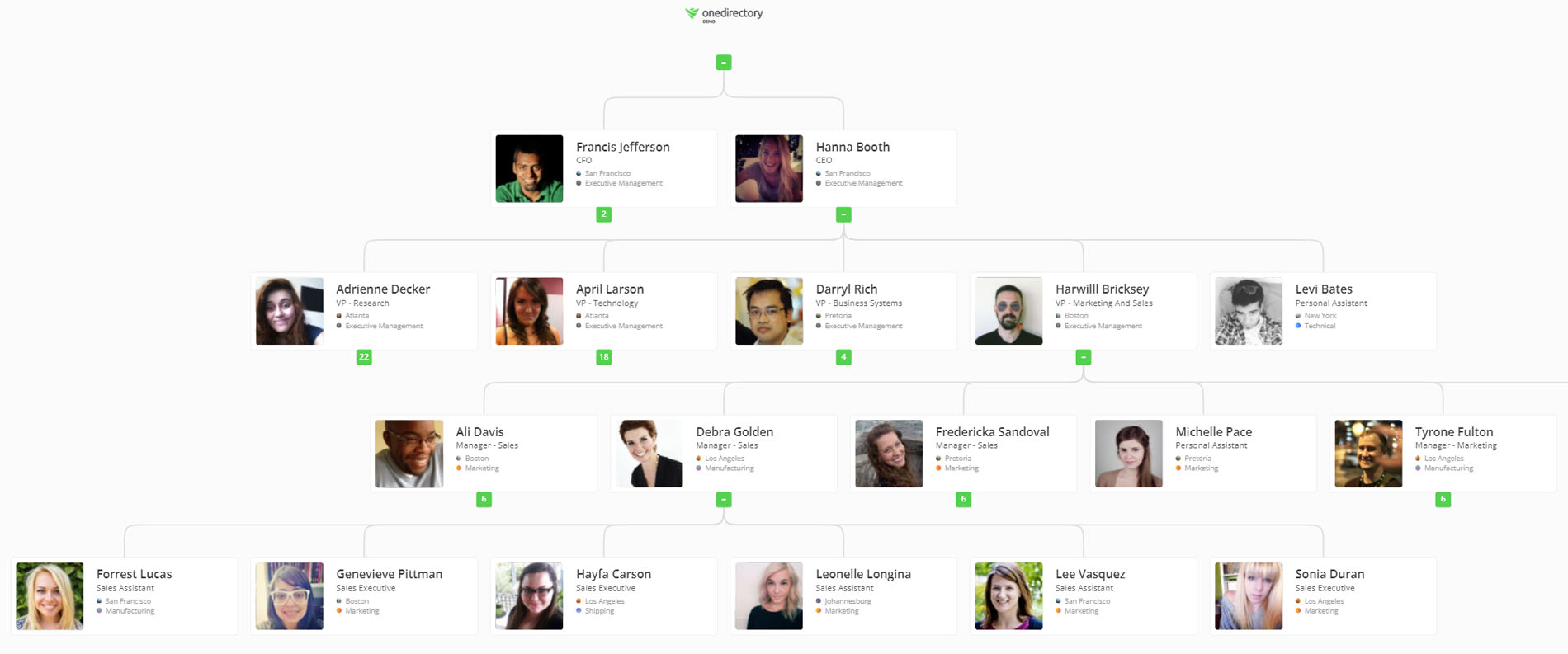
A combined tool also solves the maintenance problem once instead of twice. Because both views read from the same source, fixing the Manager field or completing a profile improves the chart and the directory in the same action — there's no second system to keep in sync.
The Decision Rule
Don't start with the tool. Start with your Manager field.
If your reporting-line data is complete, either tool will work on day one, and the choice reduces to the question you're answering most often — structure (org chart) or findability (directory). If it isn't complete — and in the 65-tenant analysis, it's completed for only 42% of employees — then the first project is the data, because every org chart and every employee directory you deploy will inherit that gap on day one.