What Is an Employee Directory? The Complete Guide
An employee directory is a searchable, always-updated map of the people in your company. This guide covers what to include, the core features, the four types, real usage data and what a directory costs.

An employee directory is a searchable, always-updated map of the people in your company. Anyone can find the right person, see teams and reporting lines, and reach colleagues in other locations.
This guide covers what a directory is, what to put in it, what it costs, and how to choose between a spreadsheet and employee directory software.
A modern employee directory helps you:
- Find people fast (name, role, team, location, contact method)
- Understand structure (teams, managers, reporting lines)
- Discover expertise (skills, certifications, projects)
- Build connection (faces, bios, interests, especially hybrid/remote)
This guide covers:
Definition: What is an Employee Directory?
An employee directory is a software application that helps you find contact details and other important information about your coworkers.
Think of a digital phone book for your company: a searchable database of names, job titles, phone numbers and other details about the people you work with.
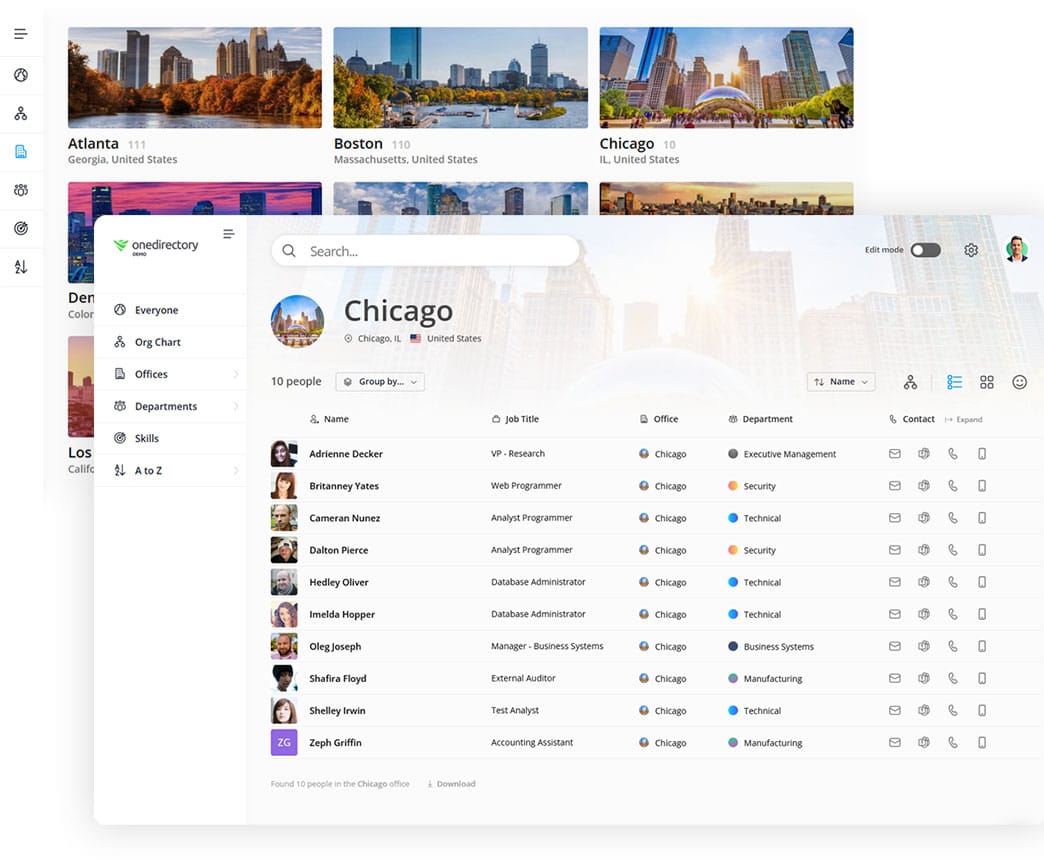
Employee directories can be as simple as a basic list of contact information. Or they can be more advanced, including personal information like nicknames and pronouns, photos, skills, biographies, birthdays, locations, projects, and work experience.
Directories started as printed booklets, then moved to spreadsheets sent round by email. Both went out of date as soon as someone joined, left or moved. Most now run as cloud software that employees open on any device.
What Are Other Names for Employee Directories?
Employee directories go by many names:
- Staff Directory
- People Directory
- Organizational Directory
- Corporate Directory
- Company Address Book
- Internal Company Directory
- Employee List
- Employee Photo Directory
Why Employee Directories Matter (Top Benefits)
A directory earns its place when employees use it. Ours do: across 65 customer organizations, 16,267 employees ran 514,602 directory searches in the 90 days to August 14, 2026.
Every organization in that sample chose to buy a directory, so read the figures as usage among adopters. They come from our product usage study.
1. An Employee Directory Improves Workplace Communication and Collaboration
Much of your work depends on other people, and in a growing company you stop knowing who they are. A directory lets you search for anyone, see what they do, and contact them from wherever you are.
2. An Employee Directory Helps Build Better Work Relationships
Profiles usually carry a bio, interests, skills, location and a photo. Some add pronouns, nicknames, languages, education and projects.
That gives a new colleague something to start a conversation with, and it puts a face to a name you have only seen in email.
3. An Employee Directory Helps People Find Expertise
Some directories include a skills directory, so employees can search for a coworker with a specific skill or area of knowledge.

A project lead uses it to find an expert. A manager uses it to review the skills in a team.
4. An Employee Directory Helps Your Remote Teams Feel More Connected
Remote and hybrid staff miss the office cues that tell you who sits where and who works with whom. A directory gives each person a profile where colleagues can find them, call or chat with them, and see where they fit, whatever their location.
5. An Employee Directory Assists Your HR Team
HR and office managers answer people questions all day, and a directory puts the profile information they need in one searchable place.
HR systems hold much of the same data, but access usually stops at the HR team. A directory also shows where everyone sits in the organizational structure.
6. An Employee Directory Improves Onboarding
New hires spend their first weeks working out who is who, who does what and who reports to whom. A directory lets them look up the names and faces on their team, find the management team, and see how offices and departments are organized.
Primary Functions of an Employee Directory
A directory does four jobs:
| Function | Why It Matters |
|---|---|
| Contact & Profile Lookup | Find a colleague's name, role, location and preferred contact method. |
| Org & Reporting Clarity | Shows who reports to whom and how departments fit together. |
| Skill & Expertise Discovery | Surfaces skills, certifications and project experience so teams can find in-house experts. |
| Workplace Connection & Culture | Puts faces to names across teams, which matters most in hybrid settings. |
Core Features of a Modern Employee Directory
Whether you are building your own employee directory or buying one, check for five features.
1. People Search
People search is the core of any directory. Look for:
- A search box
- An alphabetical A-Z index
- A list of your offices and departments
- An area where your people search results are displayed
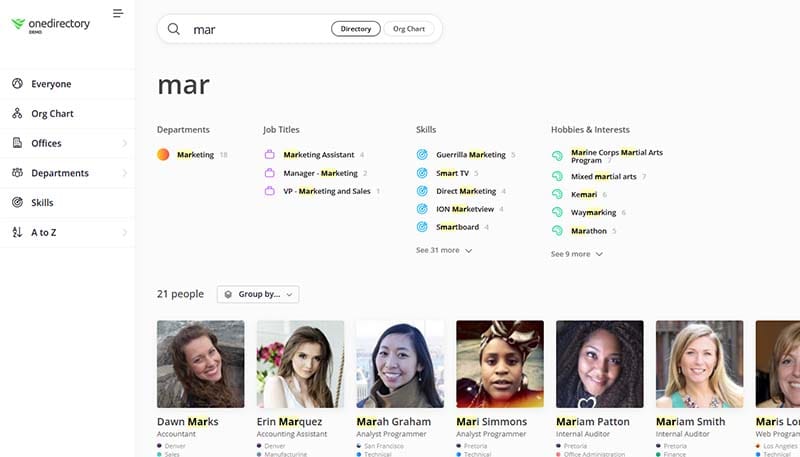
Most directory software adds filters and several ways to view results. Some also search offices, departments, skills and job titles.
2. Employee Profiles
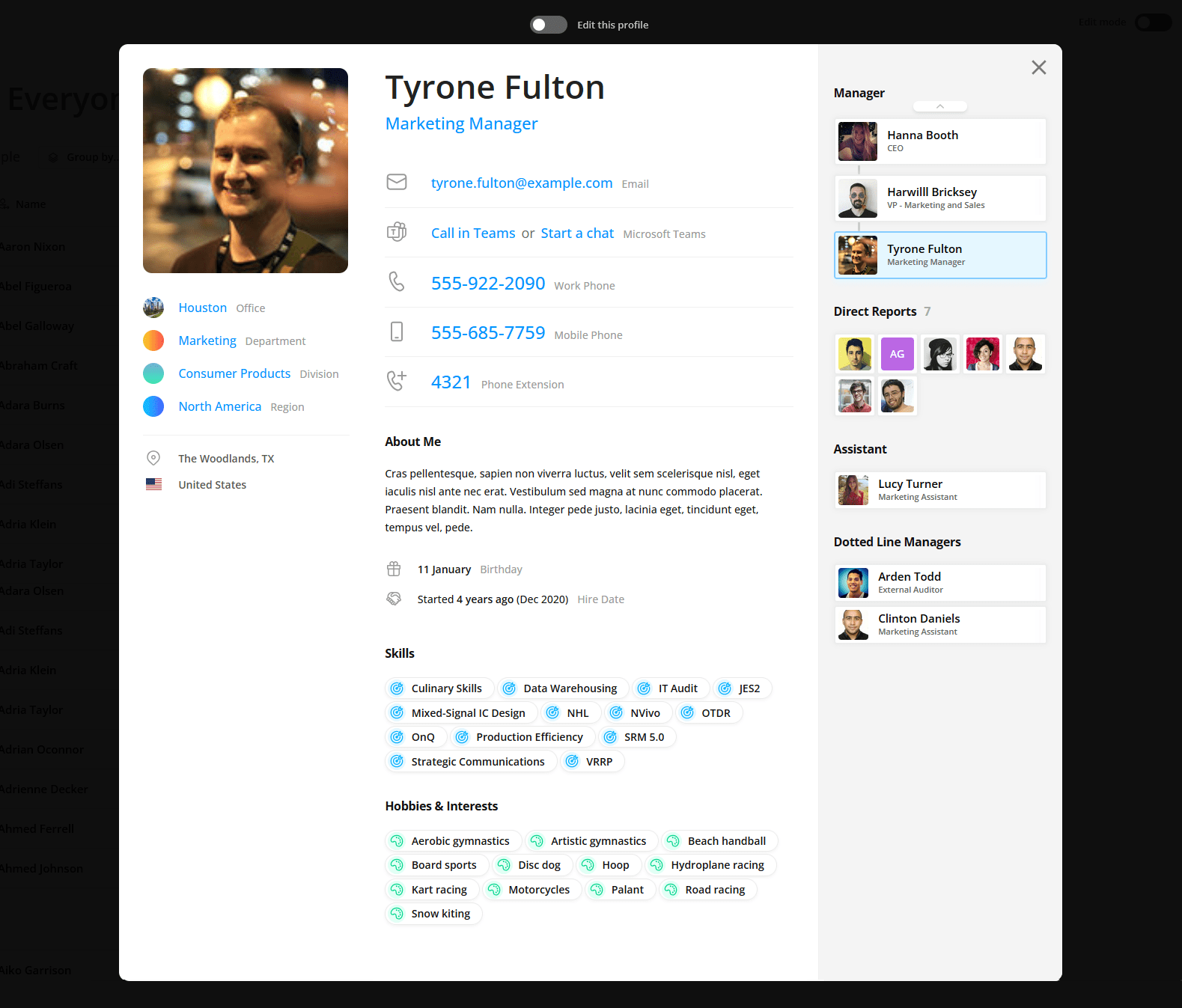
An employee profile is an internal page about one person and their place in the organization.
Employee profiles usually show name, job title, office, department, contact details and a photo. Many add a bio, skills, interests, birthday, work anniversary and manager.
3. Interactive Org Chart
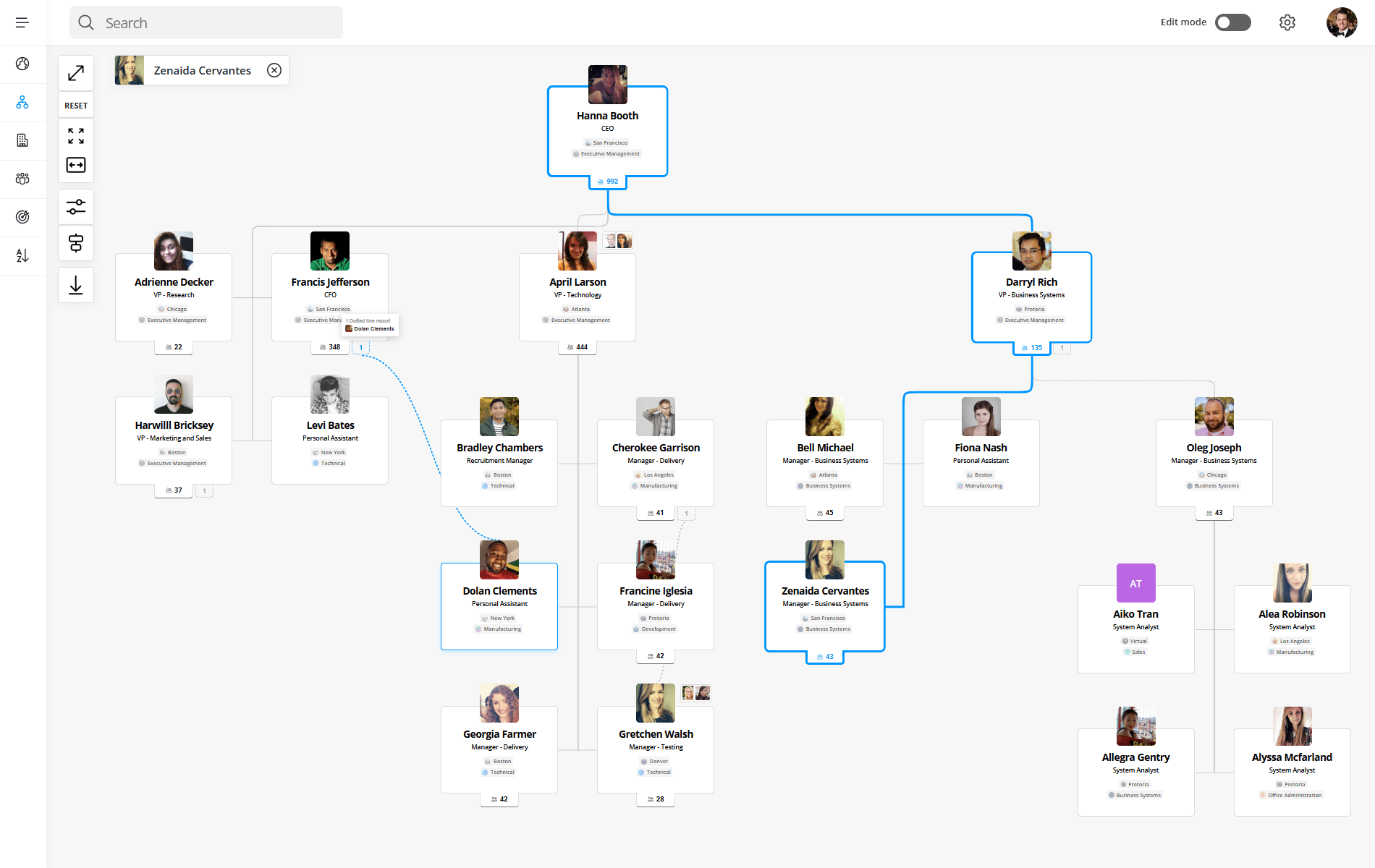
Most modern directories include an org chart view that shows where everyone sits in the reporting structure.
4. Office & Department Directory
An office directory lists each location with its address, front-desk number and the people who work there. Companies with several offices or many remote workers get the most from it.
5. Skills & Interest Directory
Employees add skills to their profiles, and the directory makes those skills searchable. Use it to find an expert for a project or to build a skills inventory.
Common Uses of an Employee Directory
Employees open a directory to answer a quick question about a person, and search is the main way in. In our product analytics, 9,652 of 16,267 employees viewed search results in the 90 days to August 14, 2026. 5,265 opened the org chart.
The questions they bring look like this:
- “Who’s Sarah’s assistant?”
- “Where does Michael work from?”
- “What does our sales team structure look like?”
- “Who’s skilled in data visualization?”
- “Is anyone else into cycling or photography?”
- “Who do I report to, and who do they report to?”
Six uses cover most of them:
- Get to know coworkers. Put faces to names and read bios and interests.
- Find the right contact. Search by name, title, department, location or skill.
- Understand the org structure. See teams, reporting lines and who leads what.
- Discover skills and expertise. Find a subject expert in another department.
- Locate people and offices. See who works in which office, region or department.
- Remember birthdays and work anniversaries. See the dates on each profile.
Types of Employee Directories
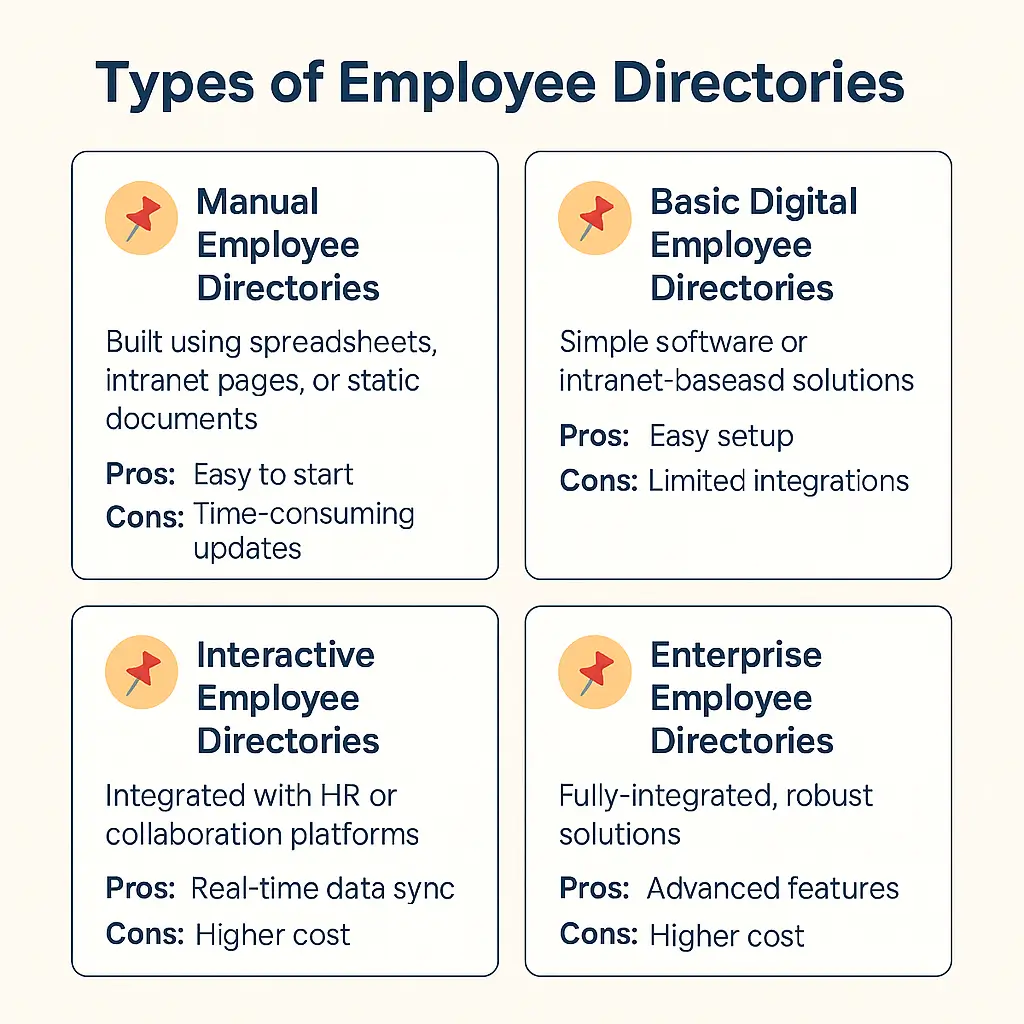
Directories fall into four types. Pick by company size and by how the data stays current.
| Type | Best for | Strength | Limit |
|---|---|---|---|
| Manual An Excel or Google Sheets file kept by HR or an admin | Small companies and startups | Free and quick to start | Updated by hand, so it goes out of date |
| Basic digital An intranet page or simple app with contact details | Small companies that need contact lookup | Cheap and online | Few integrations, weak search, no org chart or skills |
| Interactive Software that syncs from an HR system or identity provider | Mid-sized and large companies, distributed teams | Updates itself; search, profiles and skills | Costs more; needs a data source to sync from |
| Enterprise Interactive, plus security review, data residency and multi-region support | Large or global organizations with governance requirements | Scales and fits complex IT environments | Highest cost; needs an admin owner |
Org Charts vs. Employee Directories
An org chart shows reporting lines. A directory holds the people data behind the chart and lets you search it. Most modern directories include an org chart view. Our post on org charts vs. employee directories covers when you need which, and the org chart guide explains the chart itself.
How Much Does an Employee Directory Tool Cost?
Cost depends on two decisions: build or buy, and if you buy, on-premise or cloud.
1. Building Your Own Directory (Custom Development)
You can build a directory in SharePoint, as a custom web app, or from an employee directory template. Budget for three things:
- Build time: weeks or months before it is usable
- Maintenance: updates, bugs and change requests
- Developers: in-house time, or outside help billed by the hour
2. Buying an Off-the-Shelf Directory Solution
On-premise tools, such as SharePoint web parts, are usually sold as a one-time license with optional yearly maintenance.
Cloud directory software is sold by subscription, monthly or yearly, and priced per user or by plan tier. OneDirectory prices by company size band, and the pricing page shows the current bands.
For worked price comparisons, see how much employee directory software costs.
Frequently Asked Questions: Employee Directories
Do employee directories really get used that much?
In our product analytics, 59% of employees searched the directory at least once in 90 days: 9,652 of 16,267 employees across 65 customer organizations, in the 90 days to August 14, 2026. Those organizations had all chosen to buy a directory, so the figure describes adopters.
Can't I just use a spreadsheet or simple list for my employee directory?
Yes, for a small team. A shared Excel or Google Sheet works as a contact list. Someone has to update it by hand, and it has no profiles, photos or org chart. Past a few dozen people, directory software saves that upkeep.
Should our employee directory be available to people outside our company?
In most cases, no. A directory is an internal tool. Some universities and government agencies publish a public directory. For internal use, keep it secure and reachable from wherever your team works.
Where should we put our employee directory so people can find it?
Put it where employees already work. Common homes are the company intranet, a standalone web app, and Microsoft Teams or Slack. Pick the place employees open every day.