Roles vs. Responsibilities: Stop Mixing Them Up
The difference between roles and responsibilities is more than you think. This article takes a deep dive into the world of roles and responsibilities.

If your task list looks like three jobs taped together, your team hasn’t decided who owns what. That’s the whole problem.
Most teams treat roles and responsibilities as the same thing. They aren’t. When you blur them, work gets duplicated, ignored, or shoved onto the person who can’t stand watching it fail.
A role is the outcome a job exists to own. A responsibility is a deliverable with an owner, a deadline, and a clear definition of done.
Example: “Graphic Designer” is a role. “Approve any layout/typography changes before release” is a responsibility.
If your team keeps asking “Who’s doing this?” mid-project, you don’t have a workload problem. You have an ownership problem.
Roles vs Responsibilities (quick comparison)
| Role | Responsibility | |
|---|---|---|
| What it is | The purpose of a job | A specific deliverable |
| What it answers | “Why does this job exist?” | “What will you deliver, by when, and what is ‘done’?” |
| How often it changes | Rarely | Often (weekly/quarterly) |
| Example | Designer | “Create onboarding flow (10 screens) by Wed 15:00” |
| Example | Developer | “Review PRs within 24 business hours” |
What are Roles?
A role is the job’s purpose. The kind of outcomes the position exists to produce.
- Designer: owns UI/UX quality across the product
- Developer: owns the codebase, performance, and production stability
- Account Manager: owns the client relationship and renewals
Role answers: Why does this job exist?
Roles describe the lane. They don’t describe every step you take in it.
What are Responsibilities?
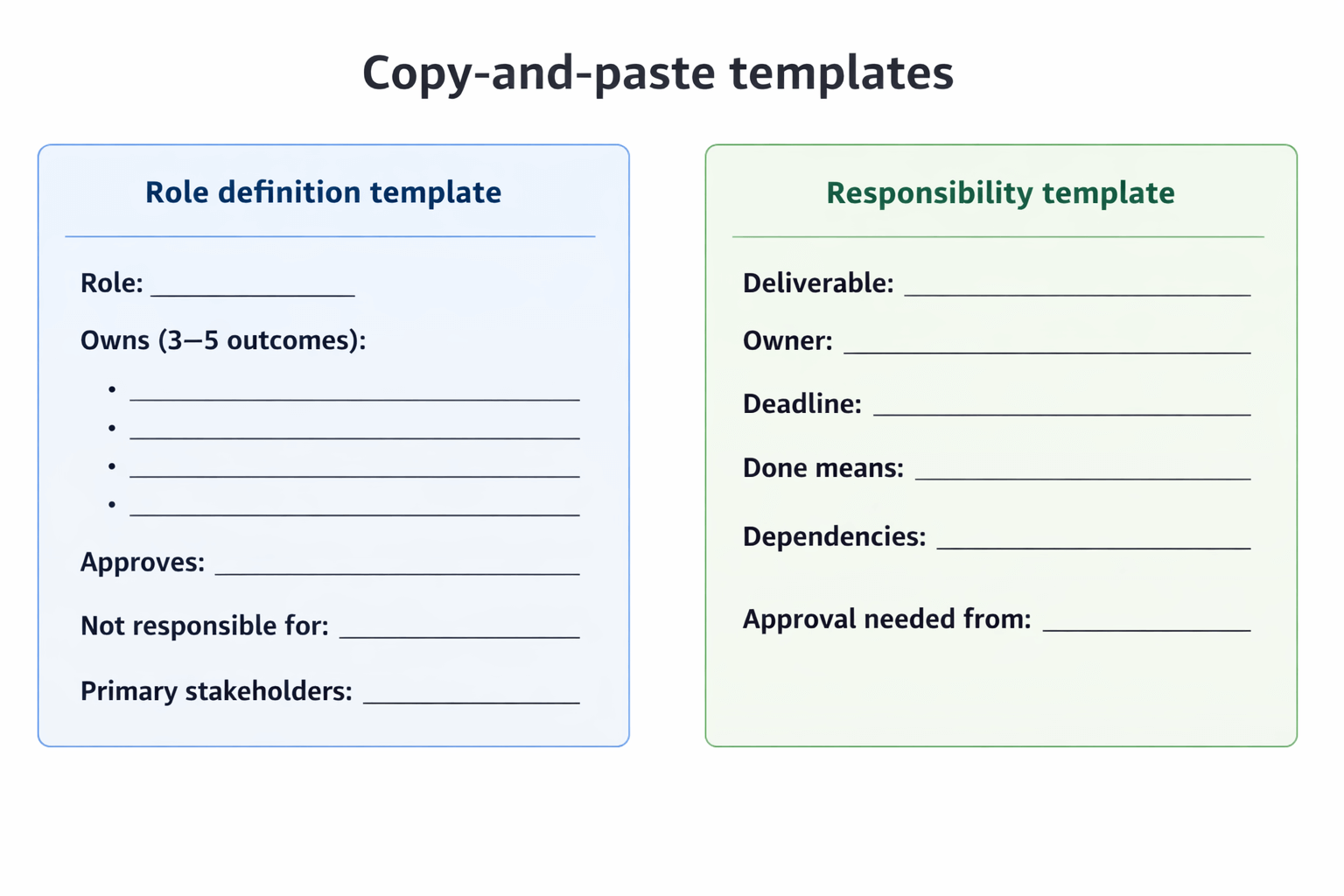
A responsibility is a deliverable with an owner, a deadline, and a clear “done.”
Good responsibilities include:
- Owner (one person, not a group)
- Deadline
- Definition of done
- Handoffs/approvals (if needed)
Examples:
- “Create the onboarding flow in Figma (10 screens), ready for dev handoff by Wednesday 15:00.”
- “Ship the pricing page update to production by Friday 12:00, including mobile layout and tracking events.”
- “Run the QBR on Jan 30, send recap within 2 hours, and log next steps in the CRM the same day.”
Responsibility answers: What will you deliver, by when, and what does ‘done’ mean?
If it can’t be measured or verified, it’s not a responsibility. It’s a slogan.
Where Teams Break: Three Scenarios You’ve Seen Before
Scenario 1: “Just tweak the UI”
A developer changes button spacing and font sizes “to match the build.” No designer reviews it. Two weeks later:
- the settings page uses one button style,
- the onboarding uses another,
- the pricing page uses a third.
Now you’ve got a patchwork UI and a never-ending cleanup list. The fix is simple: Designer owns UI consistency and approves any layout/typography changes. Developers can propose changes, but they don’t silently ship them.
Scenario 2: The client learns how to bypass you
A Design Lead joins a client call “to clarify requirements.” The client starts emailing the Design Lead directly:
- “Can you just change this one thing?”
- “We don’t need to loop in the Account Manager.”
Within a month, you’ve got side requests, undocumented promises, and scope creep. The boundary that prevents this: Account Manager runs client communication. Specialists can attend calls, but the AM owns the agenda, recap, and follow-ups.
Scenario 3: The same bug lives forever
Support logs a bug every Monday:
- “Users can’t reset passwords on iOS.”
Product says, “Not this sprint.”
Engineering says, “Not scheduled.”
Support keeps apologizing to the same customers.
Nothing moves because “logging bugs” isn’t the same as “getting bugs fixed.” A workable split:
- Support owns repro steps + severity tag
- Product owns prioritization in the backlog
- Engineering owns fix once it’s scheduled
- Someone (often Product or Support Lead) owns closing the loop with the customer within 24 hours of release
The Difference, In One Line
Role = the outcome you’re paid to own.
Responsibilities = the specific outputs you must deliver this week, this sprint, or this quarter.
How to Define Roles and Responsibilities People Can Actually Use
1) List the roles you actually have right now
Not an ideal org chart. Reality.
Example set:
- Product Manager
- Developer
- Designer
- Support
- Account Manager
2) Write 3–5 “ownership statements” per role
Not tasks. Ownership. Something you can argue about.
Developer owns:
- shipping production code
- preventing production incidents caused by code changes
- keeping the codebase maintainable (not just “working today”)
Designer owns:
- UI consistency across screens
- UX flows for priority journeys (signup, onboarding, key actions)
- final approval for layout/typography changes
Account Manager owns:
- all client-facing comms (email, calls, follow-ups)
- renewal timeline and next steps
- documenting commitments and scope in the CRM
3) Convert ownership into responsibilities with hard edges
Use deadlines, counts, and “done” conditions.
Developer responsibilities (example):
- Deliver assigned sprint tickets with tests and a short release note entry.
- Review PRs within 24 business hours.
- For P1 incidents: acknowledge within 15 minutes, mitigation plan within 60 minutes.
- Raise constraints before design is finalized: “This animation will add 2–3 days and requires a new library” or “This layout breaks at 320px.”
Designer responsibilities (example):
- Produce dev-ready designs with states: default, hover, error, loading.
- Run a 15-minute design review twice a week; approve/reject UI changes.
- Maintain the component library: buttons, inputs, spacing rules.
Support responsibilities (example):
- For every new bug: include device/OS version, steps to reproduce, expected vs actual, and screenshots.
- Tag severity using a clear rule (e.g., P1 = blocks login or payment).
- Send weekly top-5 recurring issues to Product with ticket counts.
4) Add boundaries so work doesn’t ping-pong
Write what triggers handoffs and approvals.
Examples:
- “Any change to layout, typography, spacing, or hierarchy requires designer approval.”
- “Any client request that changes scope must be confirmed by the Account Manager in writing.”
- “Bugs don’t enter engineering work unless they have repro steps and a severity tag.”
FAQ
What’s the difference between accountability and responsibility?
Accountability is owning the final outcome. Responsibility is delivering a specific piece of work that leads to the outcome.
Can responsibilities change without changing a role?
Yes. The role stays stable (e.g., Developer). Responsibilities shift with priorities (e.g., “own incident response this quarter”).
What’s the fastest way to clarify “who owns what”?
Pick a real task, write one owner, add a deadline, and define “done” in one sentence. Then add the approval boundary that prevents silent changes.
Is RACI better than defining responsibilities?
RACI helps on complex projects. Most teams first need something simpler: one owner per deliverable + clear approval boundaries.
How detailed should responsibilities be?
Detailed enough that two people won’t interpret them differently. If “done” can’t be verified, it’s not detailed enough.
The Test
Take a live task: “Update onboarding UI for mobile.”
If you can’t write:
- the owner,
- the deadline,
- and what “done” means
…your roles and responsibilities aren’t defined. They’re implied. And implied chain of command fails the moment the project gets busy.