C-Suite Org Chart: Who Reports to Whom
A quick-reference C-suite org chart: standard reporting lines, how the structure shifts by company size, and where titles commonly overlap.

A C-suite org chart is a visual map of a company's top executive roles and their reporting relationships, typically starting with the board of directors and branching down through the CEO to each functional chief. Below is the standard structure, how it changes as a company grows, and where reporting lines commonly differ from the textbook version.
What Is a C-Suite Org Chart?
According to Investopedia, the term "C-suite" comes from the "chief" prefix shared by roles like CEO, CFO, and COO.
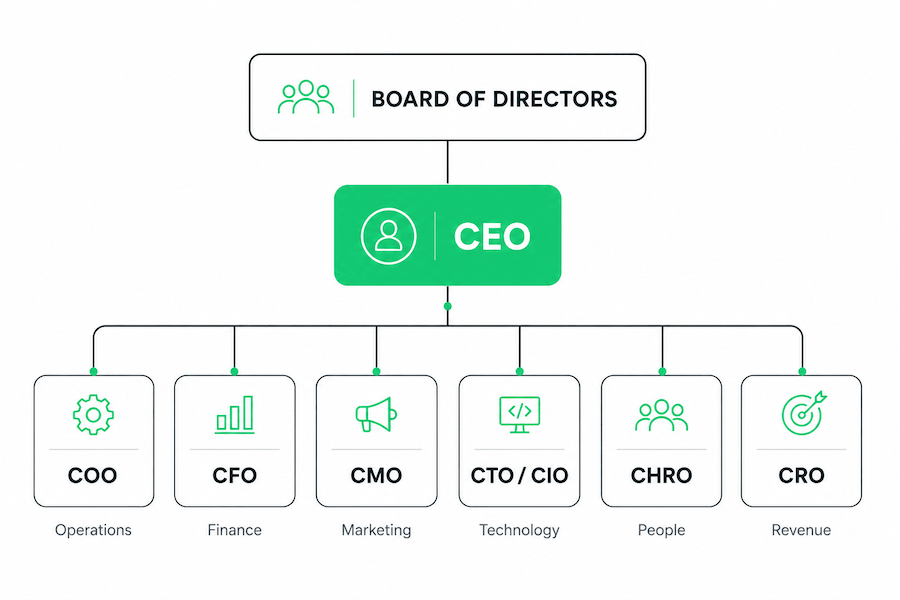
The Standard C-Suite Structure
Most companies follow this reporting line:
| Role | Reports to | Owns |
|---|---|---|
| Board of Directors | Shareholders | Oversight of the CEO |
| CEO (Chief Executive Officer) | Board of Directors | Company direction and strategy |
| COO (Chief Operating Officer) | CEO | Day-to-day operations |
| CFO (Chief Financial Officer) | CEO | Budgeting, forecasting, financial reporting |
| CMO (Chief Marketing Officer) | CEO | Brand, demand generation, positioning |
| CTO / CIO (Chief Technology / Information Officer) | CEO | Product technology or internal IT |
| CHRO (Chief Human Resources Officer) | CEO | Hiring, compensation, culture |
| CRO (Chief Revenue Officer) | CEO | Sales and revenue operations |
Not every company has all seven roles, and not every company draws the lines the same way, more on that below.
How the Board of Directors Renders in the Chart
Most C-suite org charts render "Board of Directors" as a single block rather than a set of named individuals. A board acts as a collective body, its authority comes from a vote, not any one director, and board rosters are less relevant to day-to-day reporting than the C-suite is. Naming each director makes sense in some cases, but it changes how the block behaves visually.
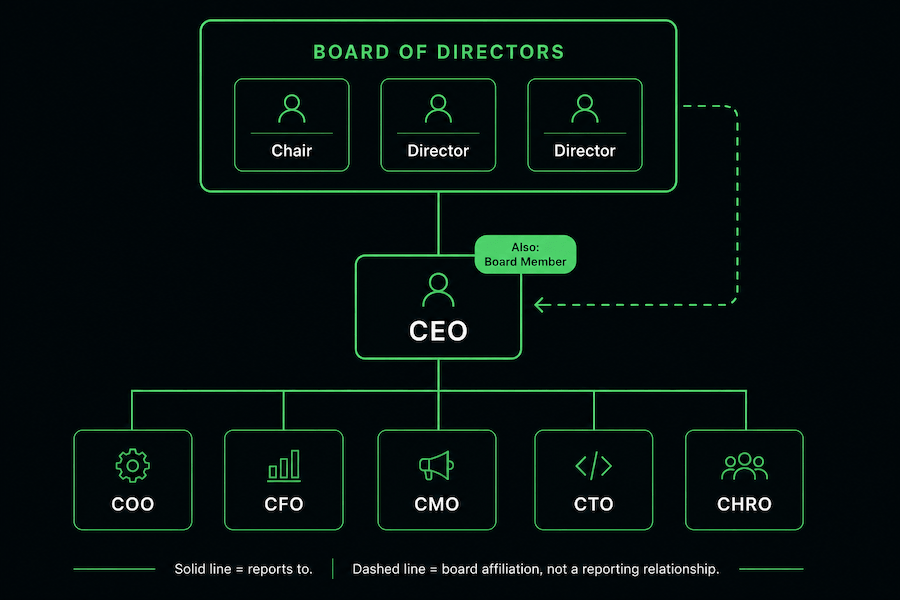
Rendering Individual Board Members
When you expand the block into individuals, list them as peers rather than a hierarchy, directors don't report to each other, so there's no reporting line between them. The common pattern is a flat roster inside or directly below the board block, distinguished by role rather than rank: Chair (or Chairperson), Vice Chair, Lead Independent Director, then remaining directors, often tagged with committee assignments (audit, compensation, governance) if the chart is governance- or investor-facing. If you don't need that level of detail, keep the block collapsed, that's the right default for an internal chart.
When a C-Suite Executive Also Sits on the Board
This is where it gets structurally awkward. A tree-shaped org chart assumes each person has one reporting line. A CEO who also holds a board seat, or, less commonly, a CFO or other exec who's an "insider director", breaks that assumption: they report to a body they're also a member of. Three approaches handle this without turning the chart into an actual graph:
- Badge the node — keep the person as a single node in their primary position (usually their C-suite role) and add a small label such as "Also: Board Member" or "Chair" rather than duplicating them. This is the right call for most internal charts; it keeps the tree readable.
- Dual-node with a dotted connector — show the person twice, once in the board block, once in the C-suite row, linked by a dashed line rather than a solid reporting line. Worth the extra complexity for governance-facing charts (proxy statements, board composition pages) where the distinction between "director" and "executive" needs to be explicit.
- Cross-link, no duplication — draw a dashed line from the person's C-suite node up to the board block without creating a second node. A middle ground: signals the affiliation without hiding it or doubling the chart's node count.
None of these represent a reporting relationship in the traditional sense. A dashed or dotted line is standard notation for "affiliated with" rather than "reports to", the same convention covered in dotted line reporting in an org chart. For most companies, the badge approach on a collapsed board block is the right level of complexity; save the dual-node treatment for charts built specifically for governance disclosure.
How the Structure Changes by Company Size
Early-stage (under ~50 people): Usually just a CEO, sometimes a CFO or CTO if the business is capital- or product-intensive. Everything else sits with founders or department leads.
Mid-market (50–500 people): The core five (CEO, COO, CFO, CMO, CTO) typically fill out first. CHRO and CRO tend to arrive as headcount and revenue complexity grow.
Enterprise (500+ people): Full C-suite plus specialized roles like CLO (Chief Legal Officer), CISO (Chief Information Security Officer), or CPO (Chief Product Officer), often with a layer of SVPs between the C-suite and department heads. The layer question has a benchmark: Gallup’s analysis of more than 20,000 managers found engagement peaks at 8–9 direct reports — one reason a CEO carrying twelve chiefs usually ends up inserting a COO or an SVP layer. For how these layers typically break down, see our guide on the main types of organizational structures.
Where Reporting Lines Commonly Shift
The table above is a starting point, not a rule. Three variations show up often enough to be worth naming:
- CMO reporting to COO instead of CEO — common in operations-heavy businesses where marketing is treated as a growth lever under ops
- CHRO reporting directly to the CEO — increasingly the norm as people strategy gets treated as a board-level concern, not a function under the COO
- CTO/CIO split — larger companies often separate product technology (CTO) from internal IT and security (CIO), where smaller companies combine both under one title
These exceptions are a version of a broader pattern, executives who sit outside the strict CEO-down line. We cover that in more detail in dotted line reporting in an org chart.
Keeping the Org Chart Accurate
A C-suite chart built in a slide deck or template is accurate for exactly as long as no one's title changes, in practice, a few weeks. Charts pulled directly from your existing directory, rather than rebuilt by hand each time, stay current automatically. That matters most at the executive level, where a stale chart in front of the board or a new hire is a worse look than no chart at all.
That is the job org chart software exists to do: the executive chart is generated from the directory, so it does not need redrawing when a title changes.
Download the C-Suite Org Chart Template
Prefer to start from a working file? Download the free PowerPoint template: a labeled example chart, a blank version for your own team, and startup, mid-market, and enterprise variants, eight slides, ready to customize.
FAQ
What is the C-suite in a company?
The C-suite is the group of top executives whose titles start with "Chief" — CEO, COO, CFO, CMO, and similar roles. They report to the CEO, who reports to the board of directors, and are responsible for setting and executing company-wide strategy.
Who is the highest-ranking C-suite executive?
The CEO. All other C-suite roles report either directly or indirectly to the CEO, who in turn reports to the board of directors.
Does every company need a full C-suite?
No. Small and early-stage companies often operate with just a CEO and maybe a CFO or CTO. Additional C-suite roles typically get added as headcount, revenue, and operational complexity grow.
For the numbers on how executive and company-wide chart usage differs by company size, see our study of how org chart usage changes as organizations grow.