
OneDirectory vs Employee Directory 365, compared from a hands-on trial with 1,000-user demo data: published pricing, org chart software in every plan, dotted-line and assist reporting, and admin control over structure.
Both products read the same Entra ID. Only one gives you somewhere to fix it.
At first Microsoft 365 sync, across 65 customer tenants, 42% of employees had a manager field populated. That is the data both of these products inherit on day one, and a directory renders what Entra ID holds.
We trialed Employee Directory 365 hands-on with a 1,000-user demonstration dataset, so this page reflects the product in use as well as the brochure. It is part of our full 12-tool review.
The short answer
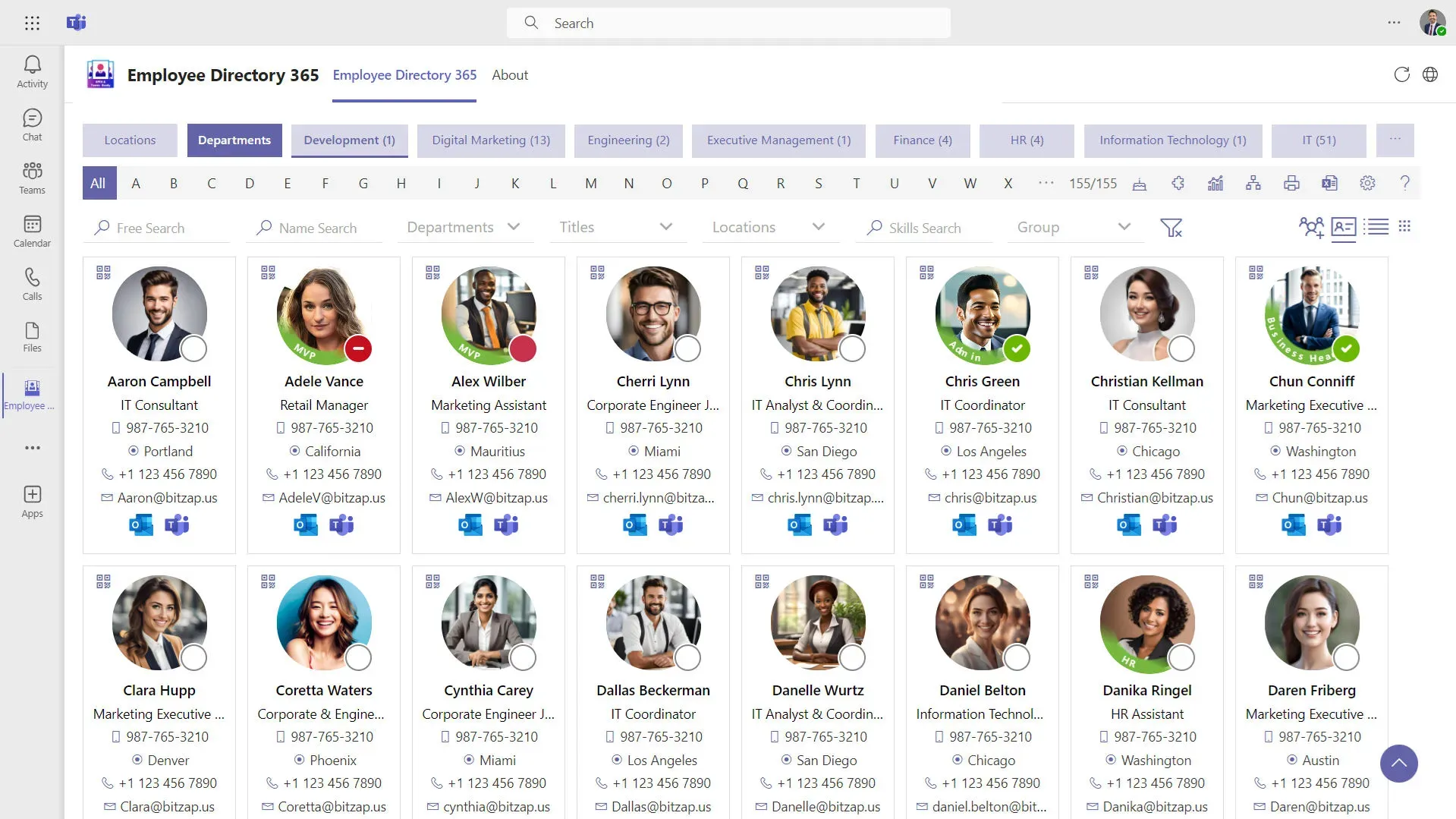
Employee Directory 365, from Apps 365, is a SharePoint and Teams web part: employee lookup with filters, delivered inside Microsoft 365, with an organization chart from its Premium plan upward. It suits organizations that want a staff list living on an intranet page.
OneDirectory is org chart software with an employee directory built in, made for mid-sized and large organizations. It runs as its own application, renders formal reporting lines from Entra ID plus dotted-line and assist reporting on both the profile and the chart, and ships a Directory Console for correcting the data underneath. G2’s Summer 2026 reports rank OneDirectory first for Mid-Market Usability and badge it fast to implement, easy to use, easy to do business with, and strong on estimated ROI.
On list price, theirs is the cheaper product. This page is about what the difference buys, and it is plain about where each product wins.
What we found when we trialed Employee Directory 365
Employee Directory 365 was harder to trial than most, there's setup overhead to get a SharePoint web part running, but once live, it delivered what it promises: a SharePoint-native directory that does the basics right without any pretense.
The settings aren't clear and customization takes work, which means setup and ongoing maintenance demand more attention than you'd expect for a simple tool. If you're looking for nothing fancier than a quick digital address book with a basic org chart, and you already live in SharePoint, it fits. It's honest work, not impressive work.
OneDirectory took the opposite trade: a standalone application with one Directory Console for people, structure, fields, data sources and roles. The G2 badges for fast implementation and ease of use are that story told by reviewers rather than by us.
When you would definitely choose OneDirectory
- You are a mid-sized or large organization on Microsoft 365 and you want the directory and org chart as a standalone application, not a web part that depends on your SharePoint pages staying healthy.
- Your manager data is incomplete and someone has to fix it at scale. Across 65 customer tenants at first sync, 42% of employees had a manager recorded, and the Directory Console is built for exactly that cleanup.
- You need dotted-line and assist reporting, shown on the profile and the chart and maintained by Administrators and Directory Editors.
- You want org chart software in every plan. In their published plans, an organization chart is not listed in Plus; it appears from Premium upward. Every OneDirectory plan is org chart software.
- You want type-and-go search across name, team, office, role and skill rather than working through filters.
Where Employee Directory 365 fits
Three situations, stated once:
- The lowest published list price decides the purchase. Their Premium plan covers up to 300 users for $187.49 a month against our $349 for up to 250 profiles, and on published rates they stay cheaper at the sizes we compared. That is the concession, in full.
- You want the directory living as a web part inside an existing SharePoint intranet that people already open.
- You need a contact lookup rather than a reporting structure. Name, title, email, phone, done.
The 42% problem
In January 2026 we measured 65 customer tenants at the moment of first Microsoft 365 sync, before anyone had cleaned anything. This is untouched Entra ID data, so the same baseline would appear in any employee directory product reading the same tenant.
| Measure | At first sync | August 2026 |
|---|---|---|
| Manager field populated | 42% | 79% |
| Average profile completeness | 30.8% | 44.1% |
| Directory-ready organizations | 33% | 61% |
| Photo coverage above 80% | 27% | 37% |
| Phone coverage above 80% | 20% | 39% |
An org chart built on 42% manager coverage is missing more than half its reporting lines. It renders, it looks finished, and it quietly omits people.
The right-hand column is the same 65 tenants after a period of use. The work took seven months of administrator effort, we cannot separate the software’s contribution from theirs, and the cohort is self-selected: every organization in it had already decided its directory needed work. The fields that moved are the fields a console makes visible and correctable in bulk. That, in plain terms, is what the price difference is for.
Full method in The Employee Directory Data Problem Is Fixable, and the January baseline in The State of Employee Directories in 2026.
Who can edit what
Employees keep their own OneDirectory profiles current. Reporting line, dotted-line manager and assist reporting are maintained by Administrators and Directory Editors only, and appear on both the profile and the chart. Nobody can quietly move themselves in the structure, which is what makes the chart worth consulting.
Fields are either synced from Microsoft, managed in Entra ID or the Microsoft 365 admin center, or configured as editable in OneDirectory, and which is which varies by customer. From an employee record you can open that person directly in Entra to fix the source.
What each product costs
Both companies publish figures. Their plans, billed yearly, checked 17 August 2026:
| Employee Directory 365 plan | Monthly, billed yearly | Users included | Additional users |
|---|---|---|---|
| Plus | $99.99 | Up to 100 | Not listed |
| Premium | $187.49 | Up to 300 | $25 per 100 |
| Enterprise | $249.99 | Up to 300 | $35 per 100 |
An organization chart is not listed among the Plus features; it appears from Premium upward, so their entry plan is a directory rather than org chart software.
OneDirectory prices by company size, on the number of employee profiles rather than per user:
| Employee profiles | Pro, monthly | Pro, annual |
|---|---|---|
| Up to 250 | $349 | $3,790 |
| 251 to 500 | $649 | $6,990 |
| 501 to 1,000 | $999 | $10,790 |
| 1,001 to 2,000 | $1,599 | $17,290 |
Above 2,000 profiles OneDirectory Enterprise is quoted. Optional extras: Guided Deployment at $3,000 one time, and additional tenants on a multi-tenant directory at $199 a month each.
On published list prices theirs is lower, as stated above. What the OneDirectory figure carries that theirs does not: the standalone application, the Directory Console, dotted-line and assist reporting, and search that covers skills as well as names. Weigh the difference against the admin time our trial found the web part asking for.
What employees actually do with it
Search is the daily habit: 514,602 search-result views across 16,267 active employees in 65 customer organizations over the 90 days to 14 August 2026. The chart earns its keep the day a reorganization lands, and more than four in five deployments above 500 active users renew.

“OneDirectory has significantly improved our internal processes. The ease of use and integration with our existing systems have made it an invaluable tool for our team.” - John-Micheal Warner, Help Desk Technician at B&D Industrial.
 Greg Bennett
“OneDirectory is focused on being an employee directory and doing it well. It has a very modern interface that is easy for any employee to use, no matter their technical skills.” - Alex Calvin, Virtual systems administrator at Citizens Alliance Bank.
Feature comparison
| Category | OneDirectory | Employee Directory 365 |
|---|---|---|
| Delivery model | Standalone web application for mid-sized and large organizations | SharePoint SPFx and Teams web part inside Microsoft 365 |
| Primary focus | Org chart software and employee directory, with a Directory Console for data governance | Employee lookup with filters; organization chart from Premium upward |
| Search | Type a name, team, office, role or skill and get results with org context | Filter-driven within the web part |
| Org chart | Live from Entra ID, with dotted-line and assist reporting on the profile and the chart | Included from the Premium plan upward; not listed in Plus |
| Data correction | Directory Console: People, Structure, Fields, Data Sources, Members and Roles | Not offered as a data-quality console |
| Structure editing | Maintained by Administrators and Directory Editors | Self-service profile editing, per vendor materials checked 17 August 2026 |
| Implementation | G2 Summer 2026 badges: fast to implement, easy to use, easy to do business with, strong estimated ROI | In our trial, web part setup carried overhead and settings were not clear |
| Pricing | Banded by profile count, published: $349 to $1,599 a month across Pro | Per plan with user ceilings, published: $99.99 to $249.99 a month plus $25 to $35 per additional 100 users |
Employee Directory 365 observations come from our hands-on trial with a 1,000-user demonstration dataset and from apps365.com, both August 2026. Vendor products change, so check before you buy.
One delivery-model fact worth knowing: Microsoft retired the legacy SharePoint Add-In model on April 2, 2026, and third-party web parts built on it stopped working that day. Employee Directory 365’s current version runs on SharePoint Framework (SPFx), the replacement model, so it was not affected. The structural point stands, though: a web part rides SharePoint’s platform calendar, so when Microsoft retires a delivery model, the vendor migrates and you retest. A standalone application has no SharePoint deployment surface to migrate.
When to choose which
| Use case | OneDirectory | Employee Directory 365 |
|---|---|---|
| You want a standalone directory and org chart application | ✓ | ✗ |
| Your manager data is incomplete and someone has to fix it at scale | ✓ | ✗ |
| You need dotted-line and assist reporting maintained by named admin roles | ✓ | Not verified in our trial |
| You want org chart software in every plan | ✓ | ✗ |
| You want type-and-go search rather than working filters | ✓ | ✗ |
| You need an org chart that stays current from Entra ID | ✓ | ✓ |
| You need to find people by skill | ✓ | ✓ |
| You want a web part inside existing SharePoint intranet pages | ✗ | ✓ |
| The lowest published list price decides the purchase | ✗ | ✓ |
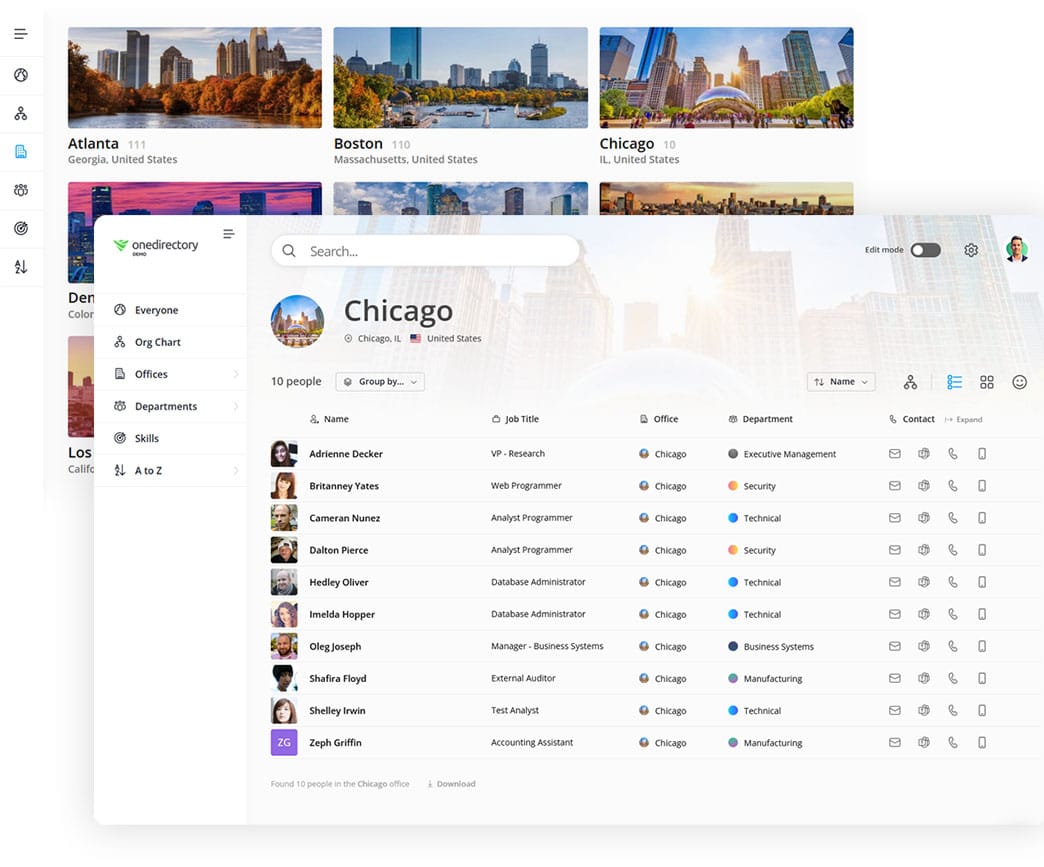
See the Directory Console, dotted-line and assist reporting on your own Microsoft 365 data
What we cannot tell you
Our trial ran on a 1,000-user demonstration dataset, not a production deployment, and trials show the product rather than year two.
Published list prices on both sides exclude negotiation, support arrangements and add-ons, so your numbers may land differently.
And the 65-tenant figures come from our own customers, each of whom had already decided their directory needed work. They show what the fix looks like, not a controlled comparison between products.
FAQs
Is Employee Directory 365 a standalone employee directory platform?
No. Employee Directory 365 is delivered as a SharePoint and Teams web part that lives inside Microsoft 365. OneDirectory runs as its own web application and does not depend on SharePoint pages or their information architecture.
Has OneDirectory actually tested Employee Directory 365?
Yes. We trialed it hands-on with a 1,000-user demonstration dataset in August 2026. It was harder to get running than most tools we tested, with real setup overhead for the web part and settings that were not clear once inside. Live, it does the basics right: a searchable SharePoint-native staff list with filters.
How much does Employee Directory 365 cost?
As published on apps365.com and checked on 17 August 2026, three plans billed yearly: Plus at $99.99 a month for up to 100 users, Premium at $187.49 a month for up to 300 users plus $25 for every additional 100 users, and Enterprise at $249.99 a month plus $35 per additional 100 users. An organization chart is not listed in the Plus plan; it appears from Premium upward.
How is OneDirectory priced?
OneDirectory is priced in bands based on the number of employee profiles in the account, not per user. As of 17 August 2026 the Pro bands run from $349 a month for up to 250 profiles, to $649 for 251 to 500, $999 for 501 to 1,000, and $1,599 for 1,001 to 2,000 profiles, with Enterprise quoted above that.
Which is cheaper, OneDirectory or Employee Directory 365?
On published list prices, Employee Directory 365 is cheaper at the sizes we compared: their Premium plan covers up to 300 users for $187.49 a month against OneDirectory's $349 for up to 250 profiles. OneDirectory costs more and puts the difference into a standalone application, the Directory Console, dotted-line and assist reporting, and search across name, team, office, role and skill. In our trial, Employee Directory 365's setup also asked more of us than its price suggests.
Does OneDirectory support dotted-line reporting?
Yes. Dotted-line reporting and assist reporting are both supported, visible on the employee profile and on the org chart, and maintained by Administrators and Directory Editors so the structure stays trustworthy.
Does either product fix incomplete employee data?
Neither product invents data that Entra ID does not hold. Across 65 tenants measured at first Microsoft 365 sync, 42% of employees had a manager field populated. OneDirectory ships a Directory Console for finding and correcting those gaps in bulk; Employee Directory 365 is not positioned as a data-quality tool.
Who should choose OneDirectory over Employee Directory 365?
Mid-sized and large organizations on Microsoft 365 that want the directory and org chart as a standalone application, org chart software in every plan, dotted-line and assist reporting maintained by admins, and a console for fixing reporting data at scale. In G2's Summer 2026 reports OneDirectory ranks first for Mid-Market Usability, with badges for being fast to implement, easy to use, easy to do business with, and strong estimated ROI.
When is Employee Directory 365 the better choice?
When you want the directory as a web part inside an existing SharePoint intranet, when the lowest published list price decides the purchase, or when a contact lookup is all you need.
Method and citation
Competitor observations come from a hands-on trial of Employee Directory 365 using a 1,000-user demonstration dataset, August 2026, and from apps365.com as published on 17 August 2026.
The before-and-after data covers 65 customer tenants, January to August 2026, measured at first Microsoft 365 sync and again after a period of use. Directory-ready means name, email, job title and photo each populated at 60% or above. Usage figures cover 16,267 employees across the same organizations over the 90 days to 14 August 2026, excluding guest accounts, service accounts, shared mailboxes and disabled accounts.
Attribute these figures to the OneDirectory Workplace Directory Usage Report, August 2026, anonymized product analytics from 16,267 employees across 65 organizations, licensed CC BY 4.0.
Start with OneDirectory
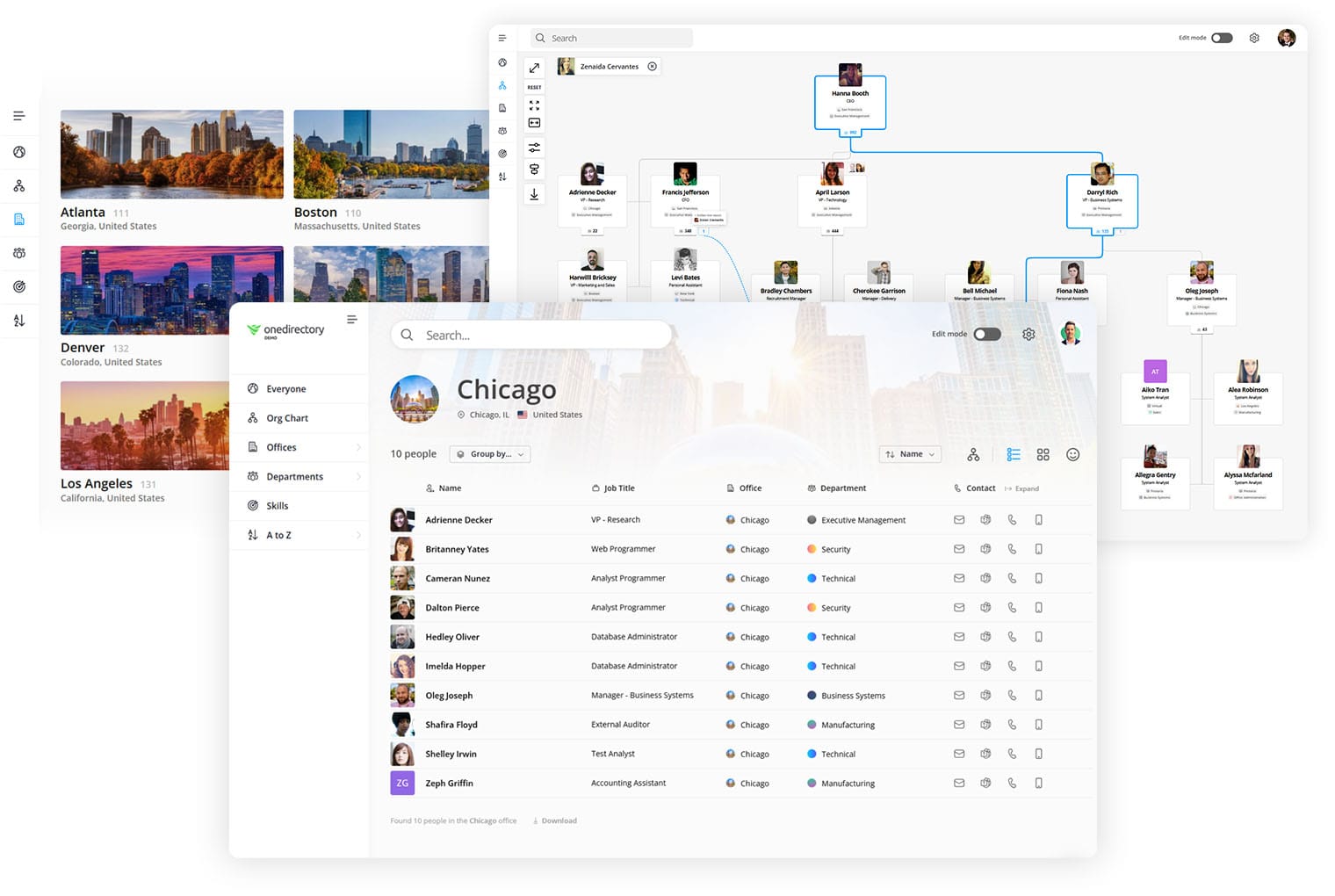
The web part is the cheaper way to put a staff list on an intranet page. OneDirectory is how a mid-sized or large organization makes the structure behind it correct, and keeps it that way.
See OneDirectory running against your own Microsoft 365 data
Other comparisons
 Greg Bennett
 Greg Bennett
Background reading: What is an organizational chart? The complete guide.