The Employee Directory 365 alternative for complex organizations
A standalone employee directory and live org chart for Microsoft 365. It maps your company however it’s organized, by office, region, division or anything else, not just as a list of names.
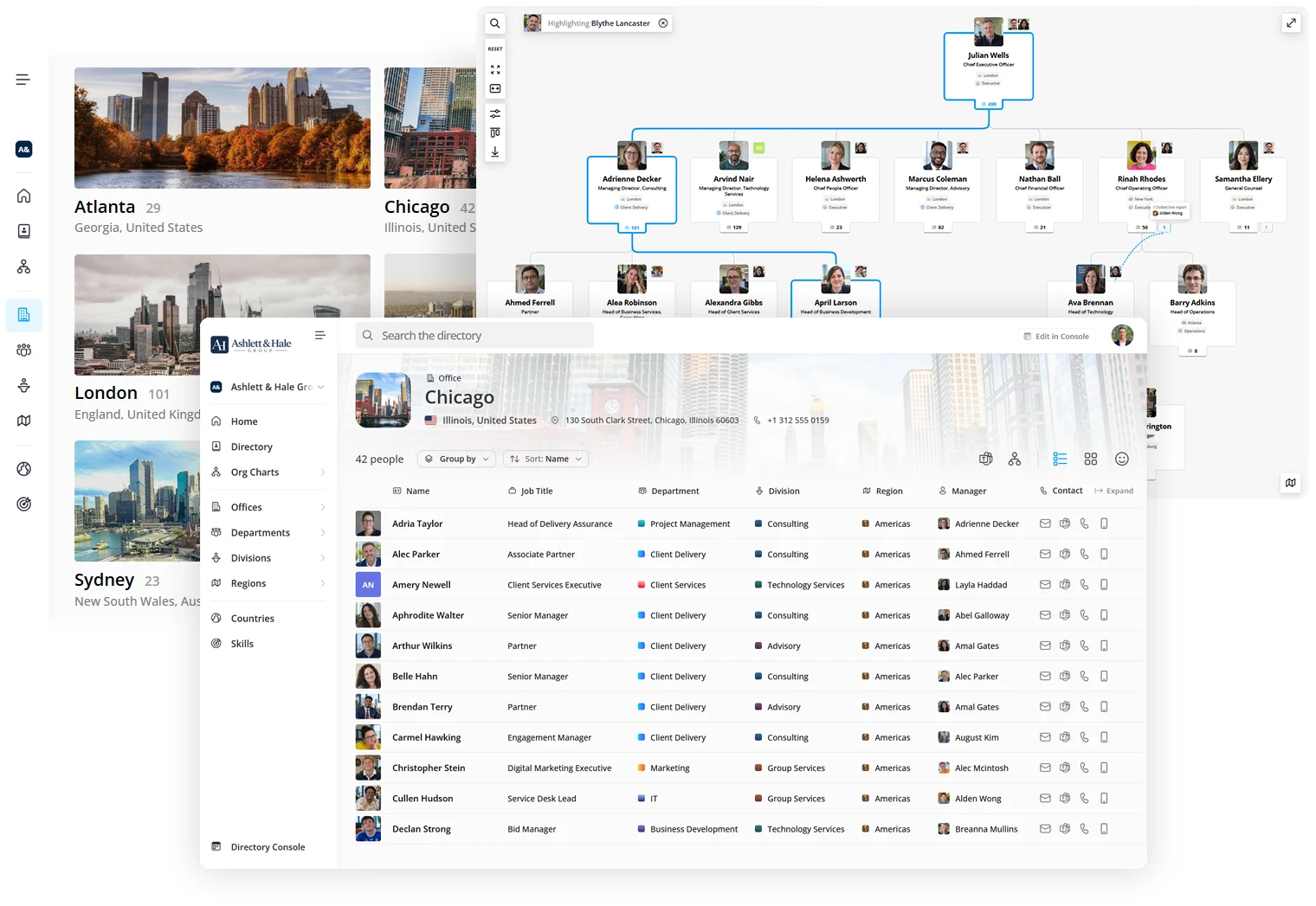
A web part or a standalone directory?
We started out building SharePoint staff directory web parts in 2011, years before OneDirectory, so we know where web parts shine and where they hit their limits. The choice comes down to where you want the directory to live and how much structure it needs to show.
A web part lives on your intranet pages. Employee Directory 365 (also sold as HR365 Employee Directory) runs inside SharePoint and Teams, which is ideal if your intranet is where people already go. OneDirectory is its own app, opened from Teams, the Microsoft 365 app launcher or a link, so it works whether or not people use your intranet.
Structure takes more than filters. Most companies aren’t one list. OneDirectory gives offices, departments and your own org units (e.g. division, region, branch, practice area) each their own page, and lets you publish a named org chart for each part of the business, each with its own link.
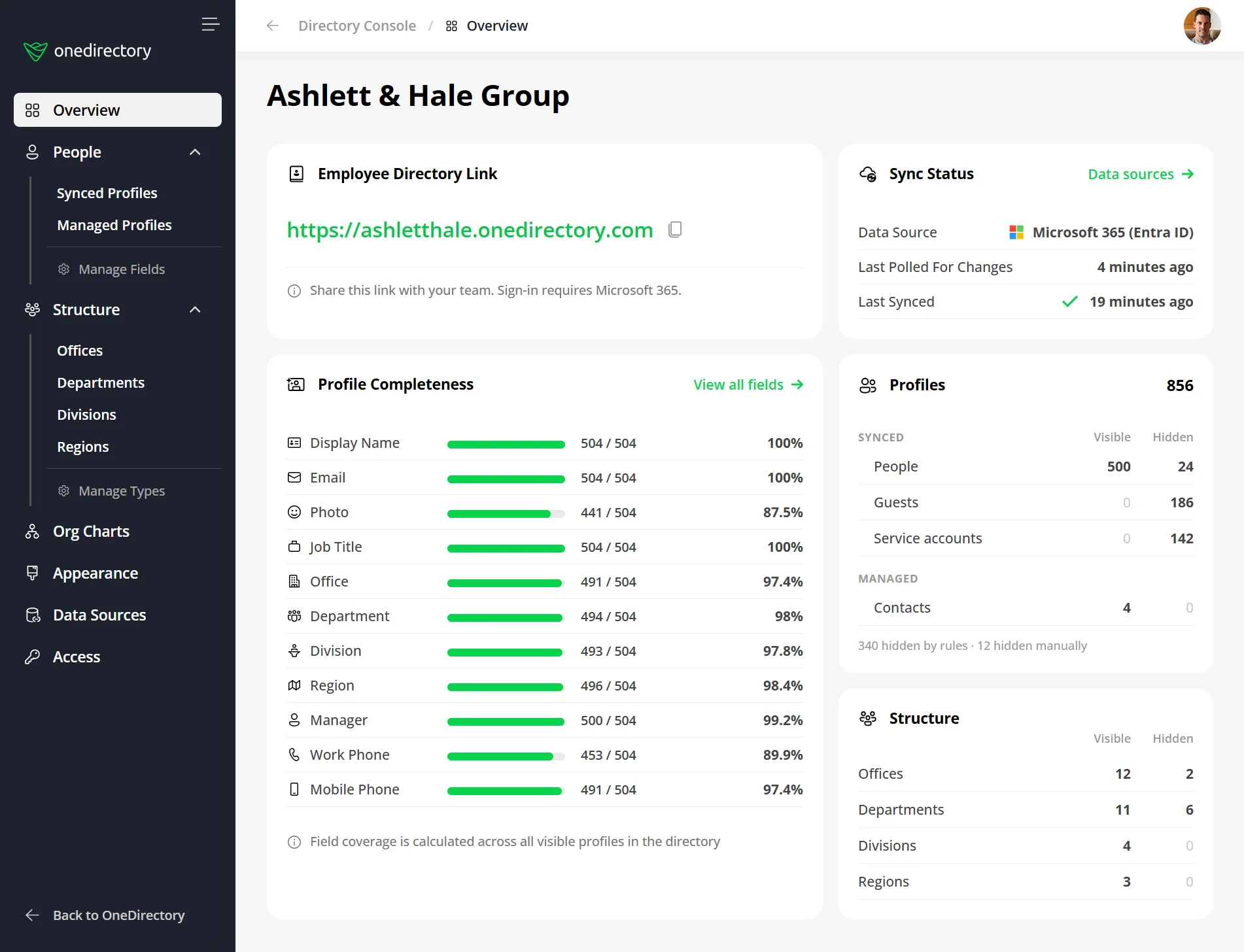
Your directory is only as good as your Microsoft 365 data. Across 65 customer tenants we measured at first sync in January 2026, only 42% of employees had a manager recorded. Any directory reading Entra ID shows those gaps. OneDirectory’s Directory Console shows which fields are missing across the whole company and links to Entra to fix them at the source.
BPM, a 1,200-person accounting and advisory firm, moved from SharePoint’s built-in people directory to OneDirectory.
“Before OneDirectory, finding accurate employee information across the firm was more difficult and time consuming than it should have been. Information was spread across multiple systems, profiles were often outdated or incomplete.”
OneDirectory vs Employee Directory 365
Both read your people from Microsoft 365 and give everyone a searchable directory. The difference is that Employee Directory 365 is a web part on your SharePoint pages, while OneDirectory is an app built to map your organization.
| OneDirectory | Employee Directory 365 | |
|---|---|---|
| What it is | Standalone employee directory and live org chart for Microsoft 365 | Employee directory for SharePoint, also available in Teams |
| Where people use it | Its own web app, Microsoft Teams, and the Microsoft 365 app launcher | SharePoint pages and Microsoft Teams |
| Company structure | Offices, departments and your own org units (e.g. division, region, branch, practice), each with its own page | Filters on directory fields such as department and location |
| Org charts | In every plan. A live company chart, plus named charts for any division, region or team, each with its own link | From the Premium plan up; not listed in the entry Plus plan |
| Fixing your data | Directory Console shows missing fields across the company and links to Entra to fix them | No equivalent listed on its features or pricing pages |
| Skills | A curated list of 37,000+ skills that can be searched and filtered | Search by skills, with skills filters on the Enterprise plan |
| People outside Microsoft 365 | Add Managed Profiles for contractors, partners and others, in every plan | Import users by CSV on the Enterprise plan |
| Price | Costs more | Costs less at every size we compared |
Employee Directory 365 details are from its pricing and features pages on apps365.com, checked November 24, 2026.
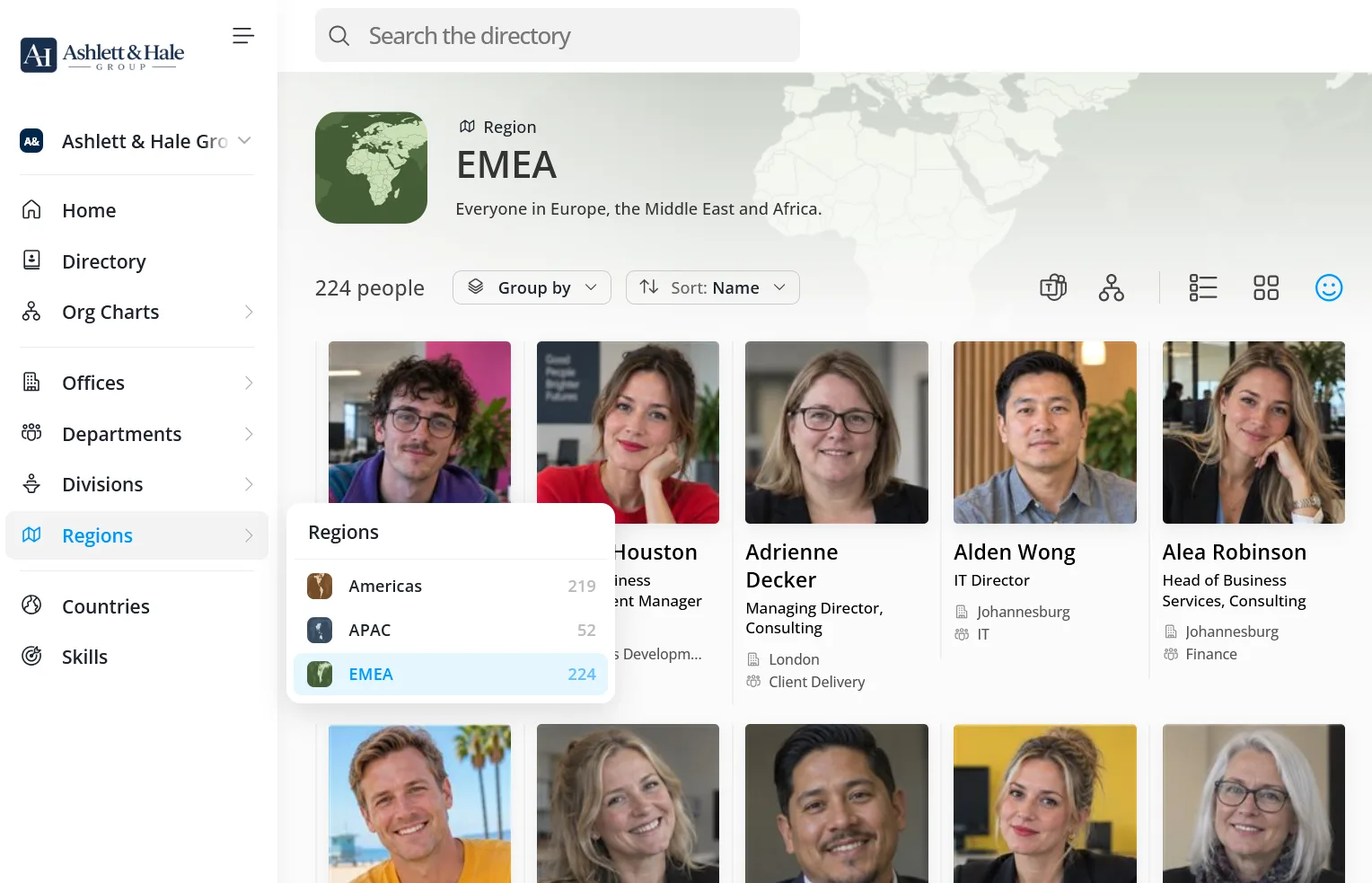
Create your own units, like divisions or regions
Or branches, practice groups and business lines. Each one gets its own page, appears on profiles and works as a filter.
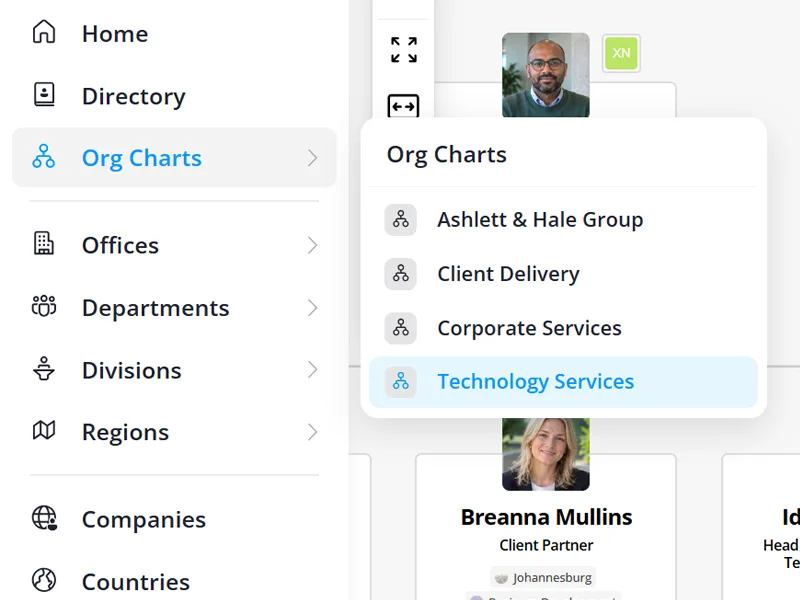
Create multiple org charts for divisions or teams
Publish a live chart for each division, region or team, each with its own link.
What it costs
Employee Directory 365 costs less than OneDirectory at every company size we compared, and it publishes its prices, so you can check for yourself on its pricing page. OneDirectory is $1 per profile a month, billed annually, up to 2,000 profiles. Up to 250 profiles is a flat $250 a month, and above 2,000 Enterprise pricing is quoted. If price decides it, choose Employee Directory 365. If structure decides it, try both on your own data.
When Employee Directory 365 is the better choice
- You want the directory on your SharePoint intranet. Employee Directory 365 runs as a web part on your SharePoint pages, so it’s only as useful as your intranet is busy. OneDirectory runs as its own app instead.
- You need a contact list, not a map of your company. Name, title, phone, email, presence: that’s what it’s built for.
- You want intranet extras in one product. Its higher plans add calendar free/busy, an employee spotlight and a Slack integration.
- Price decides it. Employee Directory 365 is cheaper at every size we compared.
Switching from Employee Directory 365
- Note what you’ve configured. Names, titles, managers and photos come from Microsoft 365, so they carry over on their own. Note any custom fields and filters you set up in the web part.
- Start a free trial and connect Entra ID. It takes one admin consent. Your directory and org chart build from your Microsoft 365 data on the first sync.
- Map your structure. Set up offices, departments and your own org units, then publish a named org chart for each part of the business. Use the Directory Console to find and fix gaps in Entra.
- Point people to it. Add the OneDirectory app in Teams and swap the web part on your intranet for a link to the directory. If you’d rather have help, try Guided deployment.
Find and fix gaps in your profile data
See how complete each field is across every profile, and jump straight to Entra ID to fix what’s missing.
Give every office and department its own page
With an image, key details and everyone who works there.

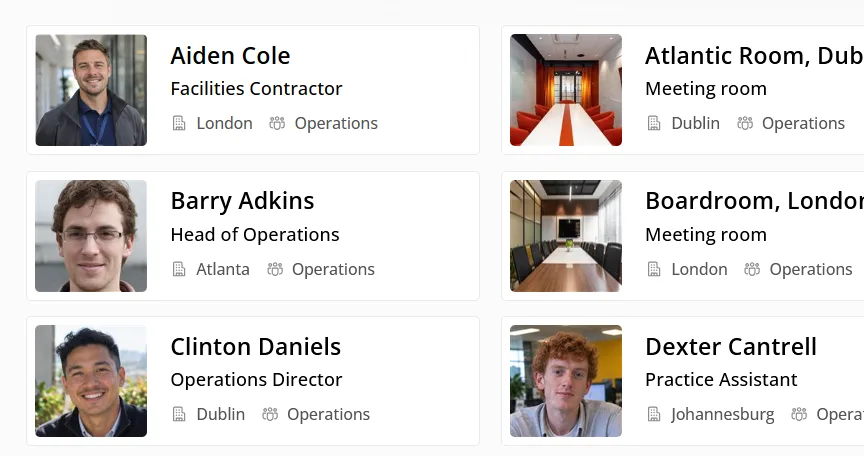
Include everyone, not just Microsoft 365 users
Add contractors, frontline staff and meeting rooms, even without a Microsoft 365 account.
Trusted since 2011 by teams worldwide







Quick to set up, easy to live with
G2 awards for ease of use, implementation and ROI, based on reviews from OneDirectory users.







Frequently asked questions
Is Employee Directory 365 a SharePoint web part?
Yes. It runs on SharePoint pages and in Microsoft Teams. OneDirectory is a standalone app that also works in Teams.
Which is cheaper, OneDirectory or Employee Directory 365?
Employee Directory 365, at every size we compared. OneDirectory costs more and puts the difference into a standalone app, your own org units, named org charts, and a console for finding and fixing gaps in your Microsoft 365 data.
Does Employee Directory 365 include an org chart?
Yes, from its Premium plan up. The org chart isn’t listed in the entry Plus plan. Every OneDirectory plan includes the org chart.
Can OneDirectory run inside SharePoint?
Not as a web part. People open OneDirectory from Microsoft Teams, the Microsoft 365 app launcher or a link on your intranet.
Who makes Employee Directory 365?
Apps365, which also sells it under the HR365 name. Both are brands of Cubic Logics, which sells a range of Microsoft 365 apps for HR, IT and finance. OneDirectory is focused on one job: a dedicated employee directory and org chart for Microsoft 365.
Is HR365 Employee Directory the same as Employee Directory 365?
Yes. It’s the same product, sold under both the Apps365 and HR365 names by Cubic Logics.
What is the best Employee Directory 365 alternative?
We’re biased, but if you need more structure than a staff list, try OneDirectory on your own data. For every option, including other SharePoint web parts, see our list of 121 OneDirectory alternatives.
Try it on your own Microsoft 365 data
The 14-day trial includes everything in Pro. Connect Entra ID and see your own company.
See all 121 OneDirectory alternatives and who each one is best for
If we’ve got something wrong about Employee Directory 365, email support@onedirectory.com and we’ll fix it.